Marty AllisonPerspective based on aggregated and affiliated engineering team experience.
In our experience deploying hardwired access control infrastructure across government facilities, corporate security offices, and high-occupancy institutional sites, the PBL-1-2 occupies a specific and essential niche: the physical panic button that does not depend on networking, software, or authentication. We've seen too many panic-bar systems fail when network connectivity drops or when integrators over-engineer a simple emergency-response requirement into an IP camera + cloud dashboard solution that adds latency and failure points. The HES latching design eliminates that problem entirely. Once pressed, the button state is held until manual reset—no way for a sensor malfunction, lost packet, or software glitch to accidentally cancel the alarm. In a 911 response context, that reliability is non-negotiable.
The dual-contact architecture is where this button earns its cost premium over cheaper momentary alternatives. On a typical site, a security officer in the command center might need to simultaneously trigger an alarm siren, unlock the front door for escape, and inhibit the turnstile entrance gate—three independent circuits, all from one panic press. With N/O and N/C contacts, you can wire these in parallel without adding relays or logic modules. We've integrated this into systems where the N/O contact gates a factory alarm, while the N/C contact breaks a circuit that normally holds the main entrance locked. One button press, two outcomes, zero additional wiring complexity. That parallel architecture is what differentiates this from a simple doorbell button.
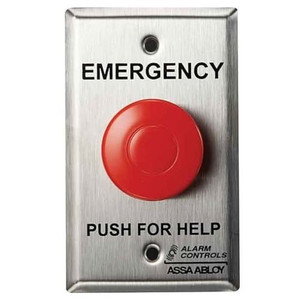
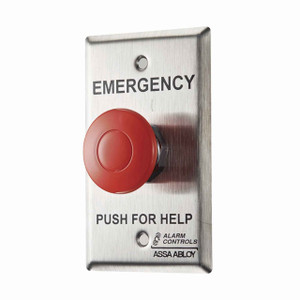
The satin chrome finish is a subtle but important detail. In institutional settings, people are suspicious of chrome devices that look like they belong in a nightclub or casino. Satin chrome with a white button reads as industrial / professional—it blends into security office cabinetry without screaming 'emergency gadget.' We've seen sites where a bright chrome panic button became a novelty that untrained staff would press to test it, causing false alarms. The PBL-1-2's discrete appearance encourages proper respect for its function.
Technical Highlights: - Latching vs. Momentary Contacts: This button maintains its contact closure until physically reset by an authorized person—critical for event logging systems that poll contact state on intervals, or for scenarios where the button is released during panic. A momentary button could clear before the access control panel samples the input, resulting in a missed alarm record.
- Dual N/O and N/C Architecture: Enables branching logic without external relay expansion. The N/O contact triggers an action (siren, unlock, alert notification), while the N/C contact simultaneously breaks a normally-closed circuit (inhibit a gate, disable a reader, cut power to a device). Two circuits from one press—wiring footprint reduction and faster response time.
- 12/24 VDC Voltage Range: Matches standard access control system power supplies. No need for separate 5VDC logic supplies or isolated power conditioning. Direct connection to panels from Salto, Honeywell, Allegion, Anixter, or any traditional controller.
- Wired, Not Networked: Failsafe by design. No IP address to manage, no cloud authentication, no firmware updates. In a genuine emergency, the button works—period. Network outages, WiFi congestion, and software glitches cannot interfere.
- Surface + Flush-Mount Flexibility: Retrofit into existing panic stations or new cabinetry without re-engineering the mounting substrate. Four-hole mounting pattern fits standard electrical outlet boxes for flush installations.
Deployment Considerations: - Manual Reset is a Feature, Not a Bug: Operators must manually press/twist the button to reset it after panic activation. This is intentional—it prevents accidental de-activation and ensures the security team acknowledges the alarm. However, train your staff on the reset procedure before live deployment. Nothing worse than an alarm button that nobody knows how to clear.
- Wiring Must Support Latching Relay Logic: The button itself only provides a switch closure; your access control panel must have a latching relay output or a software-driven latching relay to maintain the alarm state. Standard momentary-contact inputs on some older controllers won't capture the panic signal if the operator releases the button too quickly. Verify your panel's input specifications before ordering.
- Discrete Placement Requires Documented Access Policy: Because the satin chrome finish is intentionally subtle, make sure only authorized security staff know where the panic button is located. In high-turnover facilities (hospitals, retail corporate offices), unmarked panic buttons can become lost institutional knowledge. Post a laminated diagram or access-control SOP at the security desk.
- Contact Load Rating Not Specified in Datasheet: Verify with HES technical support the maximum current/voltage the N/O and N/C contacts can safely switch. Most panic buttons are rated for low-current dry-contact circuits (logic inputs, relay coils under 2A); if you're trying to switch 24VDC at 5A or higher directly, you may need external relays. Don't assume this button can power a solenoid lock directly.
- Testing Protocol in Live Environments: Establish a test schedule that doesn't trigger full alarm response every time. Consider wiring a test input on your alarm panel that logs the panic signal without sounding sirens or unlocking doors. Daily or weekly button checks keep staff aware of the device location and function without false alarm fatigue.
The HES PBL-1-2 is the right choice for security teams and integrators who value reliability and simplicity over smart-home gadgetry. If your facility has a command center, security office, or controlled-access checkpoint where authorized personnel need an instant, hardwired, manual-reset panic button that can coordinate multiple security actions simultaneously, this is the device. Pair it with a professional access control panel and proper wiring discipline, and you have a component that will outlive three generations of software updates and still work when the network is down. Explore the full HES catalog for complementary hardwired panic solutions and locking hardware.