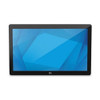
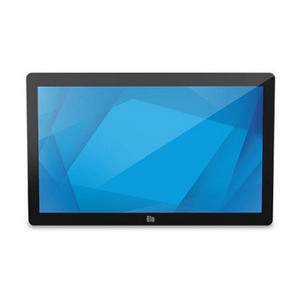
ELO Touch E126096 22-Inch Full HD LCD Touch Monitor
Overview
The ELO Touch E126096 is a 22-inch Full HD touchscreen monitor built for retail point-of-sale, kiosk, and interactive display applications where reliable touch responsiveness and straightforward integration matter. This model combines a capacitive touch surface with standard video connectivity—VGA and HDMI—and USB controller support, making it compatible with most Windows-based and Linux POS systems without requiring proprietary software stacks.
The zero-bezel design eliminates the traditional frame around the display perimeter, reducing dead space in multi-monitor arrays and presenting a cleaner aesthetic in customer-facing installations. The unit ships without a stand, meaning you'll need to source or use an existing VESA-compatible mounting solution—a common trade-off in retail environments where wall-mounting or cabinet integration is standard practice anyway.
Key Features
- 22-inch Full HD (1920 x 1080): Delivers 1080p clarity across typical retail counter distances. For POS and menu-board applications, 1920×1080 is sufficient; if you're driving text-heavy forms or spreadsheets, verify your font sizing expectations before deployment.
- Projected Capacitive 10-touch: Supports up to 10 simultaneous touch points. Multi-touch is standard for modern POS apps, kiosks, and interactive signage; capacitive sensing is more responsive than resistive but requires a conductive stylus or bare finger—gloved operation will not register.
- USB Controller: Integrates via standard USB for plug-and-play touch input. The touch data feeds through USB HID (Human Interface Device), so no separate driver installation or licensing is typically required. Verify USB 2.0 or 3.0 availability on your host system.
- VGA and HDMI Video Input: Dual video options provide flexibility in older and newer system environments. HDMI is the preferred path for new deployments; VGA is a fallback for legacy hardware. Only one video source is active at any time.
- Zero-Bezel Design: Eliminates the plastic frame around the active display area, important if you're building a tiled or multi-unit installation where frame width affects overall footprint. Reduces visual distraction in customer-facing environments.
- No Stand Included: The unit mounts via VESA 100 (standard four-hole pattern). You must provide a stand, arm, or wall bracket separately. This is intentional—retail integrators typically standardize on a single mounting solution across dozens of units.
- Black Finish, Worldwide: Standard black chassis; support and warranty coverage extends globally. Verify regional voltage requirements (110–240V AC) if ordering across markets.
Integration & Compatibility
The E126096 connects to any Windows or Linux system with available USB and either VGA or HDMI output. Common deployment scenarios include NCR, PAX, Ingenico, and Toast POS terminals, as well as self-service kiosks and digital signage players. The USB touch controller handles multi-touch natively, so your POS application must support multi-touch event handling—older applications limited to single-touch input will function but will ignore simultaneous touches.
VESA 100 mounting means the monitor is compatible with standard display mounts and stands in the market. Confirm the mount's weight rating; a 22-inch LCD panel typically weighs 4–5 lbs without additional housing.
When to Choose a Different Model
If your application requires higher resolution (such as dense reporting dashboards or multi-language menu boards where font clarity is critical), consider a 24-inch or larger Full HD variant from the same ELO Touch family, or step up to a 4K-capable monitor if your graphics hardware supports it. If touch responsiveness in high-traffic environments is a concern, confirm your integration partner has validated the E126096 with your specific POS software—some legacy systems have touch sensitivity expectations that newer capacitive monitors don't always meet without firmware updates.
Frequently Asked Questions
Q: Does the E126096 require software drivers beyond USB HID?
A: No. The USB touch controller is HID-compliant, so Windows and Linux recognize it as a standard pointing device. No proprietary driver installation is required. If your POS application needs calibration or custom gestures, ELO Touch provides optional configuration utilities, but they are not mandatory for basic operation.
Q: Can I use this monitor in a landscape or portrait orientation?
A: The VESA 100 mounting pattern allows 90-degree rotation if your bracket supports it. Landscape is standard; portrait mode is possible but rare in retail POS. Verify your mount design and application behavior (POS software may require orientation configuration in settings).
Q: What is the warranty on the E126096?
A: This unit is factory-new with full manufacturer warranty. Specific warranty duration and terms are available from your sales contact or the manufacturer's specification sheet.
Q: Is gloved operation supported?
A: No. Projected capacitive touch requires a conductive material (bare skin or a capacitive stylus). Standard gloves will not register. If your environment requires gloved operation, consider a resistive touch display variant instead.
Q: Do I need a separate power supply?
A: Yes. The monitor draws AC power (110–240V, 50/60 Hz). A power cable is typically included; confirm voltage availability at your installation site.
The ELO Touch E126096 is a straightforward 22-inch touchscreen for retail and kiosk deployments where you need multi-touch input without the complexity of a full POS workstation. The zero-bezel design and capacitive 10-touch surface make sense in high-traffic counter and self-service environments, but you need to understand the constraints before spec'ing it into a project.
Technical Highlights:
- Projected Capacitive 10-touch via USB HID: Plug-and-play into any Windows or Linux system with a USB port. No proprietary touch driver needed—most modern POS applications handle multi-touch natively out of the box. The caveat: older POS systems built for single-touch input will work but won't leverage multi-touch gestures.
- Full HD (1920×1080) on 22 inches: Adequate pixel density for typical retail counter viewing distance (roughly 18–24 inches). If you're driving dense spreadsheets or multi-language text, 1080p is still workable; verify font rendering on your actual content before committing 50+ units to a roll-out.
- Dual Video Input (VGA + HDMI): Both inputs are present, but only one is active. HDMI is the preferred path. VGA is there for legacy system compatibility—rarely needed in new deployments, but useful as a fallback if your primary graphics output fails.
Deployment Considerations:
- No stand included—you must source a VESA 100 mount or bracket. This is not an oversight; retail integrators standardize on a single mounting solution across dozens of units to simplify inventory and training. Budget for the mount separately.
- Capacitive touch does not work with standard gloves. In cold-weather environments or food-service settings where staff wear gloves continuously, resistive touch is a better fit. Test with your actual workforce before full deployment.
The E126096 works best in standardized retail and kiosk environments—quick-service restaurants, convenience store payment terminals, retail queue management, and self-service wayfinding. Avoid it if your software is legacy single-touch, your environment demands gloved operation, or your display real estate is severely constrained (upgrade to a larger model in that case).