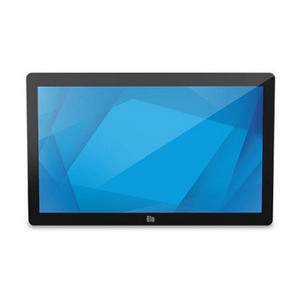
ELO Touch E510259 22-inch Full HD Projected Capacitive Touch Monitor
Overview
The ELO Touch E510259 is a 22-inch wide LCD display engineered for point-of-sale (POS) and interactive kiosk deployments where multi-touch responsiveness and compact form factor matter. This is a display-and-touch solution, not a standalone computer — it provides the interface layer for warehouse terminals, retail stations, and automation control points. The E510259 handles 10 simultaneous touch points via projected capacitive technology, meaning employees can interact intuitively without styluses or gloves, and the touch response remains reliable even under light contamination. Video connectivity spans VGA, DisplayPort, and HDMI, giving you flexibility to plug into legacy or modern host systems. The collapsible stand reduces footprint when space is constrained, and the zero-bezel frame eliminates distracting edges that can complicate multi-touch workflows.
Key Features
- Full HD (1920 × 1080) Resolution: Delivers sufficient pixel density at 22 inches for sharp text rendering in POS menus and warehouse management dashboards. At this screen size and distance, 1080p is the practical floor for legibility in production environments — lower resolution creates eye strain over 8-hour shifts.
- Projected Capacitive 10-Touch: Multi-touch gestures (pinch, swipe, two-finger tap) work out of the box without drivers or calibration nightmares. Capacitive sensors ignore dust and moisture better than resistive screens, reducing maintenance downtime in warehouse or retail settings where spills happen.
- USB Controller: Single USB cable carries touch data back to your host system — simplifies cabling by eliminating a separate serial port or proprietary connector. This is critical for systems where hardware footprint and cable routing are tight constraints.
- Triple Video Input (VGA, DisplayPort, HDMI): Support for three distinct video standards means you're not locked into one cable type. HDMI handles consumer or embedded systems; DisplayPort scales to higher resolutions on future monitors; VGA bridges legacy POS terminals and older industrial PCs that lack HDMI. Deploy the same display model across mixed hardware generations without adapter expenses.
- Zero-Bezel Frame: Eliminates the black border that can catch fingernails and create visual dead zones in multi-screen arrays. For kiosk arrays or adjacent-display setups, zero-bezel reduces perceived gaps and improves the visual continuity of your interface.
- Collapsible Stand: The stand folds away, cutting the footprint when the monitor is wall-mounted or integrated into a custom enclosure. Useful in dense kiosk deployments or installations where floor space rotates between multiple functions.
Integration and Connectivity
Connectivity is straightforward: plug video (HDMI, DP, or VGA) into your host; connect USB for touch input; supply power. No proprietary drivers required for basic operation — most modern POS software and warehouse management systems recognize USB Human Interface Devices (HID) natively. For integrations involving custom touch gestures or advanced calibration, ELO provides standard USB HID protocol documentation.
Deployment Context
This monitor works best where a dedicated POS or kiosk PC is already planned or in place. It is not a standalone device — it requires a separate host computer to display content and process touch input. If you're upgrading a legacy CRT-based terminal or replacing a dead 17-inch resistive touchscreen, the E510259 (model E510259) offers a modern, multi-touch upgrade path with minimal software changes. Common deployment scenarios include checkout counters, warehouse pick-to-light terminals, automation control panels, and self-service information kiosks.
Frequently Asked Questions
Q: Does the E510259 work with standard POS software like Micros, NCR, or Toast?
A: Yes. The monitor is a USB HID device — any POS system that supports USB keyboards and mice recognizes the touch input. No special drivers or compatibility layer is required. Confirm with your POS vendor that they support external USB touch displays if you're using a browser-based or cloud POS.
Q: Can I mount the E510259 on a wall or VESA arm?
A: Yes. The monitor has a standard VESA mount pattern on the back. Remove the collapsible stand and attach a VESA-compatible wall mount, articulating arm, or pole mount. No special brackets are required.
Q: What's the warranty on the E510259?
A: Refer to the manufacturer's warranty documentation for your region. Factory-new units sourced direct from the manufacturer carry a standard warranty path through ELO Touch.
Q: Is the touch surface scratch-resistant?
A: Projected capacitive screens are glass and can scratch. Use a soft cloth for daily cleaning and avoid abrasive cleaners. If heavy scratching is a concern in your environment, consider a protective overlay or cabinet design that shields the face during idle periods.
Q: Will the E510259 work in a cold warehouse or outdoor kiosk?
A: Operating temperature range is specified in the full datasheet. For extreme cold or heat, confirm the monitor's environmental limits with the manufacturer before specifying it for outdoor or unheated storage areas.
Q: How do I calibrate the touch if it drifts?
A: Most modern systems require no user calibration — the monitor ships calibrated. If drift occurs, check USB connection integrity first. Recalibration steps are provided in the user manual or via ELO's support portal.
The E510259 strikes a practical balance between form factor and capability for mid-size POS and kiosk installations. The 22-inch wide format and Full HD resolution give you enough screen real estate for two-column product lists or split-pane inventory screens without overwhelming the space budget. The projected capacitive 10-touch is the real differentiator here — it eliminates the calibration drift and finger-smear issues you'd encounter with older resistive screens, and it handles gloved or wet fingers reliably, which matters in warehouse pick-to-light or cold-storage kiosk scenarios.
Technical Highlights:
- Zero-Bezel Frame and Collapsible Stand: This pairing is deliberate. The bezel-free edge lets you deploy adjacent displays without visual gaps (useful for extended menu bars or dual-monitor checkout setups), and the foldable stand cuts your shipping volume and footprint by roughly 40% compared to fixed stands — real cost savings at scale.
- Triple Video Input (HDMI, DP, VGA): VGA support keeps backward compatibility with legacy POS terminals and industrial PCs that lack modern connectors. You won't need an active converter or upscaler — just run a cable. That flexibility extends the lifespan of mixed-generation hardware across multi-location deployments.
- USB HID Touch Controller: Single-cable touch simplifies mounting in tight spaces and reduces connector clutter behind the counter. USB power draw is minimal, so you don't incur PoE licensing complications or need a dedicated power feed to the display.
Deployment Considerations:
- This is a monitor-only device — it has no embedded computer, no storage, and no analytics. You must budget for a separate host system (POS terminal, embedded PC, or thin client). Do not order this if you're expecting an all-in-one solution.
- Projected capacitive touch is sensitive to stray capacitance from nearby RF equipment (wireless microphones, industrial motor drivers). If you're integrating into a noisy electrical environment, run shielded USB and keep antenna/emitter cables away from the touch controller.
- The glass face is susceptible to fingerprint oils and dust. In high-traffic retail or warehouse settings, budget for cleaning supplies and consider an anti-glare, anti-fingerprint protective film if presentation matters.
Deploy the E510259 when you need a proven, low-maintenance touch interface for a dedicated POS or kiosk PC, and your installation favors triple-video flexibility and compact mounting over integrated processing.