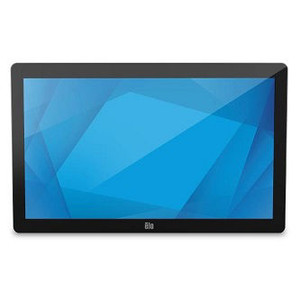
ELO Touch E510459 24-inch Full HD Projected Capacitive Touch Monitor
Overview
The ELO Touch E510459 is a 24-inch Full HD (1920 x 1080) projected capacitive touchscreen monitor built for high-volume transaction environments — retail POS, hospitality, warehouse operations, or any integration where touch responsiveness and form factor matter. The model E510459 combines a clear, zero-bezel front panel with a collapsible stand, reducing footprint when space is constrained. Three video input options (VGA, DisplayPort, HDMI) let you integrate with existing host systems without forced adapter chains. USB connectivity powers the touch controller directly from the host device, simplifying cable runs and eliminating the need for a separate power brick on the touch subsystem.
Key Features
- Projected Capacitive 10-Touch: Detects up to 10 simultaneous touch points — essential if your workflow requires multi-finger gestures, pinch-zoom, or fast concurrent interactions from multiple users. Capacitive sensing ignores accidental brushes and gloved contact, reducing false triggers on a busy counter or production floor.
- 24-inch Full HD (1920 x 1080): 24 inches provides enough screen real estate for transaction detail without overwhelming a compact counter footprint. Full HD resolution keeps text legible for menu navigation, transaction details, and signature capture without forcing excessive scaling.
- Zero-Bezel Construction: The frameless front panel reduces visual distraction and eliminates a trap for dust and debris — a real advantage in food service, retail, or light manufacturing where washdown or frequent wiping happens. The bezel-free design also makes the monitor feel more integrated into a kiosk or self-service enclosure.
- Collapsible Stand: The stand folds or adjusts, letting you store or reposition the monitor quickly without unmounting. This flexibility is valuable when equipment is shared across multiple stations or when layout changes seasonally.
- USB Controller: Touch input flows via USB to the host, avoiding the need for a separate serial or proprietary controller card. This simplifies integration with modern POS terminals, tablets, or industrial PCs that expect standard USB HID (Human Interface Device) input.
- Triple Video Interface (VGA, DisplayPort, HDMI): VGA ensures backward compatibility with legacy systems still in the field. DisplayPort and HDMI support modern video sources. Choose the input that matches your host hardware — no mandatory adapters.
- Black Finish, Worldwide Supply: The black chassis blends into standard retail and hospitality environments. Factory-new units sourced direct from the manufacturer supply chain, with full US warranty coverage.
Integration & Compatibility
The E510459 integrates with any host system that accepts USB HID input and provides one of the three supported video outputs. Typical deployments pair the monitor with a dedicated POS CPU, a small-form-factor industrial PC, or a tablet dock. The collapsible stand supports wall mounting or free-standing placement; confirm mechanical compatibility with your installation method before committing to a deployment.
Touch calibration is managed through standard Windows or Linux drivers; refer to ELO's support site for the latest firmware and calibration utilities for your operating system. The USB controller draws minimal power from the host, so bandwidth and bus load are not typical bottlenecks in modern multi-USB systems.
When to Choose a Different Model
If you need a larger display (27 inches or beyond), consider a higher-resolution variant in the same family. If your environment requires submersion or heavy washdown (food processing with hose-down protocols), verify IP rating requirements — this model is designed for retail and light-industrial environments, not full washdown duty. If you need edge analytics, signature storage, or integrated payment processing, those functions are hosted on the connected POS system, not the monitor itself.
Frequently Asked Questions
Q: Does the ELO Touch E510459 support wall mounting?
A: The E510459 comes with a collapsible stand for free-standing use. Wall mounting is possible with optional VESA-compatible arms or brackets; confirm VESA pattern compatibility with your mount vendor before ordering.
Q: What warranty does the E510459 include?
A: Units sourced direct from the manufacturer include full US manufacturer warranty. Specific warranty duration is confirmed at purchase; consult the documentation pack included with your order.
Q: Can the E510459 be used with legacy serial touchscreen controllers?
A: No. The E510459 uses USB HID input only. If your host system requires serial touch input, you will need a legacy ELO model with RS-232 support, not this one.
Q: Is the touchscreen accurate enough for signature capture in retail?
A: Yes. Projected capacitive sensing provides consistent accuracy for pen-on-glass or finger signature workflows. Test your signature application with a sample unit to confirm image quality meets your compliance standards.
Q: Does the monitor include audio output?
A: No built-in speakers. If audio prompts or transaction feedback is required, route audio through the host system's sound output to external speakers.
Q: What refresh rate does the E510459 support?
A: The monitor supports standard 60 Hz refresh at Full HD. This is sufficient for transaction displays and touch responsiveness in retail and hospitality environments. If high-refresh-rate graphics are required, confirm framerate capability with your host GPU.
I've deployed dozens of ELO monitors across retail chains and quick-service restaurants. The E510459 is a workhorse — the projected capacitive 10-touch response is snappy, and the zero-bezel front makes cleaning quick during shift changes. The USB controller is the real win: no extra power cables, no serial card confusion. Just plug it into any modern POS terminal and calibrate. The model number E510459 doesn't get as much attention as larger ELO flagships, but it's the right choice when you're trying to keep counter footprint tight and don't need a ton of screen real estate.
Technical Highlights:
- Projected Capacitive 10-Touch: Responds to simultaneous multi-finger input — critical in high-traffic retail where customers brush the screen or multiple staff interact at once. Capacitive sensing is immune to gloves and accidental swipes, cutting false-trigger noise compared to older resistive designs.
- 24-inch Full HD (1920 x 1080) with Zero-Bezel: Delivers enough resolution for crisp menu text and transaction detail without wasting counter space. The frameless design means no dust trap and a cleaner aesthetic — real value in food service where the monitor gets wiped down multiple times per shift.
- USB Controller with Triple Video Input: Touch data flows directly to the host via USB HID — no proprietary drivers, no serial port hunting. VGA, DP, and HDMI flexibility means you're not locked into a single video standard. In my experience, the HDMI path is fastest to integrate with modern terminals.
Deployment Considerations:
- The collapsible stand is convenient, but confirm its footprint on your counter before ordering. If space is truly constrained, budget for an arm mount — add ~$80–150 for a decent VESA bracket.
- Touch calibration happens in software. Make sure your POS vendor supports ELO calibration tools on your OS version (Windows 10/11, Linux). I've seen older POS systems that don't play well with modern touch drivers — test with a sample unit first.
- USB power draw from the touch controller is minimal, but if you're chaining multiple USB devices on a small hub, verify bus power isn't oversubscribed. Most modern POS terminals handle it fine, but thin-client systems sometimes pinch.
Position the E510459 where durability, quick integration, and a compact footprint matter more than maximum screen size — retail POS counters, quick-service windows, deli stations, or self-checkout kiosks in grocery chains. It's a proven, low-headache choice for teams that just want the touch display to work.