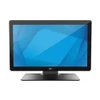
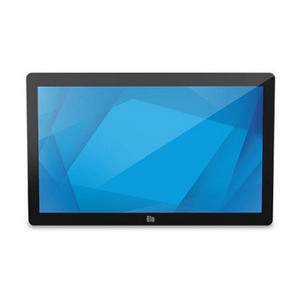
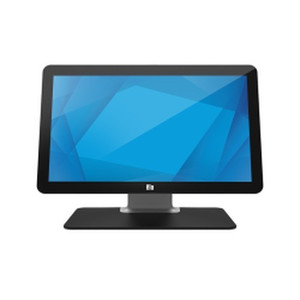
ELO Touch E351600 22-Inch Full HD Projected Capacitive Touch Display
Overview
The ELO Touch E351600 is a 22-inch desktop display built for retail point-of-sale, self-service kiosks, and interactive warehouse automation terminals. This model pairs a Full HD (1920 × 1080) LCD panel with projected capacitive 10-touch sensing, delivering responsive multi-touch input across the entire screen surface. The E351600 ships as a complete desktop system with integrated stand, black enclosure, and dual video inputs (VGA and HDMI), making it straightforward to connect to existing POS terminals, ticketing systems, or warehouse management workstations.
Key Features
- Projected Capacitive 10-Touch: Supports up to 10 simultaneous touch points — critical for multi-user or gesture-driven workflows. Capacitive sensing is more durable than resistive overlays in high-traffic retail environments because there is no mechanical membrane to wear out.
- Full HD Resolution (1920 × 1080): Delivers crisp text and graphics on a 22-inch screen — adequate for typical retail transactions, menu displays, and warehouse task screens. Not suitable for detailed CAD or forensic video review, but well-matched to checkout, order confirmation, and inventory lookup interfaces.
- Zero-Bezel Design: Minimizes frame around the touch surface, enabling seamless multi-display configurations or uninterrupted visual real estate for full-screen applications. Reduces accidental off-screen taps in crowded retail settings.
- USB Controller: Touch input is managed via a dedicated USB connection to the host computer. This simplifies integration — most modern POS terminals and Windows/Linux systems recognize the controller as a standard HID input device. No additional drivers or proprietary software typically required, though manufacturer documentation should be verified for your specific OS and POS platform.
- Dual Video Inputs (VGA and HDMI): Supports both analog and digital video connections. HDMI is preferred for new installations (digital signal, better noise immunity), but VGA compatibility ensures backward compatibility with older POS terminals or legacy PC hardware that may lack HDMI output.
- Desktop Stand Configuration: The E351600 includes an integrated stand suitable for counter or desk mounting. If wall mounting or VESA arm mounting is required, verify stand compatibility or consider third-party bracket solutions before purchase.
Integration & Compatibility
The E351600 integrates with any host system supporting USB input and providing VGA or HDMI video output. Common retail POS platforms (NCR, Ingenico, Toast, Square hardware terminals) and warehouse mobile computers with dock connectors can drive this display. Verify that your POS software recognizes the USB touch controller; most modern systems do, but legacy or custom POS stacks may require driver installation. The 22-inch form factor is a retail standard, so mounting templates, stand replacements, and protective covers are widely available from third-party suppliers. When planning multi-display retail setups, confirm that your host PC's graphics adapter can support simultaneous outputs — some integrated graphics chipsets limit dual-output configurations.
Frequently Asked Questions
Q: Is the E351600 suitable for outdoor or splash-prone environments?
A: No. This is an indoor desktop display with no environmental rating (IP rating). It is not sealed against water ingress or dust. Use this display only in dry, climate-controlled retail or warehouse environments.
Q: Can I mount the E351600 on a wall or arm?
A: The standard E351600 ships with a desktop stand. Wall or arm mounting requires removal of the stand and use of a third-party VESA-compatible bracket or mounting solution. Verify VESA compatibility and weight capacity of any aftermarket mount before installation.
Q: What is the power requirement for the E351600?
A: Specifications for AC voltage and wattage were not provided in available documentation. Contact the manufacturer or retailer for exact power specifications before finalizing installation.
Q: Does the E351600 work with macOS or Linux?
A: The USB touch controller and video inputs are industry-standard interfaces. Most modern macOS and Linux distributions recognize USB HID input devices natively. Verify with your POS software vendor that the application stack supports this display's touch protocol.
Q: Is there a warranty?
A: Warranty terms were not included in the available specifications. Contact the manufacturer or point of sale for warranty duration and coverage details.
The E351600 is a straightforward retail touchscreen — not flashy, but it does the core job. A 22-inch Full HD projected capacitive display strikes a practical balance for checkout counters, self-service kiosks, and warehouse task terminals. The 10-touch capability and zero-bezel frame eliminate mechanical wear points you'd deal with on a resistive screen, and USB input integration is solid for systems that don't require exotic VMS or deep API hooks.
Technical Highlights:
- Projected Capacitive 10-Touch: Multi-touch without a membrane overlay means durability in high-traffic retail — no peeling, no ghost touches from wear. This is a real step up from older resistive overlays if you're replacing legacy hardware.
- Full HD (1920 × 1080) on 22 inches: Pixel density is adequate for text clarity at arm's length (typical counter or desk viewing distance). Not dense enough for detailed inspection work, but more than sufficient for transaction screens, menu boards, and warehouse label scanning.
- Dual Video Input (VGA + HDMI): HDMI for modern POS hardware, VGA fallback for legacy systems. This flexibility matters if you're rolling out a mixed-generation retrofit across multiple locations — you won't get stuck with incompatible displays.
Deployment Considerations:
- The desktop stand is convenient for greenfield installs, but if you're replacing a wall-mounted or arm-mounted display, budget for a third-party VESA mount. Verify weight capacity before ordering an arm solution.
- Power specifications were not available in the documentation provided. Confirm AC requirements with the manufacturer before you wire the installation — you don't want to discover insufficient circuit capacity mid-rollout.
- The E351600 is not rated for outdoor, wet, or dusty environments. If you're planning a warehouse loading dock or semi-exposed POS terminal, this display won't survive. You'd need an industrial-rated variant with IP66 or higher.
This display makes sense for clean retail floor, call center, or indoor warehouse automation — anywhere you have a stable tabletop or can retrofit a VESA arm. If touch responsiveness and multi-point input are your priority, the projected capacitive design will outlast a resistive overlay by years in a high-use environment.