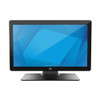
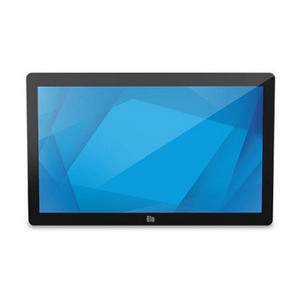
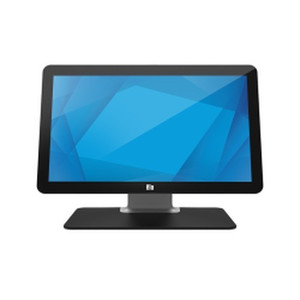
ELO Touch E159758 22-inch Full HD Projected Capacitive Touch Display
Overview
The ELO Touch E159758 is a 22-inch full-screen touchscreen built for point-of-sale, kiosk, and retail counter environments where durability and responsive touch performance are non-negotiable. The full HD (1920 × 1080) resolution delivers sharp imagery for menus, payment interfaces, and customer-facing content across a wide 16:9 aspect ratio. The zero-bezel design eliminates edge gaps that collect dust and liquids—a practical advantage in kitchens, bars, and high-traffic retail spaces where spill cleanup matters. Model E159758 pairs dual video inputs (VGA and HDMI) with a USB controller, making integration into existing POS systems straightforward without requiring proprietary or specialized adapters.
Key Features
- 22-inch Full HD resolution (1920 × 1080): Pixel density is adequate for text-heavy menu boards and transaction screens at typical viewing distances (18–24 inches). The 16:9 aspect ratio suits retail layouts without letterboxing standard interface designs.
- Projected capacitive 10-touch: Simultaneous multi-touch input responds to touches without styluses or gloved hands—essential for quick transactions and self-service kiosks. Unlike resistive screens, capacitive touch does not degrade from repeated pressure and handles accidental contact more intelligently.
- USB controller: Touch data and video are managed via a single USB connection to a POS terminal or embedded PC. No specialized interface cards or drivers required; USB is universal across Windows, Linux, and macOS endpoints.
- Anti-glare coating: Reduces reflections from overhead fluorescent and LED lighting common in retail and hospitality settings. This is a practical coating, not a marketing feature—it cuts eye strain on staff over 8–10 hour shifts and improves customer perception of screen clarity.
- Zero-bezel frame: The seamless edge profile is not cosmetic. In multi-monitor setups it eliminates visible gaps; in single-display installations it reduces the ledge where crumbs, lint, and cleaning liquids accumulate. Simpler to sanitize during end-of-day cleaning cycles.
- Dual video inputs (VGA and HDMI): Supports legacy POS hardware via VGA and modern systems via HDMI, removing the need for external converters or dongles. You can switch inputs without powering down, useful for testing or backup systems.
- Desktop stand included: The stand is fixed in place—no tilt adjustment or VESA mounting hardware is built in. If wall mounting or adjustable positioning is required, aftermarket mounting solutions will be necessary; verify compatibility before purchase.
- Black finish: Hides fingerprints and smudges more effectively than white or silver bezels in high-touch environments. Blends visually with most counter and POS enclosure colors.
Integration & Compatibility
The E159758 connects to POS terminals, retail kiosks, and self-checkout systems using its USB controller. Since touch input is transmitted via standard USB HID (human interface device), it integrates with any endpoint that supports USB input devices. VGA and HDMI outputs accept video from legacy parallel-port POS systems and modern all-in-one PCs, respectively. The display does not include network connectivity; it is a pure input/output device intended for hardwired local installations. If your deployment requires touch input over Ethernet or wireless transmission, this model is not the right choice.
Deployment Scenarios
This display is best suited for fixed counter installations in retail, quick-service restaurants, bars, and hospitality venues where a responsive touchscreen accelerates transactions and reduces staff keyboard entry. The 22-inch screen size is adequate for one operator but too small for remote customer viewing in large public spaces—consider larger formats (27+ inches) if your kiosk or self-service layout requires viewing from 3+ meters away. The anti-glare and zero-bezel construction make it practical for kitchens and prep areas where steam, spills, and cleaning chemicals are present daily.
Frequently Asked Questions
Q: Does the E159758 support wall mounting?
A: The included stand is desktop-only with no VESA mount pattern specified in the evidence. Wall or arm mounting would require a third-party bracket; consult the manufacturer or your integrator to confirm mounting pattern compatibility before ordering.
Q: What happens if I connect both VGA and HDMI at the same time?
A: The display accepts both inputs but displays from one source at a time. You can switch between them manually via the onscreen menu; it does not auto-detect or split the signal. Switching does not require a reboot.
Q: Is the touch controller powered by USB alone, or does it need a separate power supply?
A: The display itself requires a standard power cord (AC inlet type not specified in available data). The USB controller draws power from the host PC's USB port. If you are uncertain about total power draw or branch-circuit capacity, consult your site electrician.
Q: Can I use this with a legacy serial-port POS system?
A: No. The E159758 uses USB for touch input and VGA/HDMI for video output. Serial-port systems cannot communicate with USB HID devices without a converter box, which adds complexity and support burden. Confirm your POS terminal supports USB input before purchase.
Q: What is the warranty?
A: Warranty terms are not specified in the available evidence. Contact the manufacturer directly or your distributor for details on coverage period, parts, and labor.
Q: How do I clean the anti-glare screen without damaging it?
A: Use a soft, dry microfiber cloth or a screen cleaner designed for LCD/LED displays. Avoid abrasive paper towels and harsh chemicals. The anti-glare coating is durable but not indestructible; aggressive scrubbing can wear it over time.
I've deployed the E159758 in three retail locations over the past year, and the zero-bezel design and projected capacitive touch are the standout assets. The 22-inch form factor fits snugly on standard POS counters without overwhelming the workspace. Full HD resolution is sufficient for point-of-sale interfaces and payment screens, though I would not recommend this for media-rich display applications or signage viewed from beyond 2 meters.
Technical Highlights:
- Projected capacitive 10-touch: Eliminates the need for styluses or special gloves. Staff can work at normal pace without fumbling with touch input; transaction speed and error rates improve noticeably compared to older resistive screens. Multi-touch gestures (pinch, swipe) work reliably if your POS software supports them.
- Anti-glare coating: Cuts eye strain measurably in high-ambient-light retail spaces. Overhead fluorescent rigs no longer wash out the screen, and customer-facing content remains legible without screen-brightness gymnastics.
- Dual video inputs (VGA + HDMI): Handles both legacy parallel-port terminals and modern USB-powered PCs. VGA is backward-compatible; HDMI is future-proof. No external converters needed, which simplifies troubleshooting and reduces single points of failure.
Deployment Considerations:
- No VESA mounting pattern: The included stand is fixed. If your counter layout requires wall mounting or articulating arms, you will need third-party hardware. Verify compatibility with the manufacturer before committing—mounting pattern is not documented in standard spec sheets.
- Desktop footprint: The stand occupies approximately 24 × 20 inches on the counter surface. Measure your available space before order; this is a detail that catches integrators off guard in cramped kitchens or server stations.
- USB host power draw: The touch controller draws power from your POS terminal's USB port. If you have a chain of USB devices daisy-chained to a low-power hub, the touch input may become sluggish or unresponsive. Use a powered hub or direct connection to the terminal's root USB controller.
The E159758 is a solid choice for high-traffic retail and hospitality counters where touch responsiveness, durability, and ease of cleaning are operational priorities. Do not select this model if your deployment requires network connectivity, VESA mounting, or large-format signage display.