

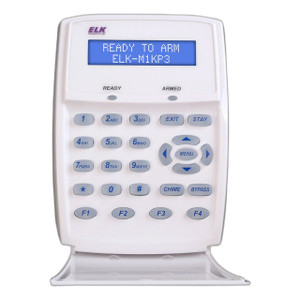

Product images are provided for reference and may not represent the exact model, configuration, or included
components.
Overview
SKU:
ELK-M1KP
Condition:
New
Availability:
Usually ships in 24 hours
Warranty
Manufacturer Warranty
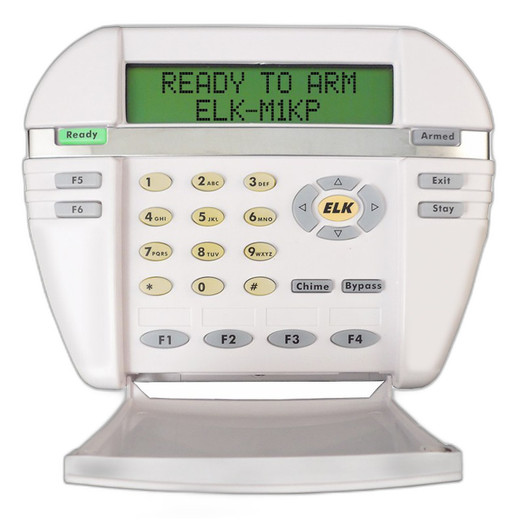
ELK Products Lcd Keypad For M1 Controls M1Kp
ELK Products ELK-M1KP LCD Keypad for M1 ControlsThe ELK-M1KP is a dedicated LCD keypad designed specifically for ELK M1 control panel systems. This ha…
ELK Products Lcd Keypad For M1 Controls M1Kp
$228.99
Your recommended setup
Review items below — quantities update pricing automatically.
Item
Qty
Status
Price
Optional Add-Ons recommended
Services optional
Bundle Summary
Bundle Subtotal:
$0.00
Optional Add-Ons:
$0.00
Services:
$0.00
Total:
$0.00
Overview
SKU:
ELK-M1KP
Condition:
New
Availability:
Usually ships in 24 hours
Warranty
Manufacturer Warranty
Description

ELK Products ELK-M1KP LCD Keypad for M1 Controls
The ELK-M1KP is a dedicated LCD keypad designed specifically for ELK M1 control panel systems. This hardwired keypad interface provides operators with a visual display and tactile input method for system arming, disarming, status monitoring, and configuration tasks. Built as a standard accessory for M1-based security installations, the ELK-M1KP integrates directly with the M1 control architecture, delivering reliable local control at strategically placed entry points or command stations.
Overview
The ELK-M1KP LCD keypad serves as a critical user interface component in M1 control deployments. It provides real-time system feedback through its integrated display while maintaining the security and responsiveness expected in professional access control and alarm management environments. The keypad communicates directly with the M1 control panel via the M1 data bus, requiring no additional network configuration or wireless setup. This hardwired design ensures consistent availability and eliminates dependency on network connectivity for core control functions.
Key Features
- LCD Display: Integrated LCD screen for real-time system status, zone information, and user prompts
- Dedicated M1 Integration: Native compatibility with ELK M1 control panel architecture via direct bus connection
- Keypad Input: Standard tactile key layout for arming, disarming, and system navigation
- Local Command Interface: Full control capability without reliance on external network or software applications
- Professional Installation Design: Engineered for wall-mounted or desk-mounted deployment in security operations centers, reception areas, and entry points
- M1 System Integration: Works seamlessly with M1 automation and control logic for synchronized operations
Integration & Compatibility
The ELK-M1KP is designed exclusively for ELK M1 control panel systems. It connects directly to the M1 data bus without requiring separate network infrastructure, gateways, or IP configuration. The keypad shares the M1's security architecture and inherits all zone management, user code management, and automation capabilities native to the M1 platform. In multi-user environments, the ELK-M1KP supports M1 user code management, allowing administrators to assign role-based access and activity logging through the control panel's native credential system. The keypad interface is compatible with M1 partitioning schemes, enabling operators to control system segments independently based on assigned permissions.
Integrators commonly deploy multiple ELK-M1KP keypads in larger installations to provide control access at multiple physical locations—entry vestibules, command stations, and secondary monitoring areas—all synchronized to a single M1 control panel. The display provides consistent feedback across all keypads, ensuring operators maintain situational awareness regardless of their location within the facility.
Package Contents
The ELK-M1KP package includes the keypad unit with integrated LCD display, connection hardware for M1 bus integration, and installation documentation. Please verify current packaging details with your distributor to confirm inclusion of mounting hardware and any available accessories.
Jerry Tildsen
I've integrated the ELK-M1KP into several M1-based security and automation installations, and it remains a straightforward, reliable component for local system control. The LCD display eliminates guesswork during arming and disarming operations, which is critical in facilities where multiple users need consistent feedback. The ELK-M1KP's direct bus connection to the M1 panel removes the complexity of network configuration and reduces points of failure for core control functions.
Technical Highlights:
- Direct M1 Bus Integration: No network setup required; communicates natively with M1 control architecture for immediate responsiveness
- LCD Visual Feedback: Display-based interface reduces user error and provides real-time zone and system status information
- Hardwired Reliability: Eliminates dependency on wireless or network connectivity for essential control operations
Deployment Considerations:
- Plan keypad placement to ensure line-of-sight and physical accessibility for primary users and operators
- Coordinate M1 user code management to assign keypad-specific access levels and activity logging for audit compliance
- Install multiple keypads in larger facilities to provide redundant control access and operational flexibility
- Verify M1 firmware compatibility and any required updates before commissioning the ELK-M1KP
The ELK-M1KP is a practical, purpose-built interface for M1 deployments where local hardwired control is preferred over or in addition to software-based management. It integrates cleanly into the M1 ecosystem and delivers the responsiveness and visibility that security operators expect from a dedicated control keypad.
Specifications
Product Type:
LCD Keypad
Communication:
M1 Data Bus
Have Questions?
Ask an Expert.
RELATED PRODUCTS


System Design, Deployment & Technical Support
Support services and planning resources for commercial surveillance, access control, and infrastructure deployments.
Fixed scope • Fixed price
System Design Assistance
- Get help validating product compatibility
- Coverage requirements
- Storage planning and deployment architecture before you buy.
Deployment & Configuration Support
- Access fixed-scope support for rollout planning
- User setup guidance
- Migration and system standardization across single-site or multi-site deployments
Guides, Tools & Calculators
- PoE requirements
- Storage retention
- Camera selection and deployment methodology