Product images are provided for reference and may not represent the exact model, configuration, or included components.

No Bots, Just Experts

Questions about this product? Free pre-sales support from a senior specialist — product questions, compatibility checks, BOM quotes, price confirmation — typically answered within one business day. Need camera placement or system design work? Engineering time is $175 per hour (qty 1 = 1 hour). Hardware buyers get up to one hour ($175) credited back on their order.

Description

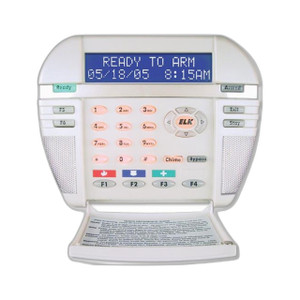
ELK Products ELK-M1KP3 LCD Keypad

Overview

The ELK-M1KP3 is an LCD keypad for M1 series control panels, giving users a local interface to arm, disarm, and monitor zones without going through a mobile app or web portal. It fits standard security deployments where you need a physical keypad at an entry point, hallway, or equipment room — the kind of install where an LCD screen with direct button access is faster and more reliable than a touchscreen app during a network outage. It mounts to the wall or recesses into it, so you can match the keypad to the finish level of the installation, from surface-mounted commercial retrofits to flush-mounted new construction.

Compatibility

The ELK-M1KP3 operates as an addressable device on the M1 data bus, meaning it shares wiring with other bus devices such as a zone expander and an output expander. Each device on the bus — including this keypad — gets its own distinct address even when multiple devices are set to address 2, since the panel differentiates by device type, not address alone. Confirm the panel firmware and existing bus device addresses before adding this keypad to avoid a conflict with another bus device already occupying that slot.

Installation Notes

Two mounting options are supported: surface wall mount for retrofit jobs where opening the wall isn't practical, and recessed mount for a flush, low-profile finish in new construction or remodel work. Because this is a bus-addressed device, wire runs need to support the shared data bus topology rather than a home-run per device — plan conductor routing accordingly before pulling cable. Verify the keypad's assigned address against other bus devices (zone expander, output expander) during commissioning so the panel enumerates each one correctly.

Specifications
Product Type: LCD Keypad
Type: Reader
Reader Type: LCD Keypad
Warranty: Manufacturer Warranty
Mount Type: Wall; Recessed
Keypad: , a Zone Expander, and a Output Expander all set to address 2 and on the same data bus since each device is a different device
Q&A
Reviews

ELK Products ELK-M1KP3 LCD Keypad

$183.00
$182.99

RELATED PRODUCTS

Save $37.94
ELK Products ELK-M1KPB M1 LCD Keypad Monitor (view 2)
Add to Cart The item has been added

ELK Products ELK-M1KPB

ELK Products ELK-M1KPB M1 LCD Keypad Monitor

Blue LCD keypad monitor for ELK M1 control panels

  • Blue backlit LCD keypad for ELK M1 panel monitoring in low light
  • Drops into M1 data bus - no extra wiring or interface card needed
  • Wall or corner mount for tenant suites and main entries
Usually Ships in 2-3 Weeks Free shipping over $499
$228.93 $190.99 Save $37.94
The item has been added Add to quote
$228.93 $190.99 Save $37.94
Save $37.94 Add to cart Add to quote
Save $50.95
ELK Products ELK-M1KP LCD Keypad for M1 Control Systems (view 3)
Add to Cart The item has been added

ELK Products ELK-M1KP

ELK Products ELK-M1KP LCD Keypad for M1 Control Systems

LCD keypad for ELK M1 systems with single twisted-pair connection

  • LCD keypad for ELK M1 control panels over the M1 data bus
  • Twisted-pair connection carries both power and data - one cable run
  • Wall or corner mount for tenant suites and main facility entries
Usually Ships in 2-3 Weeks Free shipping over $499
$236.94 $185.99 Save $50.95
The item has been added Add to quote
$236.94 $185.99 Save $50.95
Save $50.95 Add to cart Add to quote
Save $0.70
ELK Products ELK-M1KAM Wired Keypad Reader
Add to Cart The item has been added

ELK Products ELK-M1KAM

ELK Products ELK-M1KAM Wired Keypad Reader

Wired keypad reader with Wiegand/RS-485 for ELK panel access control

  • Wired keypad reader with both Wiegand and RS-485 communication
  • Drops into most ELK panels without extra interface modules
  • 8VDC low-voltage operation fits standard access power architecture
Usually Ships in 2-3 Weeks Free shipping over $499
$179.69 $178.99 Save $0.70
The item has been added Add to quote
$179.69 $178.99 Save $0.70
Save $0.70 Add to cart Add to quote
ELK Products ELK-M1KPNAV ELK M1KPNAV Navigator Touchscreen Keypad
Add to Cart The item has been added

ELK Products ELK-M1KPNAV

ELK Products Navigator Touchscreen - ELK-M1KPNAV

Touchscreen keypad designed to integrate with ELK M1 control panels, providing a visual interface for system arming, disarming, and zone status

  • Touchscreen keypad for ELK M1 panel arming and zone status display
  • 12V or 24V panel-supplied power over the ELK keypad bus
  • Visual interface replaces button-only keypads at primary entries
Usually Ships in 2-3 Weeks Free shipping over $499
$248.99
The item has been added Add to quote
$248.99
Add to cart Add to quote
ELK Products ELK-M1KPAS ELK M1KPAS LED Keypad Arming Station for M1
Add to Cart The item has been added

ELK Products ELK-M1KPAS

ELK Products M1 Led Keypad Arming Station M1Kpas - ELK-M1KPAS

Wired keypad arming station designed as a hardwired remote control interface for ELK M1 security control panels

  • Wired LED arming station with PIN-code system arm and disarm
  • Hardwired to ELK M1 panel for local arm and status indication
  • Drops into residential and small-commercial ELK deployments
Usually Ships in 2-3 Weeks Free shipping over $499
$199.99
The item has been added Add to quote
$199.99
Add to cart Add to quote

System Design, Deployment & Technical Support

Support services and planning resources for commercial surveillance, access control, and infrastructure deployments.

Fixed scope • Fixed price

System Design Assistance

  • Get help validating product compatibility
  • Coverage requirements
  • Storage planning and deployment architecture before you buy.
Request Design Help

Deployment & Configuration Support

  • Access fixed-scope support for rollout planning
  • User setup guidance
  • Migration and system standardization across single-site or multi-site deployments
View Support Services

Guides, Tools & Calculators

  • PoE requirements
  • Storage retention
  • Camera selection and deployment methodology
Open Technical Resources