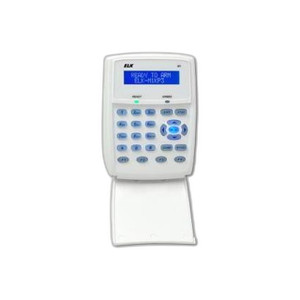
ELK Products ELK-M1KPB M1 LCD Keypad Monitor
Overview
The ELK-M1KPB is a dedicated LCD keypad monitor designed as the primary operator interface for ELK M1 control panels in security and access control deployments. The blue LCD display delivers clear status visibility for armed/disarmed states, zone indication, alarm information, and user command input. This keypad functions as the control point for system operators managing entry access, system arming/disarming, and real-time event monitoring across commercial and institutional installations.
The ELK-M1KPB (often searched as ELK M1KPB) integrates directly into M1-based security architectures without requiring external integration layers or middleware. It is purpose-built for environments where centralized, reliable keypad access and visual feedback are critical to daily operations.
Key Features
- Blue LCD Display: Provides clear operator visibility in varied lighting conditions. The backlit LCD is readable from multiple angles and distances, reducing operator error during high-stress alarm or access-denial scenarios.
- M1 Panel Direct Integration: Connects directly to ELK M1 control panels with no additional gateway or protocol converter required. This eliminates single points of failure in the communication path and simplifies commissioning.
- Armed/Disarmed Status Display: Real-time armed state indication tells operators at a glance whether the system is live. Paired with zone-by-zone feedback, operators can quickly diagnose which areas are protected or bypassed.
- Zone Indication: Shows individual zone status (normal, open, bypassed, alarm) so responders know exactly where an event occurred without wading through event logs. Critical for efficient response in multi-zone facilities.
- User Command Interface: Dedicated keypad for arming, disarming, and user code entry. Hardware buttons reduce dependency on software menus and eliminate touchscreen lag or calibration drift common in field conditions.
- Commercial and Institutional Deployment: Rated and validated for warehouses, distribution centers, office complexes, and similar environments where security integration is mission-critical. The ruggedized keypad tolerates frequent use and incidental contact.
Integration and Compatibility
The ELK-M1KPB is engineered for M1 series control panels from ELK Products. Compatibility extends across M1 configurations regardless of the number of zones, input channels, or output relays in the parent panel. Installation requires only a wired connection from the keypad to the M1's keypad port; no additional software licensing or firmware updates are required on the panel side.
When selecting this keypad, confirm that your M1 panel includes an available keypad input port. Some legacy or heavily configured panels may have all keypad ports in use; in that case, a secondary panel or remote integration may be required. Consult your M1 panel documentation or system integrator to verify available ports before ordering.
Physical and Operational Context
The ELK-M1KPB is designed for wall or console mounting in secure access points, control rooms, or administrative areas. It is not intended for outdoor or high-humidity environments; install it in climate-controlled spaces to ensure LCD longevity and keypad reliability. The wired connection to the M1 panel means placement is limited to the panel's control room or a location reachable by conduit runs.
Frequently Asked Questions
Q: Can I install multiple ELK-M1KPB keypads on a single M1 panel?
A: Yes. Most M1 panels support two or more keypad ports. Check your specific M1 model documentation for the maximum number of keypad connections allowed.
Q: Does the ELK-M1KPB work with non-ELK M1 panels or third-party security systems?
A: No. This keypad is designed exclusively for ELK M1 control panels and is not compatible with Honeywell, 2GIG, or other third-party panels.
Q: What happens if the keypad loses connection to the M1 panel?
A: The M1 panel will detect the loss of communication and generate a trouble signal. The panel will continue to operate independently, but operators will lose local visibility into armed state and zone status until the keypad connection is restored.
Q: Can the ELK-M1KPB be installed outdoors or in a warehouse environment with dust and temperature swings?
A: The ELK-M1KPB is rated for indoor, climate-controlled installation only. For outdoor or harsh-environment access points, consider a weatherproof steel enclosure or a different keypad designed for those conditions.
Q: What is the typical cable length from the ELK-M1KPB to the M1 panel?
A: Standard twisted-pair cabling should not exceed 300 feet (approximately 90 meters) without signal conditioning. Longer runs may require shielded cable or a repeater module. Consult your system integrator for your specific cable routing.
Q: Does the ELK-M1KPB require its own power supply?
A: No. The keypad draws power from the M1 panel over the communication link. No separate power supply is needed.
Ted PerryPerspective based on aggregated IP Security Depot and affiliated engineering team experience.
The ELK-M1KPB is a straightforward, hardwired M1 keypad that does one job well: it gives your operators a reliable, dedicated interface to arm/disarm the panel and read zone status at a glance. The blue LCD backlight is bright enough for typical control room and lobby installations, and the direct M1 connection eliminates the network complexity you'd face with IP-based keypads.
Technical Highlights:
- Direct M1 Wiring: No network stack, no VLAN configuration, no IP address conflicts. The keypad talks to the M1 panel over a simple twisted-pair link, reducing commissioning time and troubleshooting complexity.
- Multi-Keypad Support: Most M1 panels accept two or more keypads on separate ports, allowing you to place operator interfaces in different areas (control room, guard station, facility office) without expensive repeater hardware.
- Zone Status Display: The LCD shows armed state and individual zone status in real time, letting operators diagnose entry points and respond to access denials or open-zone alarms without consulting a computer or audit log.
Deployment Considerations:
- The ELK-M1KPB is indoor-only. If you need a keypad in a loading dock, warehouse floor, or outdoor gatehouse, this is not the right choice—you'll need an enclosure or a weatherproof alternative.
- Cable distance from the panel is limited to roughly 300 feet on standard twisted pair. Longer runs require shielded cable or a signal repeater, which adds cost and complexity. Plan your control room location accordingly.
- Unlike IP keypads, this unit cannot be monitored remotely over a network. Mobile arming/disarming or remote status checking requires a separate mobile app or remote keypad—this ELK-M1KPB handles local, in-building control only.
The ELK-M1KPB is the right call for mid-sized commercial facilities (warehouses, distribution centers, multi-building office parks) where you want reliable, low-latency operator interfaces in a central control room and don't need remote or mobile access. It's not a fit for cloud-centric or fully networked deployments, nor for outdoor or mobile security operations.