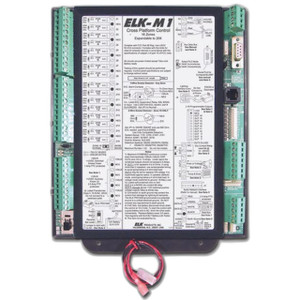
ELK Products ELK-6021 M1 Controls Transceiver
Overview
The ELK-6021 is a transceiver accessory engineered for integration within ELK Products M1 Controls security system environments. As a communication component, it functions to extend signal transmission between M1 system modules and field devices, enabling both retrofit installations and platform expansion scenarios where signal reliability or coverage distance must be improved. The ELK-6021 (often searched as ELK 6021) is purpose-built for M1 architecture and does not function as a standalone device—it requires an existing M1 control panel and compatible system topology.
Key Features
- M1 Protocol Support: Operates on standard M1 communication protocols, meaning it integrates directly with existing M1 command sets and panel programming without translation layers or custom firmware. This eliminates integration complexity and reduces commissioning time on retrofit projects.
- Retrofit and Expansion Capability: Supports both new M1 deployments and additions to mature systems. If your existing M1 panel is at the edge of reliable radio or hardwired coverage, adding the ELK-6021 can extend reach to outbuildings, remote zones, or additional readers without rewiring long cable runs.
- Field Device Communication: Enables bidirectional communication between the M1 control panel and wireless or networked field devices (readers, sensors, keypads, transmitters). This is particularly useful when panel-to-device distance or physical obstacles (masonry, metal structures) attenuate signals.
- Installation Flexibility: Works in retrofit and new-build scenarios, provided the M1 system architecture has been documented and verified. Installers must confirm compatibility with the specific M1 panel firmware version and any existing network topology before deployment.
Integration & Compatibility
The ELK-6021 is designed exclusively for M1 Controls environments. Before selecting this transceiver, verify your system control panel is M1-based and that system firmware is current. Installation requires confirmation of existing M1 network topology, channel assignments, and any frequency or protocol settings in use. If your deployment includes multiple control panels or hybrid legacy/modern hardware, consult ELK documentation or a certified integrator to ensure the transceiver placement and configuration support your coverage objectives.
This transceiver is not a standalone communicator or gateway; it functions within the M1 ecosystem and requires an active M1 panel to operate. For deployments that mix M1 with non-ELK security hardware, additional gateways or protocol converters may be required.
Typical Deployment Scenarios
- Multi-Building Campus: When a facility spans multiple buildings with metal or masonry barriers, the transceiver extends signal reach from the main M1 panel to remote access control readers or wireless sensors without running cable across outdoor terrain.
- Retrofit Signal Extension: Existing M1 installations experiencing weak or intermittent device communication can deploy an additional transceiver as a repeater or bridge to improve redundancy and coverage.
- Wireless Sensor Networks: If your M1 system includes wireless door contacts, motion sensors, or panic buttons, the transceiver enhances bidirectional communication and reduces missed or delayed signals from edge-mounted devices.
Frequently Asked Questions
Q: Does the ELK-6021 work with non-M1 control panels?
A: No. The ELK-6021 is designed exclusively for M1 Controls environments. It is not compatible with other ELK product families or third-party control panels.
Q: Can I use the ELK-6021 to extend range to outdoor wireless sensors?
A: Yes, provided those sensors operate on M1-compatible protocols. Verify sensor and transceiver frequency alignment and any required licensing before deployment. Environmental exposure (rain, temperature extremes) may affect wireless propagation—ensure outdoor sensor mounting accounts for weather protection.
Q: What is the maximum distance the ELK-6021 can extend?
A: Distance depends on frequency, antenna type, building materials, and line-of-sight conditions. Consult ELK technical documentation or work with an integrator to model your specific site topology.
Q: Do I need to reprogram my M1 panel to use the ELK-6021?
A: Panel programming changes depend on your system configuration and the transceiver's intended role (repeater, bridge, or module expansion). Work with your integrator or ELK support to ensure proper setup.
The ELK-6021 is a straightforward signal-extension component—not a fancy device, but genuinely useful in M1 deployments where building layout or RF propagation creates communication gaps. I've seen it deployed most often on multi-building campuses where running cable between structures isn't practical and wireless sensor or reader performance suffers from distance or obstruction. The ELK-6021 operates within standard M1 protocols, which means zero translation overhead; your panel recognizes it as native M1 hardware and handles it accordingly.
Technical Highlights:
- M1 Protocol Native: No gateway, no translation layer, no firmware workarounds. The transceiver speaks M1 natively, so integration overhead is minimal and troubleshooting aligns with standard M1 commissioning steps.
- Retrofit-Friendly: Drops into existing M1 deployments without forcing panel reprogramming or topology redesign—critical when you're retrofitting an aging system that can't afford downtime.
- Field Device Reach: Extends bidirectional communication to wireless sensors, keypads, transmitters, and readers—particularly valuable for motion sensors or door contacts mounted in remote or RF-shadowed areas.
Deployment Considerations:
- M1-Only: Non-negotiable constraint. If your site runs a hybrid or multi-vendor control platform, the ELK-6021 won't help devices that aren't M1-compatible.
- RF Environment Matters: Transceiver effectiveness hinges on site RF propagation. Metal structures, masonry, and electrically noisy equipment can still limit range even with a transceiver in place. Pre-deployment RF survey is smart, not optional.
- Frequency and Licensing: Confirm your M1 devices and transceiver operate on the same frequency band and comply with FCC or local regulatory requirements. Unlicensed bands (typically 900 MHz or 2.4 GHz) are common but not universal.
Best fit: multi-building M1 installations where wireless or wired reach to remote devices falls short, or retrofit projects where adding a transceiver costs far less than trenching cable. Not suitable for single-building offices or for environments requiring non-M1 device support.