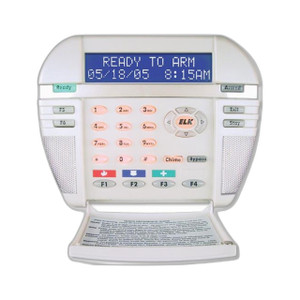
ELK Products ELK-M1KP LCD Keypad for M1 Control Systems
Overview
The ELK-M1KP is a dedicated LCD keypad designed to provide local operator access and real-time system status monitoring on ELK M1 control systems. It connects directly to the M1 data bus, eliminating the need for separate wiring runs or serial connections—reducing installation labor and simplifying commissioning on multi-keypad deployments. This is a core component for any M1 installation where operators need tactile, visual feedback without relying solely on remote apps or touchscreen interfaces.
Key Features
- M1 Data Bus Integration: The ELK-M1KP (often searched as ELK M1KP) connects via the M1 proprietary data bus protocol, allowing a single twisted-pair connection to carry both power and communication. This cuts wiring labor compared to keypads requiring separate RS-232 or network drops, and simplifies integration on retrofits or new builds where cable runs are constrained.
- LCD Display with Tactile Controls: A built-in LCD screen displays real-time zone status, arming state, and system alerts. Physical buttons provide reliable, fail-safe arming and disarming even if network connectivity drops—critical in security deployments where you cannot depend on IP connectivity alone.
- Local Arming and Disarming: Operators can arm/disarm the system directly from the keypad using PIN codes or proximity readers (if configured), without routing commands through an app server or cloud gateway. This reduces latency and eliminates a potential point of failure for armed-state confirmation.
- System Status Visibility: The display shows open/closed zones, alarm conditions, and system state at a glance. This is invaluable in warehouses, manufacturing facilities, or multi-tenant buildings where staff need to verify security status before opening doors or modifying access permissions.
- Scalable Keypad Deployment: Multiple ELK-M1KP units can be installed on a single M1 panel via the data bus, allowing decentralized control across large buildings or campuses without installing a separate control system at each location.
- Compatible with M1 Automation Modules: The keypad integrates with ELK M1 automation and access control add-ons, enabling unified security and facility automation from a single control platform—reducing training overhead and simplifying troubleshooting for integrators managing mixed-vendor environments.
Integration and Compatibility
The ELK-M1KP integrates exclusively with ELK Products M1 control panels via the M1 data bus. It is compatible with all versions of the M1 firmware that support keypad devices, making it a safe retrofit on existing installations. Installers configuring new M1 deployments should verify keypad port availability on the control panel; most M1 models support 2–4 keypads per system. For deployments requiring mobile or web-based arming in addition to local keypads, configure the keypad alongside an Ethernet or cellular gateway module to enable dual-path control.
Frequently Asked Questions
Q: Does the ELK-M1KP require a separate power supply?
A: No. Power is delivered over the M1 data bus connection, so you need only run a single twisted-pair cable from the M1 panel to the keypad location. This simplifies installation and reduces wiring cost.
Q: Can I install multiple ELK-M1KP keypads on a single M1 control panel?
A: Yes. The M1 panel supports multiple keypads on the same data bus. Consult the M1 documentation to confirm the maximum number of keypads your specific panel revision supports—typically 2–4.
Q: What happens if the M1 control panel loses power?
A: The ELK-M1KP will also lose power, since it draws power from the M1 data bus. Ensure your M1 panel has battery backup if you require keypad functionality during a mains outage.
Q: Can the ELK-M1KP work with third-party VMS or access control software?
A: The ELK-M1KP is a hardware component of the M1 ecosystem and operates through the M1 data bus. It does not have a standalone ONVIF or REST API. Integration with third-party platforms depends on whether that platform supports M1 protocol bridging—contact the software vendor or an ELK integration specialist to confirm compatibility.
Q: Is the ELK-M1KP suitable for outdoor installation?
A: No. The ELK-M1KP is designed for indoor use in climate-controlled environments. For outdoor keypad access, consult the ELK product portfolio for weather-rated alternatives or consider pairing an indoor keypad with an outdoor access control reader.
Q: What is the maximum cable run distance from the M1 panel to an ELK-M1KP keypad?
A: Refer to the M1 system documentation for maximum data bus cable distances. Twisted-pair distances vary by M1 firmware and configuration, but typical runs are under 500 feet. Use the guidance in your M1 spec sheet to avoid signal degradation on longer runs.
Ted PerryPerspective based on aggregated IP Security Depot and affiliated engineering team experience.
The ELK-M1KP is the standard local control point for M1 systems where you need operator-facing feedback and hardwired failsafe arming. Unlike apps or browser-based interfaces, this keypad draws power from the M1 data bus and provides immediate visual and tactile confirmation of system state—no network gateway, no cloud latency, no credential management overhead. It's a straightforward device, but its simplicity is its strength: it works when networks don't.
Technical Highlights:
- M1 Data Bus Power & Communication: Single twisted-pair connection eliminates the need for separate power and serial runs. On a retrofit, this can save hours of cable labor in multi-story buildings or facilities with long cable distances.
- LCD Status Display: Real-time zone monitoring and system state visibility ensure operators never guess whether the system is armed or if a zone is bypassed. Critical for facilities where access decisions depend on confirmed system status.
- Multi-Keypad Scalability: Support for 2–4 keypads per M1 panel means you can decentralize control across warehouse floors, manufacturing areas, or multi-tenant spaces without installing separate control cabinets.
Deployment Considerations:
- No Outdoor Rating: The ELK-M1KP is indoor-only. If you need keypad access at exterior doors or gates, pair this unit with a weather-rated proximity or PIN reader on the access control module.
- Battery Backup Dependency: Keypad functionality is lost if the M1 panel loses power. Verify that your M1 installation includes a UPS or battery module if 24/7 keypad access is a requirement.
- Data Bus Distance Limits: Cable runs from the M1 panel to remote keypads are constrained by twisted-pair attenuation. Check your M1 firmware spec for maximum distances; 500 feet is typical, but verify before ordering long cable runs.
Deploy the ELK-M1KP in warehouse facilities, small-to-medium office buildings, and manufacturing sites where staff need fast, reliable arming/disarming at a single control point, and where a cloud-connected keypad or mobile app is a secondary feature or compliance risk. It pairs well with access control readers and automation modules, making it the right choice for integrated ELK M1 environments where unified control from one panel is a priority.