Comnet CWFE1005POESHO-M Commercial-Grade Fiber Media Converter with PoE Output
Overview
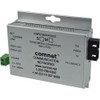
The CWFE1005POESHO-M is a 100Mbps media converter that bridges copper Ethernet to single-mode fiber, with integrated 60W PoE power injection on the copper side. Deploy this when you need to extend surveillance camera runs across distance using fiber — the converter accepts power from a standard 48 VDC supply, then regenerates PoE (IEEE 802.3at) on the Ethernet port to power remote cameras or network devices. ST connectors provide secure mechanical coupling and are standard in commercial AV installations.
Compatibility
Works with any PoE-enabled IP camera, NVR, switch, or access control device expecting IEEE 802.3at power delivery (13–30W per device). Supports both Mode A (pins 1,2,3,6) and Mode B (pins 4,5,7,8) wiring standards — confirm your camera's pinout before installation. Single-mode fiber backbone accepts standard 1310nm transceivers and pairs with fiber patch panels, distribution racks, and backbone routing in commercial security deployments. No specific brand lock-in; operates as a transparent Ethernet-to-fiber bridge.
Installation Notes
Connect 48 VDC power supply to the converter (1.25A rated input). The unit accepts 10 or 100 Mbps Ethernet on the copper side via RJ-45; negotiate speed manually if the link won't auto-sense. ST fiber connectors require careful mating — avoid excessive insertion force (apply firm pressure until you hear a click, then stop). Keep fiber runs away from high-voltage AC lines and fluorescent ballasts to minimize noise on the optical signal. Operating temperature range supports typical indoor-to-outdoor equipment closet environments; consult equipment specifications for extreme cold or heat. Bi-color LED indicators (red/green) signal link status and power — green indicates active link and power delivery. DIN-rail, shelf, or stand-alone mounting options suit rack integration or wall-mount scenarios.