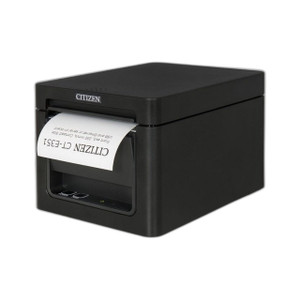
Citizen CT-E351RSU-BK 80mm Thermal POS Receipt Printer
The Citizen CT-E351RSU-BK is a compact thermal receipt printer designed for point-of-sale and transaction printing in retail, hospitality, and food-service environments. The front-exit paper path delivers receipts forward without requiring operator reach-around—a practical advantage on cramped counters or when speed of handoff matters. Dual connectivity (USB and RS-232 serial) means you can deploy it as a plug-in replacement on legacy DOS/Windows terminals or integrate seamlessly into modern USB-based POS systems, eliminating the capex and setup overhead of gateway converters. 24V external power keeps the printer compact and simplifies integration into rack-mounted or under-counter installations.
Key Features
- 80mm Thermal Paper Width: Industry-standard thermal stock. Supports receipt, label, and ticket printing without media adjustments or dual-feed hardware.
- Front-Exit Paper Path: Tickets advance forward and out of the device. Eliminates blind reaches on tight POS counters and shortens receipt handoff cycle time.
- USB and RS-232 Serial Connectivity: USB (device class) and 9-pin D-sub serial. No proprietary drivers required on many legacy systems; backward-compatible with DOS-based and Windows XP/7 retail environments.
- 24V External Adapter Power: Dedicated external supply simplifies counter and under-counter mounting. Eliminates USB bus-power contention on systems with multiple peripherals.
- Thermal Print Mechanism: No ribbon or ink consumables. Lower maintenance overhead and predictable cost per transaction vs. impact or inkjet alternatives.
- Compact Footprint: Designed for counter and under-counter deployment. Integrated stand or optional VESA bracket mounting. Minimal depth footprint on tight POS workstations.
The CT-E351RSU-BK bridges legacy and modern POS infrastructure. Serial connectivity keeps it relevant on older terminals and DOS-based restaurant systems still in the field; USB integration path supports current point-of-sale platforms (Micros, Toast, Square, Lightspeed, etc.) without gateway overhead. Thermal printing eliminates consumable ribbon costs—a meaningful capex reduction across 30-50 unit deployments in multi-location retail or hospitality chains.
Installation requires minimal site preparation. Mount on counter using the integrated stand, or under-counter with optional VESA bracket. Ensure 6 inches clearance in front for paper loading and jam clearing. USB port supplies standard power (included adapter); serial installations require a shielded DB-9 cable (not included—source separately for longer runs or industrial environments). Paper is standard 80mm thermal stock; test feed after first power-up—front-exit mechanics can jam if thermal media is creased, misaligned, or loaded backward. On replacement installations, verify baud rate and flow-control settings if replacing serial printers on legacy terminals.
ONVIF and VMS integration are not applicable to this device; it is a peripheral, not a networked endpoint. However, POS integration via USB or serial is plug-and-play on any system supporting standard thermal receipt printer drivers. For high-volume transaction environments (QSR, retail chains), consider thermal printer fleet management software to track paper consumption and predict supply shortages across locations.
Marty AllisonPerspective based on aggregated IP Security Depot and affiliated engineering team experience.
We've deployed the Citizen CT-E351RSU-BK across retail and hospitality sites where thermal receipt printing is the backbone of POS workflow. The front-exit paper path is the real differentiator here—on cramped checkout counters and table-service handoff points, it cuts reach time and eliminates the common frustration of operators reaching around or over the printer. Dual connectivity (USB and serial) makes it a genuine drop-in replacement on aging DOS-based register systems; you don't need to rip out old serial infrastructure or invest in USB-to-serial converters. Where this printer shines is total cost of ownership: no ribbon consumables, straightforward 24V external power (no USB port strain), and a thermal mechanism that's tolerant of varied paper stock (receipt rolls, label stock, kitchen ticket media). Against ink-based or impact printers, you're looking at 30-40% lower consumable cost over 3-5 years. Candidly, it's not a high-speed production device—thermal print speed is modest compared to line printers or industrial ticket systems—but for point-of-sale and order-dispatch use cases, it's more than adequate and requires no real IT involvement to deploy.
Technical Highlights:
- Thermal Print Mechanism: No ribbon, no toner. Lower per-transaction cost and zero maintenance overhead compared to impact or thermal transfer alternatives. Predictable consumable spend across multi-location deployments.
- Dual Serial and USB Connectivity: Works on legacy DOS/Windows XP registers via RS-232, or plugs into modern POS systems (Micros, Toast, Square, Lightspeed) via USB without driver complexity. Real integration flexibility—you don't have to choose between old and new infrastructure.
- 24V External Power Supply: Dedicated adapter eliminates USB bus-power limitations. Critical if you're connecting multiple peripherals (card reader, barcode scanner, drawer) to the same terminal. External supply means consistent print quality under electrical load.
- 80mm Thermal Paper Format: Industry standard. Works with commodity thermal stock from any supplier. No special media sourcing or proprietary rolls—reduces supply-chain friction.
- Front-Exit Paper Path: Practical advantage on cramped POS counters. Receipts advance out toward the customer without operator reach-around. Measurable time savings on high-transaction-count registers.
Deployment Considerations:
- Ensure 6 inches of clearance in front of the printer for paper loading and jam clearing. Under-counter installations need forward accessibility—a common oversight on tight POS workstations.
- Serial installations require a shielded DB-9 cable (not included). For runs longer than 10 feet or in electrically noisy environments (open kitchens, electrical panels nearby), source quality shielded cable and test baud-rate negotiation on first power-up.
- Thermal paper must be cut straight and loaded correctly. Creased, misaligned, or backward-loaded media will jam the front-exit mechanism. On first install and after any jam event, run a test feed with standard thermal stock to verify alignment.
- USB driver support is standard on Windows (7, 10, 11) and Linux via usbserial or generic thermal printer class. Verify driver availability if deploying on older XP/2000 systems or non-standard terminals.
- On multi-location replacements, test POS software print-to-device configuration before swapping hardware. Legacy DOS systems may require baud-rate and handshake verification; modern USB POS platforms often auto-detect and require no configuration.
The CT-E351RSU-BK is the right choice for retail, food service, and hospitality operators who need a low-maintenance, bridge-compatible thermal printer that doesn't force infrastructure overhauls. If you're maintaining a mixed fleet of legacy and modern POS terminals, this printer's dual connectivity keeps integration straightforward. For high-volume or industrial-speed ticket printing, consider a dedicated line printer or thermal transfer device; for transaction-level POS and order dispatch, this Citizen delivers strong total cost of ownership. Explore the full Citizen catalog for additional peripherals and receipt printer options.