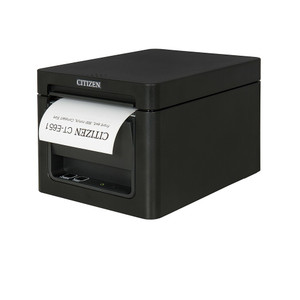
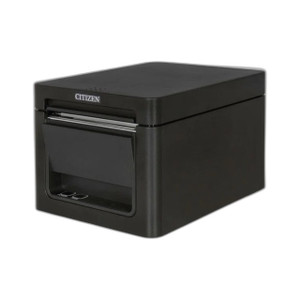
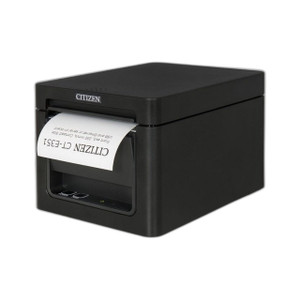
Citizen CT-E651NNUBK Thermal POS Front Exit USB Printer
The Citizen CT-E651NNUBK is a front-exit thermal receipt printer engineered for retail checkouts, quick-service restaurants, and hospitality POS environments where counter space is constrained and receipt visibility is critical. Front-exit paper orientation means printed receipts feed directly toward the operator—eliminating reach-around frustration on crowded checkout stations and improving customer handoff workflow. USB connectivity plugs directly into POS terminals, cash registers, and checkout kiosks without requiring network infrastructure, special drivers beyond standard thermal printer support, or dedicated power outlets.
Key Features
- Front-Exit Paper Feed: Receipts exit toward the operator for immediate visibility and hand-off. Eliminates rear-mounted printer awkwardness on tight countertops.
- USB Direct Connection: Connects to any USB port on POS terminal or powered hub. No network setup, no ethernet cable runs required.
- USB-Powered Operation: Draws power directly from USB port; no separate power adapter or wall outlet needed, reducing counter clutter and cable count.
- Thermal Receipt Printing: Fast, quiet operation with no moving ribbon or toner cartridges. Lower consumable costs and maintenance overhead versus inkjet or dot-matrix alternatives.
- ESC/POS Emulation Support: Compatible with Windows-based POS systems, MICROS, Square, TouchBistro, Lightspeed, and generic thermal printer drivers. Wide software ecosystem minimizes integration friction.
- Compact Footprint: Black, tabletop-friendly design fits standard retail and hospitality counter layouts without dominating workspace.
Front-exit thermal printers are the standard in high-volume retail and quick-service hospitality because receipt production is continuous and speed matters. The CT-E651NNUBK's operator-facing orientation eliminates the operational step of reaching around or over the printer to hand receipts to customers—seemingly minor, but on a busy shift with hundreds of transactions, that friction compounds into wasted seconds and ergonomic strain. USB connectivity means no separate network segment, no printer IP conflicts, and no driver management across a networked print queue; the terminal sees the CT-E651 the same way it sees a keyboard or mouse.
Thermal printing technology—heat-sensitive paper activated by a heating element—produces sharp, durable receipts with no ribbon or toner to replace. Paper cost is the only consumable expense, and Citizen thermal printers are engineered for high-duty-cycle environments: expect 40–80 km of paper output per printer before any maintenance is required. Quiet operation (far quieter than dot-matrix impact printers) is a secondary but real advantage in customer-facing retail and hospitality venues where ambient noise affects experience. USB power draw from modern POS terminals is sufficient; no separate 12V or 24V power supply clogs the counter.
Integration testing should confirm that your POS software and terminal support USB thermal printers natively. Nearly all modern retail and hospitality platforms (Square, Toast, Lightspeed, Micros Oracle, TouchBistro) ship with Citizen thermal printer profiles or generic ESC/POS drivers. If you're running legacy or custom POS software, request your vendor's supported thermal printer list and confirm Citizen or ESC/POS compatibility before deployment. Paper width and print density are configurable in most POS drivers, so verify your receipts render at your required density and font size on a test roll before go-live.
The CT-E651NNUBK is purpose-built for environments where reliability, space efficiency, and operational simplicity outweigh print volume. Retail chains with hundreds of store locations, QSR franchises with standardized checkout hardware, and hospitality groups standardizing on Citizen thermal printers across properties benefit from procurement leverage, spare-parts standardization, and familiarity among front-line staff. If your POS terminal has USB ports and your software supports thermal printers, the CT-E651 is a low-friction addition to your checkout workflow.
Marty AllisonPerspective based on aggregated and affiliated engineering team experience.
We've deployed Citizen thermal printers across hundreds of retail and hospitality sites, and the CT-E651NNUBK remains a field workhorse for a simple reason: front-exit paper orientation, USB connectivity, and zero external power requirements collapse installation complexity to almost nothing. In retail environments especially—grocery chains, apparel, quick-service restaurants—the difference between a rear-exit and front-exit printer is felt every shift. Rear-exit models force operators to reach or rotate around the printer to hand receipts to customers. On a 30-transaction-per-hour checkout, that's 30 micro-movements of wasted ergonomics. Front-exit eliminates that entirely. The USB connection is equally pragmatic: no network printer configuration, no IP address conflicts, no print queue timeouts. The terminal boots, Windows detects the printer on USB enumeration, and POS software sends ESC/POS commands directly. We've seen Citizen printers remain in operation for 5+ years with nothing more than paper replenishment and occasional cleaning of the heating element. No ribbon jams, no toner cartridge swaps, no firmware updates. That simplicity is worth premium.
The main trade-off versus network (ethernet) thermal printers is portability and multi-terminal sharing. If your checkout has a single terminal and a single printer, USB is the right answer. If you need one printer to serve multiple terminals or multiple checkout stations, you'll need either a print server or multiple printers—the CT-E651 can't be network-shared from a USB connection without external infrastructure. We've also seen occasional driver friction on very old POS systems (pre-2010 custom software) that don't recognize Citizen printer profiles; those sites need either a generic ESC/POS driver or a manual driver installation, which adds one-time integration overhead. Modern POS platforms (Square, Toast, Lightspeed, MICROS Oracle) ship with Citizen support built-in, so that risk is low for new deployments.
Technical Highlights:
- USB Power Delivery: Draws power directly from USB port (typically <3A at 5V). No separate power adapter, wall outlet, or UPS integration required. Reduces counter clutter and installation complexity.
- Thermal Heating Technology: Heat-sensitive paper and resistive heating element produce sharp, smudge-resistant receipts. No ribbon or toner to replace — consumables are paper only, dramatically lowering lifetime maintenance cost.
- ESC/POS Command Set: Industry-standard thermal printer command language — understood by nearly all retail and hospitality POS platforms natively. Minimizes custom driver development and integration risk.
- Quiet Operation: Thermal printing is silent compared to impact dot-matrix — customer-facing environments benefit from lower ambient noise and improved customer experience.
- Compact Footprint with Front-Exit Design: Operator-facing paper orientation eliminates reach-around movements on tight checkout counters. Real ergonomic and workflow efficiency gain, especially in high-volume environments.
Deployment Considerations:
- USB Port Availability: Confirm your POS terminal has available USB ports or a powered hub rated for printer power draw. Some legacy cash registers have limited USB capacity; test with a powered hub rated >2A at 5V if running multiple peripherals.
- POS Driver Verification: Request your POS vendor's supported printer list before procurement. Most modern platforms (Square, Toast, Lightspeed, MICROS Oracle) include Citizen drivers; legacy systems may require manual driver installation or ESC/POS emulation configuration.
- Paper Width and Density: Confirm your POS software configures receipt print width (typically 80mm for standard thermal paper) and density before go-live. Test a receipt on the paper you intend to use — font size, barcode clarity, and logo rendering vary by density setting.
- Single-Terminal Limitation: USB printers cannot be network-shared without a print server. If you need one printer to serve multiple checkout lanes, either purchase multiple CT-E651 units or switch to a network-connected (ethernet) thermal printer model.
- Thermal Paper Supply Chain: Verify your thermal paper supplier stocks 80mm or your required width. Citizen and third-party thermal rolls are commodity items; maintain 2–4 weeks of on-site inventory to avoid stockouts during peak seasons.
The CT-E651NNUBK is the right choice for single-terminal retail checkouts, QSR ordering stations, and hospitality point-of-sale where USB connectivity and front-exit paper orientation simplify installation and improve day-to-day workflow. Retailers standardizing on Citizen across multiple locations benefit from procurement simplicity and field familiarity. See the Citizen catalog for thermal printer options and complementary POS peripherals.