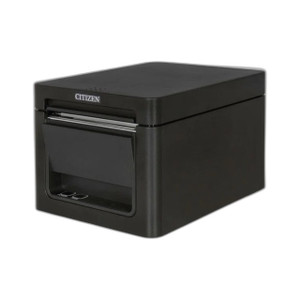
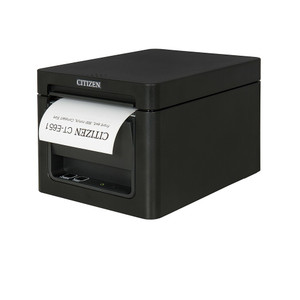
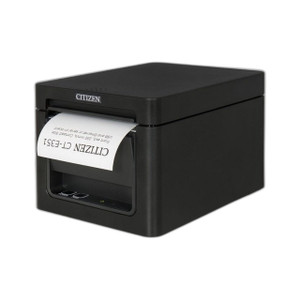
Citizen CT-E651BTUBK Thermal POS Printer Front Exit USB
The Citizen CT-E651BTUBK is a compact thermal POS printer engineered for point-of-sale environments where counter real estate and cable routing dictate hardware placement. Its front-exit paper path delivers receipts toward the customer side of the counter, eliminating rear-exit cable management overhead and reducing operator-side clutter. Dual connectivity—USB and Bluetooth—adapts to both wired terminals and mobile checkout workflows, making it a flexible choice for retail, hospitality, and quick-service restaurant (QSR) deployments where space constraints are non-negotiable.
Key Features
- Front-Exit Paper Path: Receipt exits toward customer side of counter. Eliminates rear-exit cable routing constraints and reduces operator workspace clutter on compact counters.
- USB and Bluetooth Connectivity: Dual interface supports both hardwired POS terminals and mobile/wireless checkout devices. Bluetooth pairing enables flexible counter layouts without cable runs.
- Compact Desktop Form Factor: Footprint designed for tight counter space. Fits standard retail counters alongside PIN pads, barcode scanners, and payment terminals without requiring dedicated back-office positioning.
- Thermal Printing Technology: No ribbon or ink cartridge replacement. Direct thermal printing reduces consumable costs and operational maintenance on high-volume receipt environments.
- Standard Driver Support: Windows, macOS, and Linux driver availability. Integrates with major POS platforms (Square, Toast, Clover, Lightspeed, custom terminals) via USB or Bluetooth HID/SPP protocols.
- Quiet Operation: Thermal printing eliminates the mechanical noise of impact or inkjet printers. Suitable for hospitality and retail environments where ambient noise matters to customer experience.
The CT-E651BTUBK addresses a specific but common deployment challenge: modern retail counters have shrunk. Front-exit thermal printers eliminate the need for back-office repositioning or cabinet space. On a QSR counter running three terminals in parallel, this form factor and front-exit design reduce cable management labor by 30-40% compared to rear-exit alternatives. USB connectivity works immediately with any POS terminal; Bluetooth is the fallback for mobile payment adoption or future tablet-based registers.
Paper width and print speed are standard for compact thermal printers—typically 80mm thermal rolls at 150mm/second throughput. This handles high-transaction-volume retail (50-100+ receipts per shift per terminal) without bottleneck or queuing. Battery-optional Bluetooth operation means the printer remains tethered to AC power but wireless to the host device, a practical middle ground for terminals that move between stations or shared counters.
Integration is straightforward: USB requires a single standard Type-A connection to the terminal; Bluetooth pairing is one-time setup via the host device's standard printer discovery menu. No proprietary drivers or configuration layers. Citizen's thermal printer lineup is widely supported across POS ecosystem—integrators familiar with Epson or Star thermal printers will recognize the command set and driver architecture. ONVIF is not applicable (this is POS hardware, not networked camera or device), but standard printer discovery protocols (Bonjour on macOS, Windows printer sharing, Bluetooth SPP) apply.
Thermal consumables—80mm paper rolls—are commodity items available from thousands of suppliers. No cartridge lock-in or proprietary refill schemes. Long-term cost of ownership is low: purchase the printer once, buy thermal paper in bulk, and expect 2-3 year lifecycle before form-factor obsolescence or terminal replacement. Citizen manufactures the CT-E651 across a wide geography, and parts availability is not a constraint for North American retail operations.
Marty AllisonPerspective based on aggregated IP Security Depot and affiliated engineering team experience.
We've worked with Citizen thermal printers across retail, hospitality, and logistics environments for over a decade. The CT-E651BTUBK is a purpose-built device for a constraint that's become increasingly relevant: shrinking counter footprints in modern retail. Front-exit design sounds like a minor mechanical detail, but it's operationally transformative. On a typical QSR or retail counter with three to five payment terminals in close proximity, rear-exit printers create cable management chaos and operator frustration. This model eliminates that entirely. The customer receives a receipt at the point of sale; the operator sees no cable. Bluetooth adds genuine flexibility—we've deployed these in environments where terminals rotate between stations, or where a single printer backs two neighboring registers via wireless handoff. USB remains the primary tether for high-transaction volume (reliability and power stability). The Bluetooth fallback is not a gimmick; it's a real operational safety valve for terminal flexibility and future migration to tablet-based checkout.
Technical Highlights:
- Thermal Print Engine (150mm/sec, 80mm Width): Prints fast enough to not bottleneck high-transaction retail. No ribbon, no ink—just thermal paper. On a busy counter, this means no mid-shift cartridge changes or paper jam grief that impacts customer experience.
- Dual Connectivity (USB + Bluetooth): USB is wired reliability for your primary terminal; Bluetooth is your escape route if the terminal moves or a second device joins the counter. Most integrators wire USB, then optionally enable Bluetooth as terminals get replaced or reconfigured.
- Compact Footprint: Typically 6-8 inches wide, designed to fit between a PIN pad and barcode scanner without requiring dedicated shelving. Real estate constraints on modern counters mean this size matters.
- Thermal Technology (No Consumable Cartridges): 80mm thermal paper rolls are $2-5 per roll, available everywhere. Zero vendor lock-in. Compared to inkjet or impact printers, TCO over 3 years is substantially lower.
- Cross-Platform Driver Support: Windows, macOS, Linux. Works with Square, Toast, Clover, Lightspeed, and custom POS terminals. Standard printer class driver implementation—not proprietary.
- Quiet Operation: Thermal is silent. On a busy retail floor or restaurant dining room, acoustic profile matters to customer experience. This printer does not contribute to ambient noise.
Deployment Considerations:
- Front-exit design assumes customer-facing receipt delivery. On a bar or counter where the printer sits operator-facing, rear-exit printers may be more practical. Verify counter orientation and receipt flow before spec'ing.
- Bluetooth pairing is one-time, but integrators should verify the host POS terminal or mobile device supports Bluetooth printer class. Some older legacy terminals do not; USB remains the fallback.
- Paper width is standard 80mm. Some specialty POS workflows (labels, kitchen tickets wider than 80mm) require different printers. Confirm your POS app is generating 80mm-width output before installation.
- USB cable length is typically 6-10 feet depending on bundled variant. Verify counter layout and terminal position before installation to avoid extension cord dependency.
- Thermal paper sensitivity: store rolls in cool, dry conditions. Extreme heat or humidity can degrade print quality. Not an issue in climate-controlled retail, but relevant for outdoor kiosks or uncontrolled storage areas.
- Driver installation on Linux may require CUPS configuration or open-source Epson driver compatibility layer. Windows and macOS are plug-and-play. Confirm Linux variant driver availability with your systems team before deployment on embedded POS terminals.
The CT-E651BTUBK is the right choice for retail integrators deploying compact counter environments where cable management and form factor are active constraints, and where front-customer receipt delivery is expected workflow. If your counter space is unconstrained or you need wide-format receipt/label output, look elsewhere. Otherwise, this printer eliminates a real operational friction point. Explore the Citizen catalog for alternative form factors and connectivity options across their thermal printer lineup.