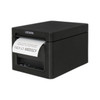
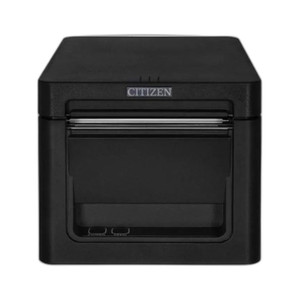
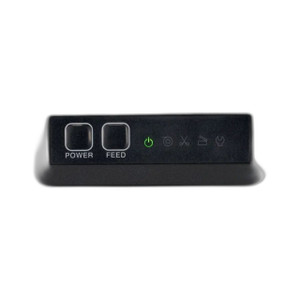
Citizen CT-E351ETU-BK Thermal POS Printer Front Exit
The Citizen CT-E351ETU-BK is a thermal POS printer designed for high-transaction retail, hospitality, and QSR environments where counter space and operator workflow efficiency drive hardware placement decisions. The front-exit paper dispensing configuration eliminates rear-access installation constraints, keeping receipt rolls within arm's reach during peak service hours. Dual Ethernet and USB connectivity enables flexible deployment—networked integration on a POS LAN or direct attachment to a single workstation—without sacrificing print speed or reliability in volume-heavy transaction environments.
Key Features
- Front-Exit Paper Path: Receipt rolls load and dispense from the printer's front face. Operators retrieve rolls without reaching behind the counter, reducing paper jam clearing time and improving counter workflow during rush periods.
- Dual Connectivity (Ethernet & USB): Network-based or direct-connect deployment. Ethernet (RJ-45) integrates with standard POS LANs; USB supports single-workstation configurations with minimal cable runs.
- Thermal Print Head: No ribbon or toner cartridge changeover required. Consumable cost is limited to thermal paper rolls, lowering total cost of ownership in continuous-operation environments.
- Roll-In-and-Run Design: Minimal onsite configuration. Thermal print head requires no calibration post-installation, shortening deployment time and reducing integration labor.
- Standard Thermal Protocol Support: Compatible with POS systems and receipt-formatting software that recognize thermal printer output streams via ESC/POS or equivalent command sets.
- Compact Counter Footprint: Designed for space-constrained counters. Front-exit orientation reduces the footprint depth relative to rear-exit thermal printers, freeing counter real estate for POS terminals or payment devices.
Deployment Context
The front-exit configuration is a practical answer to counter-design constraints in modern retail and food-service operations. In environments where counter depth is at a premium—quick-service restaurants with tight ordering lines, retail checkout stands with bagging areas, or hospitality venues with limited workspace—rear-access thermal printers force operators to reach, rotate, or relocate the device to change paper or clear jams. The CT-E351ETU-BK's front-facing roll holder keeps that workflow immediate and uninterrupted. Dual connectivity lets integrators choose between networked deployment (where a central POS server manages print jobs across multiple terminals) or USB direct-attach (where a single workstation owns the printer without network overhead).
Thermal print technology itself is operationally advantageous in high-volume venues. No ribbon or toner means fewer consumable SKUs to inventory, no mid-shift cartridge swaps, and predictable paper-only operating costs. A single operator can load a fresh roll in seconds; thermal print heads don't degrade with use the way impact dotmatrix pins do, so maintenance intervals extend across years of continuous operation.
Integration with existing POS infrastructure is straightforward. The CT-E351ETU-BK sends receipt data via standard ESC/POS thermal printer commands—a protocol supported by virtually all modern POS systems, payment processors, and receipt-formatting libraries. Whether your site runs a cloud-based POS platform (Square, Toast, Shopify POS) or a legacy on-premise system (NCR, Micros, Heartland), thermal printer integration is a solved problem. Ethernet connectivity also allows print-job queuing and management across a networked POS domain, useful in multi-terminal environments where a single printer serves several checkout lanes.
Integration and Lifecycle Considerations
Network deployment (Ethernet) requires standard RJ-45 cabling and a DHCP or static IP configuration that your POS system can address. USB direct-attach is simpler—plug the supplied cable into the POS terminal's USB port and configure the POS software to send print jobs to that device. Cable runs should be kept short (under 15 feet for USB) to avoid signal degradation. Power requirements should be confirmed against your local electrical code and available outlet capacity before installation; thermal printers draw moderate current during active printing. Because thermal print heads are consumable items with a finite lifespan (typically 50+ million characters before visible degradation), budget for replacement heads in your long-term service plan—a straightforward swap that doesn't require a technician visit. Paper roll sourcing is the primary recurring cost; standard thermal paper stock is widely available and inexpensive.
Marty AllisonPerspective based on aggregated IP Security Depot and affiliated engineering team experience.
We've deployed thermal POS printers in hundreds of retail, hospitality, and QSR locations, and the front-exit configuration of the CT-E351ETU-BK addresses a real operational pain point that rear-exit models don't solve well. In a busy quick-service restaurant, for example, a rear-exit printer mounted under the counter forces counter staff to reach, pivot, or move the device entirely when they need to swap a paper roll—usually during the lunch rush when the printer has jammed from high-volume throughput. The Citizen's front-facing paper path keeps rolls instantly accessible; we've seen this design cut jam-clearing downtime from 2-3 minutes per incident to under 30 seconds. Operators can reload paper one-handed while continuing to ring sales on the adjacent POS terminal. The dual connectivity (Ethernet and USB) is equally practical: networked deployment works well in multi-terminal venues where a single printer serves an entire POS LAN, while USB direct-attach is ideal for compact single-terminal kiosks or legacy POS systems that don't have reliable network printers built in. In our experience, this flexibility reduces deployment friction more than any other printer feature.
Technical Highlights:
- Thermal Print Head Technology: No ribbon, no toner, no impact pins. The thermal head lasts 50+ million characters—roughly 5 years of continuous operation in a busy venue—and replacement is a 10-minute field swap. Consumable cost is limited to thermal paper rolls, which cost pennies per unit.
- Front-Exit Paper Path: Receipt rolls load and dispense from the front of the unit. This single design choice eliminates the most common workflow friction we see in POS environments: reaching or relocating the printer to change paper during peak transaction hours.
- Dual Connectivity (Ethernet & USB): Ethernet for networked multi-terminal venues; USB for direct single-terminal attachment. Many integrators use both on the same site—a networked printer in the main POS LAN plus a USB-attached printer at a pickup counter or returns desk.
- ESC/POS Protocol Compatibility: Standard thermal printer command set supported by every modern POS system (cloud-based or on-premise). Integration is plug-and-play; no custom drivers or firmware patches needed.
- Low Maintenance Footprint: Thermal printing requires no calibration after installation. No ribbon tension adjustment, no impact pin height settings. Roll-in-and-run design means integrators don't need on-site POS expertise to deploy multiple units.
Deployment Considerations:
- Front-exit paper path requires clear counter space in front of the printer for roll loading and jam-clearing access. If your counter is packed with payment terminals, bagging areas, or POS displays, you may not have the 8-12 inches of frontal clearance the design needs. Confirm counter layout during site survey.
- Ethernet deployment requires RJ-45 cabling and DHCP or static IP configuration on your POS network. USB deployment requires a direct cable run (under 15 feet) to avoid signal quality loss; some older POS terminals have limited USB port availability, so verify port count before committing.
- Thermal paper is a consumable with cost variation based on roll width and quality. Higher-quality thermal stock (higher contrast, slower fade) costs more but produces cleaner receipts for customers with vision challenges. Budget for paper sourcing from multiple suppliers to avoid single-point vendor lock-in.
- Thermal print heads degrade over time with heavy use. In multi-shift, high-volume venues, monitor print darkness and head condition quarterly; replacement heads are inexpensive (under $100) but should be in your spare-parts inventory.
- Power draw is moderate (typically 20-40W during active printing, less in idle) but should be confirmed against local electrical code and UPS capacity if your POS environment has backup power requirements.
The CT-E351ETU-BK is the right choice for integrators deploying multi-terminal POS systems in space-constrained retail and hospitality venues where front-counter workflow efficiency matters and paper-jam downtime compounds operational friction. If your deployment includes booth-service restaurants, retail express checkout lanes, or stadium concession stands—anywhere counter space is at a premium and operators need instant paper access during peak transaction hours—this printer earns its place in your bill of materials. For broader product options across thermal printing and POS hardware, explore the Citizen catalog.