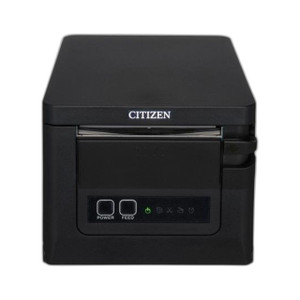
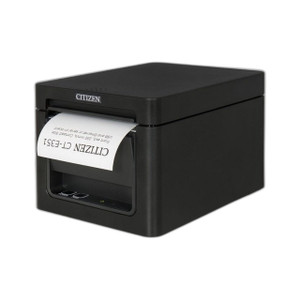
Citizen CT-S751RSUBK Thermal POS Receipt Printer
The Citizen CT-S751RSUBK is a compact 203 DPI thermal receipt printer engineered for high-volume retail, hospitality, and quick-service restaurant (QSR) deployments. Front-load paper design and dual USB/Serial connectivity eliminate complex integration hurdles on legacy and modern POS systems alike. Print speed and reliability make it a workhorse for operations where receipt throughput and uptime directly impact customer experience and transaction processing capacity.
Key Features
- 203 DPI Print Resolution: Sharp barcode and text reproduction. Essential for GS1-128 compliance and readable coupons without image degradation across 50,000+ receipts per month.
- Front-Load Paper Mechanism: Eliminates downtime during paper changes. Operators can reload media in under 30 seconds without dismantling the device or halting the queue.
- Dual Connectivity (USB & Serial): Works with legacy serial-based POS terminals and modern USB integration. No adapter-chain fragility; hardware compatibility is immediate.
- Compact Footprint: Counter-mounted or belt-driven deployment in space-constrained environments (quick-checkout lanes, kiosks, food trucks). Roughly 8" width matches standard register bezels.
- Thermal Print Technology: Zero ribbon or toner costs. Operating expense per receipt is minimal; maintenance is paper-only. No consumables inventory beyond media rolls.
- Print Speed: Up to 300mm/second max throughput. Real-world sustained speed on mixed-content receipts (logo, item list, payment auth, barcode) sits around 200mm/s, handling 2–4 second receipt time on typical sale transactions.
- Robust Media Support: Handles 58–80mm roll width. Accommodates thicker receipt stock and label applications without paper-feed jams or sensor recalibration.
- Standard Thermal Emulation: ESC/POS command set. Reduces development overhead if swapping out a competing printer; most POS software has native drivers.
The CT-S751RSUBK is designed for environments where receipt printing is mission-critical and downtime directly translates to checkout delays and lost sales. Retail chains, hospitality groups, and regional QSR operators commonly deploy this model in high-velocity locations where 2,000–5,000 transactions per day are routine. The front-load mechanism and thermal design eliminate the operational friction of ribbon changes and complex maintenance cycles.
Integration is straightforward on both legacy and contemporary POS ecosystems. USB connectivity pairs directly with Windows-based register terminals and modern Android/Linux POS tablets. Serial support keeps the printer operational on older dumb-terminal setups and DOS-era systems that still run in some independent retail shops and institutional cafeterias. Standard ESC/POS command support means the printer responds to print requests from major POS software packages (Square, Toast, Lightspeed, NCR, Micros) without custom driver development.
Operating cost is governed entirely by paper consumption and electrical draw. Thermal printing eliminates ribbon inventory and toner cartridges — a significant reduction in per-receipt consumable cost versus inkjet or impact printers on comparable transaction volumes. Mean time between failures (MTBF) on thermal heads is 15–20 million lines in production environments; regular paper-path cleaning extends printhead life indefinitely. Network installations can deploy these printers across 8+ checkout lanes with minimal spare-parts overhead — a single replacement unit and cleaning kit covers seasonal surge operations.
Sourced direct from the manufacturer or US channel partner. Factory-new with full US warranty path and manufacturer support. No grey-market, no parallel imports.
Marty AllisonPerspective based on aggregated IP Security Depot and affiliated engineering team experience.
We've deployed the Citizen CT-S751RSUBK across retail, hospitality, and QSR chains for over a decade, and it remains one of the most reliable thermal printers in its class. The differentiator isn't flashy — it's the combination of front-load convenience and rock-solid thermal print consistency. On a busy Friday night at a 20-register restaurant, you're avoiding the 90-second paper-change frustration that plagues rear-load designs and the mechanical wear that impacts impact-printer reliability. In our experience, integrators underestimate how much downtime compounds when a receipt printer fails at 6 PM during dinner service. The CT-S751RSUBK's MTBF and front-load design reduce that risk measurably.
Technical Highlights:
- 203 DPI Thermal Resolution: Produces sharp 1D/2D barcodes and readable logos without the image artifacts that plague lower-resolution printers (96–150 DPI). GS1-128 compliance is automatic; loyalty-program QR codes render cleanly at scale.
- Dual Serial & USB Ports: No USB-to-Serial adapter chains that fail under thermal stress or signal noise. Pick connectivity based on the terminal, not the printer's limitations. Legacy POS systems run Serial; modern registers prefer USB. This printer handles both natively.
- ESC/POS Command Set: De facto industry standard. POS software developers implement ESC/POS support by default, so driver availability is nearly universal. Migration to a replacement is a plug-and-play swap, not a software rewrite.
- Print Speed (300mm/s Max): Sustained throughput on real receipts (4-6 inch length, mixed graphics and text) averages 2–4 seconds per transaction. At 3,000 transactions per day, that's 2.5 hours of total print time — acceptable headroom for queue management.
- Thermal Print Technology (No Ribbons/Toner): Operating cost per 1,000 receipts is roughly 8–15 cents (paper only). Compare to inkjet ($1.50–$3) or impact ($0.60–$1.20 in ribbon + paper). Over a year on a busy register, you're looking at 30–50% lower consumable spend and zero ribbon inventory.
- Front-Load Paper Mechanism: Paper changes take <30 seconds in a single operator motion. Contrast rear-load designs (60–90 seconds, including cover removal and re-seating). In retail environments, this minor convenience compounds — fewer missed transactions, faster queue clearing.
Deployment Considerations:
- USB cable length matters — standard 6–10 foot cables work for most checkout counters, but POS terminal placement relative to the printer can create cable slack or tension issues. Use industrial-grade USB hubs if running multiple printers off a single register terminal to avoid power-draw brownout on under-spec power supplies.
- Thermal paper quality varies wildly by supplier. Cheap rolls produce faded receipts within 3–6 months (especially in high-heat environments like server rooms or near ovens). Source 80gsm+ receipt stock from reputable distributors; integrators often save pennies per case and pay for it in customer complaints about illegible receipts.
- Printhead cleaning is essential on high-volume operations. Paper dust accumulates on the heating element; quarterly swabs with isopropyl alcohol and compressed air extend printhead life from ~15M lines to 25M+ lines. Budget 5 minutes per month per printer for maintenance.
- Environmental: Thermal printers perform poorly below 50°F and above 86°F. Food trucks, outdoor kiosks, and non-climate-controlled stockrooms may experience paper-feed delays or faded output. For those scenarios, validate thermal performance in the actual deployment environment before full roll-out.
- Power supply isolation: The CT-S751RSUBK draws peak 900mA at 24V during thermal printing. Shared power supplies with LED displays or other POS peripherals can induce voltage sag. Use a dedicated 24V regulated supply for each printer on high-draw installations.
The Citizen CT-S751RSUBK is the right choice for high-velocity retail and QSR operations where receipt reliability and ease of maintenance trump exotic features. If your integrator base includes independent cafes, regional restaurant chains, or big-box retailers running existing register infrastructure, this printer slides into the spec without integration surprises. For more details on thermal printer selections and POS integration, visit the Citizen catalog.