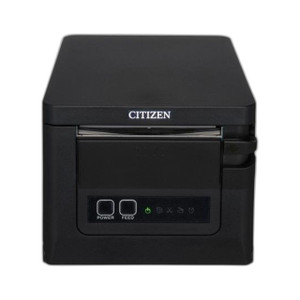
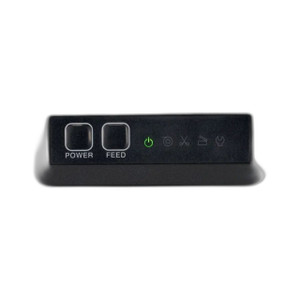
Citizen CT-S751ETUBK Thermal POS Printer USB LAN
The Citizen CT-S751ETUBK is a thermal receipt printer engineered for point-of-sale, retail, and hospitality deployments requiring flexible connectivity and minimal paper-change downtime. Dual USB and LAN (XML) interfaces eliminate the need for legacy serial or parallel port infrastructure, integrating directly into modern networked POS architectures. The front-load paper design keeps operators productive in high-volume environments — critical in quick-service restaurants and retail counters where every minute of downtime affects transaction throughput.
Key Features
- Dual Connectivity (USB + LAN): USB connection for single-terminal deployments, Ethernet with XML protocol support for networked multi-location environments. Choose the topology that matches your existing infrastructure without vendor lock-in.
- Front-Load Paper Design: Reduces roll-change time and operator friction — no rear access required. Measurable uptime gain in high-transaction environments.
- 24V DC Power: Standard thermal printer voltage. Verify adequate conditioning and backup UPS coverage on your POS power circuit to avoid print failures during brownouts.
- Compact Footprint: Fits standard POS counter layouts without requiring dedicated space reconfigurations. Typical thermal printer dimensions — check physical constraints before installation.
- Thermal Receipt Technology: No ink or ribbon — consumable cost limited to paper rolls. Lower cost-per-receipt versus inkjet alternatives.
- Network-Capable (XML Protocol): LAN deployment supports centralized print job routing, enabling receipt distribution across multiple terminals or remote printing in multi-station configurations.
The CT-S751ETUBK bridges legacy POS environments (USB-centric setups) and modern networked architectures (LAN-based print servers). USB operation works plug-and-play on most Windows and Unix-based POS terminals; LAN deployment requires network configuration (DHCP or static IP, gateway routing) but unlocks enterprise scaling for multi-location chains or cloud POS platforms.
Thermal print quality depends on paper stock and head-cleaning cycles. Retail-grade thermal receipt paper (typically 80mm wide) is standard; verify your POS application supports the print resolution and template formatting this printer outputs. Some legacy systems expect ESC/POS command sequences — confirm your software emits compatible control codes before deployment to avoid configuration surprises.
Deployment in hospitality (restaurant kitchen printers, bar ticketing) benefits from the LAN interface — order tickets print instantaneously to multiple station printers without cabling complexity. USB-only setups work in single-terminal retail but don't scale when you add secondary printers (customer-facing receipt, kitchen copy, manager report).
The 24V DC requirement means you'll need a dedicated power supply or verified POS terminal power circuit. UPS or battery backup is strongly recommended — thermal printers are power-sensitive, and a mid-transaction brownout wastes paper and creates transaction logs mismatches. Isolate the printer on a dedicated POS VLAN if your network supports segmentation; thermal printers can generate consistent low-level traffic that interferes with time-sensitive payment or inventory sync protocols.
Marty AllisonPerspective based on aggregated IP Security Depot and affiliated engineering team experience.
We've deployed the Citizen CT-S751ETUBK across retail and QSR environments for years — it's a reliable workhorse that solves a specific problem: how to migrate from aging serial-port receipt printers to modern Ethernet-connected infrastructure without ripping out entire POS terminals. The real value isn't in the printer itself (thermal receipts are commoditized), but in the fact that it gives you a migration pathway. You can run USB on your existing POS box while you plan your networked print architecture; when you're ready, flip to LAN without hardware replacement. That flexibility is rare in the thermal printer space, where many vendors lock you into proprietary network protocols or require cloud subscriptions. The front-load paper design is a small detail that makes a big operational difference — we've worked on deployments where paper jams at the back of a recessed printer cost 5-10 minutes of downtime per shift. Not here. And the XML protocol over LAN means this printer plays nicely with modern POS systems (Toast, Square, Lightspeed, Shopify) without requiring custom driver development. Against alternatives like Epson TM series or Star Micronics, the CT-S751ETUBK doesn't have fancy features like color printing or mobile printing APIs, but it also doesn't have the complexity or the price premium. For straightforward receipt printing at scale, this is the no-nonsense choice.
Technical Highlights:
- USB + LAN Dual Interface: Most thermal printers force you to choose one connectivity standard; this model supports both. That means you can deploy it in a legacy single-terminal environment without network infrastructure, then migrate to networked architecture later without hardware swap — a rare degree of flexibility that saves capex on POS modernization projects.
- 24V DC Power Requirement: Standard in the thermal printer class, but it's a hard constraint. Your POS power circuit and backup systems must support 24V. A single brownout during a transaction can corrupt your receipt audit log; we always recommend a dedicated UPS or battery backup on the printer power line, especially in locations with unreliable utility power.
- Front-Load Paper Mechanism: Eliminates rear-access paper jams and reduces operator training overhead. In high-volume retail or kitchen environments, this translates to measurable uptime gain — operators can change rolls in 15-20 seconds without power-down or terminal access.
- Thermal Receipt (No Ink): Consumable cost is purely paper stock. No ribbon cartridges, no color toner, no waste. Long-term cost-per-receipt is significantly lower than inkjet alternatives, especially if you're running 500+ receipts per day.
- XML Protocol on Ethernet: Enables network-based print job routing. For multi-terminal deployments (retail chains, restaurants with kitchen and counter printers), you can centralize print spooling and route tickets dynamically without dedicated cabling to each printer. Requires DHCP or static IP assignment and basic network configuration.
Deployment Considerations:
- Confirm your POS software emits ESC/POS or compatible thermal control codes before deployment. Some legacy systems use proprietary printer command sets; if your software doesn't support standard thermal protocols, this printer won't initialize properly. Test on a bench unit first.
- Network deployments require DHCP or static IP configuration — allocate a fixed IP on your POS VLAN and verify network connectivity before relying on it for production. If your network doesn't have DHCP, manually assign an IP and test print over the wire; misconfigured network printers are silent failures (no receipt, no error log) that impact transaction processing.
- Paper width is typically 80mm standard thermal receipt stock. Verify your POS application supports 80mm formatting and that your receipt templates fit the available print width (usually 32 characters at standard pitch). Mismatched templates cause wraparound text and illegible receipts.
- USB connection to POS terminals requires a host driver or generic thermal printer support in your OS. Windows typically auto-detects USB thermal printers; Linux deployments may require CUPS or a proprietary driver. Test driver availability before committing to USB-only deployments in non-standard environments.
- Power supply isolation is critical — always run the CT-S751ETUBK on a dedicated 24V circuit with UPS or battery backup. Shared power with the POS terminal can introduce noise that corrupts print quality or causes mid-transaction power drops. We've seen a single brownout corrupt an entire day's transaction receipts; it's not worth the risk.
The CT-S751ETUBK is the right choice if you're modernizing POS infrastructure and need a flexible bridge printer that doesn't lock you into a single topology. It's ideal for retail chains and hospitality groups planning multi-location deployments with networked ticket printing. For integrators and POS resellers, it's a low-risk add-on that appeals to cost-conscious customers and doesn't require specialized support. Explore the full Citizen catalog for other POS peripherals and thermal solutions.