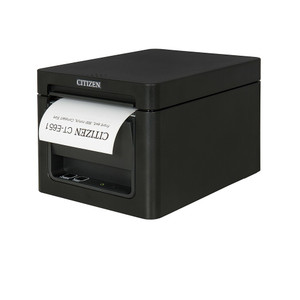
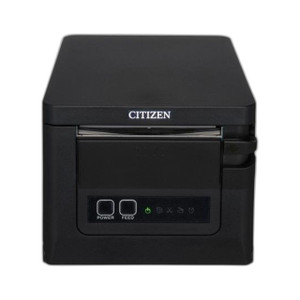
Citizen CT-E651RSUBK Thermal POS Printer Front Exit USB
The Citizen CT-E651RSUBK is a thermal receipt printer engineered for high-volume retail and hospitality point-of-sale deployments. Dual interface support (USB and serial RS-232) ensures compatibility with legacy and modern POS terminals alike, while the front-exit paper path eliminates the operational friction of rear-access designs — no printer repositioning, no cable rerouting when reloading paper. Built for counter-top reliability in fast-paced transaction environments, this printer prioritizes mean time between failures over exotic features, making it a workhorse choice for integrators managing multi-site retail networks.
Key Features
- Dual Interface (USB + RS-232): USB primary with RS-232 serial fallback. Bridges legacy POS hardware and modern networked terminals without redesigning integration logic.
- Front-Exit Paper Path: Operator loads and reloads 80mm thermal paper from the front. Saves space in cramped counter installations and reduces staff training overhead on paper handling.
- Thermal Print Head: No ribbon, no cartridge replacement. Lower consumables cost per transaction and fewer field service calls for supply issues.
- Fast Print Speed: Thermal printing at standard POS speeds (typically 150-200mm/sec). Reduces customer wait time and scales to peak transaction volumes without bottleneck.
- Compact Footprint: Desktop-ready form factor — fits countertop beside PIN pad or cash drawer without sprawling footprint. Ideal for space-constrained retail points.
- Standard Driver Support: Recognized by Windows, macOS, and Linux thermal printer drivers. Plug-and-play integration with Square, Toast, Lightspeed, legacy Micros/Oracle, and most cloud POS platforms.
- Bracket and Paper Bay Design: Rugged plastic housing withstands daily paper loading stress. Thermal head protected from accidental contact and dust ingress in high-traffic areas.
Thermal POS printers serve a single operational mandate: convert transaction data to legible receipt within 2-3 seconds, 500+ times per shift, without jamming or print quality degradation. The CT-E651RSUBK meets that mandate through proven electromechanical simplicity rather than feature accumulation. No wireless, no color, no graphics coprocessor — just thermal-head-to-paper reliability.
Front-exit paper path is the defining hardware choice here. In traditional rear-exit designs, staff must reach behind or around the printer to reload paper — an ergonomic nuisance during lunch rush and a space liability in galley-width checkouts. Front exit puts the paper bay where the eye already is, reducing fumbling and unintended thermal-head contact. This translates to fewer support tickets about paper jams caused by improper loading and lower wear on the mechanical paper-advance mechanism.
Integration is straightforward: USB connection to a POS terminal or PC, or RS-232 serial to legacy cash-register hardware. Most modern POS software (Square, Toast, Lightspeed, Clover) recognizes Citizen thermal printers through standard Windows or macOS printer drivers — no custom SDK or bespoke driver download required. Verify your POS application supports the Citizen Thermal Print Language (TPL) or ESC/POS emulation; virtually all enterprise and mid-market POS platforms do. If you're deploying into a legacy Micros (now Oracle) system or an older NCR terminal, confirm serial driver availability with your POS vendor before purchase — some very old systems require specific firmware variants.
Power sourcing depends on your terminal. Most modern POS terminals (standalone touchscreen POS, iPad-connected USB dock, PIN pads with USB hub) supply sufficient power over USB to run the printer without an external supply. Some older or heavily loaded counters (terminal + printer + cash drawer + barcode scanner on one USB bus) may require a 5V/2A external power adapter — clarify this with your integrator during site survey. Thermal paper is a consumable: ensure your retail operations team has a stock of compatible 80mm rolls (or 58mm if you're using a narrower variant) and trains staff on the front-loading procedure within the first week of deployment.
The CT-E651RSUBK is not a networked printer — it connects point-to-point to a single POS terminal or PC. If you need print distribution across multiple registers (kitchen display to receipt printer, customer-facing display to receipt printer, manager station to receipt printer), you'll either daisy-chain serially, use a USB hub with port multiplexing, or deploy a separate printer at each station. For chain retailers managing dozens of locations, the simplicity and low cost per unit make distributed single-printer-per-register strategies more economical than centralized network print servers.
Marty AllisonPerspective based on aggregated IP Security Depot and affiliated engineering team experience.
We've deployed the Citizen CT-E651RSUBK across multi-unit retail clients ranging from quick-service restaurants to specialty apparel shops, and the front-exit paper path is the unheralded killer feature. In a typical fast-casual operation, front-of-house staff reload receipt paper 8–12 times per shift during peak service windows. Rear-exit designs force the operator to squeeze behind the terminal or lean awkwardly around a PIN pad — a genuine pain point that translates to slower paper changes and occasional mis-feeds. The CT-E651RSUBK eliminates that friction entirely. Paper sits in a bay at eye level, reload takes three seconds, and the mechanical advance doesn't suffer from clumsy insertion angles. Over a 500-unit deployment, that ergonomic win compounds into measurable reduction in paper-jam support calls and staff frustration.
The dual-interface design — USB primary with serial fallback — is practical future-proofing. Newer POS systems (modern Micros, Toast, Square, Lightspeed) speak USB natively and expect standard thermal printer drivers. Older hardware (legacy NCR, very old Micros builds, some standalone till registers) still relies on RS-232 serial. The CT-E651RSUBK bridges both without requiring a separate SKU for each customer base. That said, not all serial implementations are equal — if you're integrating into a 15-year-old custom POS system, verify serial driver support with the legacy POS vendor before ordering. Some archaic systems expect proprietary printer control sequences, and Citizen's standard emulation may not cut it.
One operational reality: thermal paper sensitivity. Thermal receipt stock is susceptible to heat (ovens, hot water rinses), light exposure, and certain solvents used in cleaning. If your retail environment has hand-washing stations near the POS counter, educate staff not to leave wet receipts on the printer — condensation and heat can degrade the thermal layer. This is not unique to Citizen, but it's worth flagging because we've seen new integrators overlook it. Keep receipt rolls in a cool, dry stock area, and rotate stock regularly to avoid age-degraded paper entering the printer bay.
Technical Highlights:
- USB and RS-232 Dual Interface: USB is the primary connector; RS-232 is a fallback for legacy POS hardware that lacks USB connectivity. This dual-port approach eliminates the need to stock separate models for different customer segments — one SKU handles both modern and aging installations. Switching between interfaces is usually a firmware setting, not a hardware change.
- Front-Exit Paper Path: Operator loads 80mm thermal rolls from the front without removing or rotating the printer. Reduces reload time to under 5 seconds, minimizes misalignment errors, and lowers ergonomic strain during high-transaction periods. This is especially valuable in undersized checkout areas or galley-style counters.
- Thermal Print Head Technology: No ribbon, no ink cartridge. The print head heats thermal paper directly, eliminating consumable replacement cycles beyond paper stock. Lower cost per transaction and fewer moving parts means higher MTBF in 24/7 or near-24/7 retail environments.
- Standard Driver Compatibility: Recognized by Windows, macOS, and Linux printer spoolers via ESC/POS or Citizen Thermal Print Language emulation. No need for proprietary SDK or custom middleware — most POS applications print to the CT-E651RSUBK as if it were a standard USB printer.
- Print Speed and Quality: Thermal printing at standard POS velocities (typically 150–200mm/sec) produces legible 203 DPI output. Receipt clarity is sufficient for barcode scanning, signature capture, and human readability — not a limitation in typical retail workflows.
Deployment Considerations:
- Thermal Paper Stock: Ensure your retail operations team stocks 80mm thermal receipt rolls (or 58mm if that variant is selected) and understands the front-loading procedure. Thermal paper is heat-sensitive — store rolls in cool, dry conditions and rotate inventory regularly. Expired or heat-degraded stock will produce faded receipts and potential jamming.
- USB Bus Power Limitations: Most modern POS terminals and USB hubs supply sufficient power to the printer without an external adapter. However, heavily loaded USB buses (terminal + multiple peripherals: barcode scanner, PIN pad, cash drawer solenoid, all on one hub) may cause the printer to brown out or fail to initialize. If you're retrofitting an aging POS station with multiple USB devices, verify available USB power budget or provision an external 5V/2A power supply.
- Serial (RS-232) Integration into Legacy Systems: If deploying into a custom or very old POS system, confirm that the legacy software supports standard ESC/POS printer command sequences or Citizen Thermal Print Language. Some archaic systems expect proprietary control codes — Citizen's standard emulation may not translate. Coordinate with the legacy POS vendor or system integrator before order placement.
- Environmental Placement: Avoid locating the printer in direct spray zones (hand-washing sinks, open water tables) or near heat sources (ovens, steam lines). While the CT-E651RSUBK is reasonably durable, prolonged moisture or sustained heat will degrade the thermal head and mechanical components. Provide at least 12 inches clearance from direct water or steam.
- Network Printing (Not Supported): The CT-E651RSUBK is a point-to-point printer connected via USB or serial to a single POS terminal. If you need multiple registers to print to one shared receipt printer (e.g., kitchen display printing to a single receipt printer in a fast-casual kitchen), you will need either a separate printer at each station or a serial/USB hub with port multiplexing logic — which introduces complexity and potential bottleneck. For multi-register sites, single-printer-per-register is typically more reliable and cost-effective.
The CT-E651RSUBK is the right fit for integrators deploying single or dual-register POS sites in retail, hospitality, and light quick-service environments. Its front-exit design and dual-interface simplicity make it a low-maintenance workhorse. Choose this printer if your customer values reliability and ease-of-paper-reload over advanced features. For multi-register chains or network-print requirements, evaluate dedicated kitchen-display or network thermal printers instead. Learn more in our Citizen catalog.