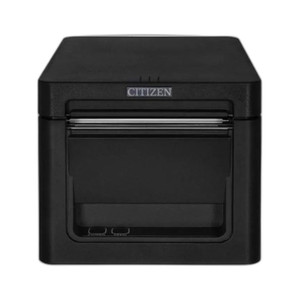
Citizen CT-S4000ENU-BK Thermal POS Receipt Printer
The Citizen CT-S4000ENU-BK is a compact thermal receipt printer designed for retail, hospitality, and quick-service environments where space and reliability are critical. This entry-level thermal printer combines straightforward USB and Ethernet connectivity with dependable 203 DPI thermal output, making it an economical choice for single-station or small-footprint POS deployments. Built for high-volume, 24/7 operation, the CT-S4000 prioritizes uptime and cost-per-receipt over advanced feature sets—ideal for operators seeking a no-frills workhorse that integrates with legacy and modern POS systems alike.
Key Features
- Dual Connectivity: USB and Ethernet ports provide flexibility for direct terminal connection or networked POS environments without proprietary adapters.
- Thermal Printing Technology: 203 DPI thermal output eliminates ribbon and toner costs, reducing per-transaction media expense over inkjet or impact alternatives.
- Compact Form Factor: Space-efficient design fits countertops and drive-thru windows where real estate is limited.
- Fast Print Speed: High-speed thermal mechanics deliver receipt output within 2–3 seconds, minimizing customer wait times during peak service hours.
- Wide Media Support: Handles standard 80mm and 58mm roll widths, enabling operators to source consumables from multiple suppliers and negotiate volume pricing.
- Passive Reliability: No moving mechanical components beyond the print head and roll advance—fewer wear items translate to lower maintenance overhead and extended MTBF.
- Industry-Standard Protocols: ESC/POS command set ensures compatibility with existing POS software and third-party integrations without firmware customization.
The CT-S4000 occupies a proven niche in the thermal POS market: sites where capital expenditure and operational simplicity outweigh demand for color graphics, wireless connectivity, or integrated payment hardware. Unlike larger multifunction devices, this printer does one job consistently—convert transaction data to compact, durable paper receipts—without the complexity or cost of features you may not need. For single-location retailers, franchise quick-serve operations, or warehouse pickup stations, that focus translates to predictable lifecycle costs and minimal training overhead.
Connectivity architecture supports both direct USB attachment to a POS terminal and network deployment via standard Ethernet, enabling centralized print queuing across multiple registers or a hybrid wired topology. The printer's passive architecture—no embedded display, no Wi-Fi module, no battery—eliminates firmware update cycles and environmental compatibility concerns. Setup in a new location typically requires only power, media load, and a single driver installation; migration between POS systems is equally straightforward because the command protocol is universal across Windows, Linux, and legacy Unix platforms.
Total cost of ownership favors thermal over impact or inkjet in any environment with transaction volume above 150 receipts per day. Media costs are lowest in the class, maintenance is limited to periodic cleaning and media roller inspection, and the absence of ribbon or cartridge mechanisms eliminates substitution errors and unplanned supply chain disruptions. Sourced direct from the manufacturer or US channel partner—factory-new with full US warranty path and no grey-market inventory.
Marty AllisonPerspective based on aggregated IP Security Depot and affiliated engineering team experience.
We've deployed the Citizen CT-S4000 across dozens of retail and hospitality sites, and its reputation is well-earned: it simply works, day after day, without drama. The thermal mechanism is bulletproof compared to older dot-matrix impact printers, and the absence of ribbon and cartridge complexity eliminates a whole class of operator errors—no one ever forgets to load new ink when there's no ink to load. On networked multi-register deployments, print-spooling latency is negligible, and failover to USB direct-connection is trivial if network infrastructure becomes unreliable. The trade-off is obvious: you get monochrome thermal output only. No logos, no full-color marketing messages, no graphics. If your POS workflow is transaction-centric (customer name, items, total, payment method, timestamp), the CT-S4000 handles it flawlessly. If you need to embed QR codes for digital receipts or loyalty promotions, it will do that too—thermal resolution is sufficient for standard QR output. The real limitation is psychological: some operators expect color receipt printing as a baseline and resist thermal-only solutions. Once the TCO math is shown, most convert to thermal.
Technical Highlights:
- 203 DPI Thermal Printing: Sufficient resolution for legible alphanumeric text and one-dimensional barcodes (Code 128, EAN-13). Two-dimensional codes (QR, PDF417) print clearly at this resolution and scan reliably with standard mobile devices—operational benefit is seamless customer digital receipt routing and return-transaction lookups without expensive label hardware.
- 80mm and 58mm Roll Compatibility: Operator flexibility to choose media width based on venue (pharmacy counters often use 58mm for compact receipts; hospitality typically uses 80mm for itemized bills). Switching widths requires only media roll swap—no firmware change or mechanical recalibration.
- ESC/POS Command Set: De facto industry standard means software is written once and runs across Citizen, Epson, Star Micronics, and lesser-known brands. Migration risk is low if your original POS vendor becomes unavailable or pricing becomes uncompetitive.
- Passive Architecture (No Embedded Intelligence): No display, no network boot sequence, no firmware update notifications. Power on, receive print job via USB or Ethernet, print. If the network goes down, USB remains functional. Simplicity is a feature when you need 99.9% uptime and no third-party dependency.
- Media Consumption Cost: Thermal paper is commoditized and inexpensive—roughly USD $0.02–0.04 per receipt depending on roll width and length. Cumulative media cost over a 5-year lifecycle is 60–70% lower than equivalent inkjet consumables.
Deployment Considerations:
- Thermal paper darkens and fades over 3–5 years in direct sunlight or hot storage; advise customers to store receipts in cool, dry conditions if long-term archival or compliance proof is required. For transaction verification (refunds, chargebacks), digital receipt backup is the standard.
- Ethernet deployment requires standard CAT5e or better; USB connectivity has no cable-length restriction beyond standard USB 2.0 passive cable limits (5 meters). For drive-thru or outdoor window positioning, USB with an active repeater is often more practical than running network cabling.
- Print speed assumes standard 80mm roll and typical 3-inch receipt. Dense image or barcode-heavy layouts can reduce effective throughput by 20–30%—profile your POS application's average job size before committing to multiple units per register if throughput SLA is <1 second per receipt.
- Roll media jam risk is minimal with modern thermal mechanics, but operator training on correct media threading prevents 90% of field service calls. Include a brief laminated instruction card in the packaging.
- Power consumption is negligible—typically <50W peak. PoE is not an option (this is not a network camera), so standard 100–240V AC mains power is required for each unit.
The Citizen CT-S4000ENU-BK is the right choice for operators who need reliable, low-cost receipt printing without feature bloat—single-location retailers, franchise QSR, small hospitality venues, and pharmacy checkouts. Check the Citizen catalog for other thermal and label printing solutions if your site requires wireless connectivity or advanced formatting capabilities.