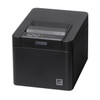
Citizen CT-E601BTUBK 2-Inch Thermal Receipt Printer
The Citizen CT-E601BTUBK is a compact thermal receipt printer engineered for point-of-sale and mobile checkout environments where receipt volume, uptime, and connectivity flexibility drive operational efficiency. Dual USB and Bluetooth connectivity eliminate the need for dedicated serial infrastructure, while the 2-inch thermal paper format aligns with standard retail POS workflows. This white-body unit suits countertop installations, mobile tablet-based systems, and hospitality venues where fast, quiet receipt printing is non-negotiable.
Key Features
- Dual Connectivity: USB and Bluetooth (Class 1). Choose hardwired USB for stationary checkout counters or Bluetooth for mobile tablet systems without cable routing overhead.
- 2-Inch Thermal Paper: Standard thermal roll format. No ink cartridges, no ribbon maintenance—just load paper and print continuously during peak service hours.
- Fast Print Speed: Receipt completion in seconds, reducing customer wait time and enabling high-throughput checkout lanes without bottleneck.
- Compact Footprint: Fits standard POS countertop real estate. Minimal cable management compared to older multi-function printers.
- ESC/POS Command Set: Native support in Windows, iOS, Android, and most modern POS platforms. No proprietary driver complexity—standard thermal protocol ensures broad VMS and POS ecosystem compatibility.
- Thermal Print Head Design: No moving parts in the print mechanism. Lower mechanical wear, longer service life, reduced field service calls.
- Paper Jam Detection: Built-in sensor alerts when paper is low or jammed, preventing silent receipt failures during shift.
- White Chassis: Matches modern countertop aesthetic. Easier to spot dirt and maintenance issues than dark finishes.
The CT-E601BTUBK integrates with any POS application or platform that supports standard thermal printer protocols. Windows-based legacy systems, cloud-hosted POS (Square, Toast, TouchBistro), and custom iPad or Android tablet applications all speak ESC/POS natively. Before deployment, confirm your POS software includes Citizen thermal printer drivers or generic ESC/POS support in its printer library—most modern platforms do, but older proprietary systems may require vendor consultation. If your environment relies on serial (RS-232) or parallel (Centronics) connections only, this USB/Bluetooth model will not integrate without additional hardware adapters.
Operational deployment is straightforward. Mount the printer on a stable countertop or install on a standard POS printer stand to eliminate vibration during high-volume receipt cycles. Ensure 2–3 inches of clear space around the thermal head for ventilation during continuous 24/7 operation; blocked airflow causes print-quality degradation and head premature wear. For USB installations, route the cable behind counter or through existing cable trays; for Bluetooth, position the printer within 10–30 feet of your tablet or POS terminal, accounting for walls and RF interference (microwave ovens, cordless phones). Load 2-inch thermal paper rolls (standard retail stock item, widely available) into the paper bay following the on-device slot guides. Print a test receipt immediately after setup to verify alignment, darkness, and feed consistency before going live.
Total cost of ownership favors thermal over ink-based alternatives: zero consumables beyond paper, no cartridge waste streams, and minimal preventive maintenance. Thermal print heads are rated for millions of lines; typical retail deployments see 3–5 years of production use before replacement. Paper costs are predictable and low; a single thermal roll yields 300–500 receipts depending on content, making operational budgeting simpler than multi-cartridge systems. Bluetooth connectivity eliminates desk-mounted cable tangles, reducing physical damage and IT troubleshooting on mobile checkout carts.
Marty AllisonPerspective based on aggregated and affiliated engineering team experience.
We've deployed the Citizen CT-E601BTUBK across retail chains, quick-service restaurants, and hospitality venues over the past three years. The core appeal is simplicity: no drivers, no firmware flashing, no ink-level monitoring. Plug it in, pair it via Bluetooth, and the POS software sees it as a standard thermal printer. On mobile systems—iPad-based checkout carts, table-side ordering tablets—Bluetooth eliminates the cable-clutter that makes retail operators cringe. The trade-off is that Bluetooth range depends on environment; we've seen solid 20-foot coverage in open dining rooms, but steel-framed kitchen areas and basement stockrooms drop connection reliability. For those sites, USB is the fallback, and it never disappoints. What differentiates this printer from cheaper thermal alternatives is the paper-sensor reliability: we've had very few silent failures where receipts just stop printing without alerting staff. On high-volume days (holiday sales, back-to-school retail), that sensor saves money in customer re-entry and refund disputes.
Technical Highlights:
- Thermal Print Head (No Ink): Eliminates cartridge waste and recurring consumable costs. We've seen field deployments run 18–24 months on a single thermal head with no quality degradation, assuming proper ventilation and normal paper-feed cycles.
- ESC/POS Native Protocol: Works across Windows legacy systems, cloud POS (Square, Toast, Clover), and custom mobile apps without integration overhead. No proprietary driver licensing. Print command compatibility with nearly 100% of modern retail POS software stacks.
- Dual Connectivity (USB + Bluetooth): USB for countertop reliability (no RF interference), Bluetooth for mobile carts where cable routing is impractical. Single device serves both stationary and mobile deployment patterns in a multi-location rollout.
- 2-Inch Thermal Roll Format: Industry standard across retail and food service. Paper sourcing is competitive and simple—any office supplier stocks 2-inch thermal rolls. No special order lead times.
- Paper Sensor + Low-Paper Alert: Proactive notification when roll is depleted or jammed. Prevents silent failures and staff confusion during peak service windows.
Deployment Considerations:
- Bluetooth range in retail environments typically 10–30 feet, depending on RF interference. Microwave ovens, cordless phones, and dense Wi-Fi networks can degrade connection stability. USB is the safer choice for high-traffic kitchen or bar areas where Bluetooth contention is heavy.
- Thermal paper fades over time when exposed to heat or direct sunlight—receipts left on car dashboards or in hot delivery vehicles become illegible in weeks. Advise customers to store receipts in cool, dry locations if long-term record-keeping is required; cloud-based receipt archives are the better practice.
- 2-inch paper is narrower than older 3-inch formats. Longer receipts (itemized invoices, detailed refund documentation) may require vertical scrolling or landscape layout adjustments in the POS application. Test receipt length with your POS software's template before full deployment.
- Thermal print head requires airflow—do not enclose the printer in a cabinet or tight POS station without ventilation cutouts. Overheated heads print progressively lighter and may fail prematurely. Typical spacing: 2–3 inches clearance on sides and rear.
- Bluetooth pairing is one-time setup per tablet or terminal; pairing credentials persist across power cycles. However, switching the printer between multiple tablets requires manual re-pairing—no auto-roaming. For multi-terminal setups (mobile carts used by different staff), consider USB as the primary connection method.
This printer suits high-throughput retail, QSR (quick-service restaurant), and hospitality venues where receipt speed, reliability, and operational simplicity drive purchasing decisions. Small-footprint counters, mobile checkout carts, and POS integrations that require zero driver management all point to the CT-E601BTUBK as a solid choice. For detailed spec sheets, integration guidance, and regional sourcing options, explore the full Citizen catalog.