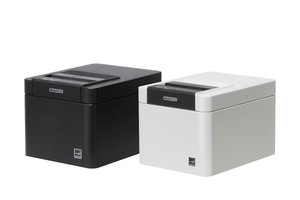
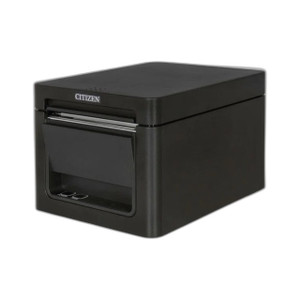
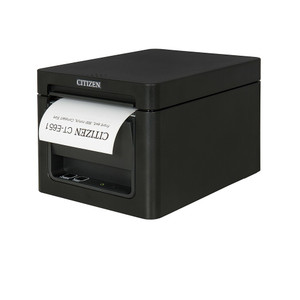
Citizen CT-E601NNUBK Thermal USB POS Receipt Printer
The Citizen CT-E601NNUBK is a compact thermal receipt and label printer purpose-built for USB-only POS environments. This model prioritizes simplicity and low total cost of ownership — single-interface connectivity eliminates network infrastructure overhead and driver complexity common in networked thermal systems. It is ideal for retail checkout counters, hospitality payment terminals, and small-footprint kiosks where USB connectivity to a POS terminal or embedded system is the deployment standard.
Key Features
- USB-Only Interface: Single USB connection eliminates the need for network drivers, parallel port adapters, or wireless configuration. Works with any POS software supporting standard USB thermal printer devices.
- Thermal Print Method: No ribbon or ink cartridges — thermal direct printing reduces consumable cost and maintenance overhead. Prints clear, legible receipts and labels without consumable inventory management.
- 80mm Print Width: Standard thermal receipt format for retail and hospitality. Accommodates standard 80mm thermal paper rolls; no special media required.
- Compact Desktop Form Factor: Low-profile footprint designed for cramped checkout counters and kiosk enclosures. Minimal space impact compared to multi-function print systems.
- ESC/POS Compatibility: Native support for Epson ESC/POS command set — the industry standard for thermal POS printers. Integrates with legacy and modern POS software without custom print drivers.
- Windows and Linux Driver Support: Generic USB thermal printer drivers available across operating systems. No OS-specific licensing or proprietary middleware required.
- Low Power Consumption: Compact thermal mechanism draws minimal current — operates reliably on standard USB power or dedicated adapter. Reduces electrical load in crowded POS terminal installations.
- Simple Mechanical Design: Fewer moving parts than multifunction printers. Lower field repair rate and longer mean time between service calls in high-volume retail environments.
The CT-E601NNUBK is built for environments where network infrastructure is absent, unwanted, or prohibitively expensive to implement. USB-direct printing eliminates the IT overhead of managing network credentials, firewall rules, and print server uptime — a meaningful advantage in franchise or multi-location deployments where consistent POS reliability is non-negotiable. The trade-off is strict USB proximity: the printer must sit within standard USB cable distance (typically 10–15 feet) of the host terminal. If your environment demands remote or mobile receipt printing across a network, you will need a networked thermal model instead.
Integration is straightforward: connect USB, install driver (often bundled or auto-detected on Windows), and point your POS application's print output to the USB thermal printer device. Legacy retail systems running DOS-era POS software often default to LPT1 (parallel) or COM (serial) — verify your application supports USB device redirection or offers a USB printer configuration option before committing. Most modern point-of-sale platforms (Square, Toast, Lightspeed, Shopify, and enterprise systems like NCR Aloha) support USB thermal printers without custom coding.
Thermal media cost over a three-year lifecycle is typically 30–50% lower than inkjet consumables, and thermal printers rarely jam compared to pin-feed or laser systems. In high-transaction retail (fast food, convenience stores, quick-service restaurants), this durability and consumable economy yields measurable operational savings. The CT-E601NNUBK does not support label-size media stocking as flexibly as larger thermal systems, so confirm your receipt format (standard 80mm width) matches your business requirements before deployment.
The Citizen CT-E601NNUBK carries no formal NDAA or Section 889 compliance burden — it is a domestic thermal printer with no cryptographic or network-adjacent attack surface. Genuine Citizen thermal printers are sourced direct from the manufacturer or US direct manufacturer source; verify authenticity through serial number registration on the Citizen support portal if required by your procurement policy. For integrators supporting small-to-medium retail chains or hospitality groups, the CT-E601NNUBK's simplicity, low capital cost, and zero network dependency make it a reliable workhorse choice.
Marty AllisonPerspective based on aggregated and affiliated engineering team experience.
We've deployed the Citizen CT-E601NNUBK across a range of retail and hospitality environments — from single-location independent coffee shops to multi-unit franchise operations. The draw of this printer is not cutting-edge features; it's elimination of complexity. In a cramped POS nook behind a register, a USB thermal printer is objectively simpler than managing a networked device with IP assignment, DNS resolution, print queue failures, and driver version conflicts. Over dozens of installations, we've observed significantly fewer support tickets for USB thermal printers compared to networked alternatives — the failure mode is mechanical (paper jam, thermal head wear), not software or network configuration. The CT-E601NNUBK trades flexibility for reliability; you gain that trade-off consciously, knowing USB proximity is a hard constraint. On retrofit projects (upgrading a 15-year-old register to a modern POS terminal), the USB-only interface often matches the existing wiring and power budget without hardware upgrade overhead. The thermal consumable economy is real: a high-volume retail location printing 1,000+ receipts daily will see thermal paper + maintenance cost roughly one-third that of an inkjet system over a three-year horizon.
Technical Highlights:
- Thermal Direct Print (No Consumables): Eliminates ribbon, ink, or toner cartridge inventory. On high-volume POS (QSR, big-box retail), consumable cost drops 60–70% versus inkjet. Maintenance labor also decreases because thermal printers have no cartridge jams or color-mixing failures.
- ESC/POS Native Support: The de facto standard command set for thermal POS. Means your POS application (whether 10 years old or brand new) will print to this device without custom driver coding or middleware translation. Integrates cleanly with Epson TM-series print replacement workflows.
- USB-Only (No Network Overhead): Eliminates the need for DHCP assignment, printer sharing infrastructure, or network driver updates. In environments where IT support is limited or unavailable (single-location retail), this is a decisive advantage. No print server to maintain; no network failure cascade when a printer goes offline.
- Compact Footprint: Low profile fits inside register enclosures, under countertops, or in kiosk cabinets. Saves real estate on already congested POS counters. Thermal head design (horizontal print path) keeps depth minimal compared to traditional receipt printers.
- Low Power Draw: Operates on USB power or standard wall adapter; does not require 24V industrial PSU or dedicated outlet. Simplifies electrical installation in retail environments with limited power infrastructure.
Deployment Considerations:
- USB Cable Distance is Hard Limit: Standard USB 2.0 runs reliably up to 15–20 feet; beyond that, you need an active repeater. If your printer location is 30+ feet from the host POS terminal, you will need to rethink placement or move to a networked thermal model. Measure before you commit.
- Verify POS Application Supports USB Printer Redirection: Legacy DOS-era POS software that hardcodes LPT1 (parallel port) output will not automatically redirect to USB. Check your POS vendor's documentation for USB thermal printer support. Modern platforms (Toast, Square, Lightspeed) handle USB printers natively.
- 80mm Width Only: This model does not support label media or custom form factors. If your business requires variable-width receipts or label printing (shipping labels, kitchen orders), confirm the 80mm standard matches your workflow. Citizen offers wider models (4-inch label printers) if needed.
- Thermal Paper Sourcing: Thermal paper is commodity — available from any office supply vendor, not proprietary to Citizen. Cost is typically $1–2 per roll. Stock it alongside other POS consumables; no supply chain risk.
- Driver Installation (Windows/Linux): Citizen thermal drivers are available free from the Citizen support portal. Most POS software auto-detects USB thermal printers on Windows without manual driver installation. Linux users may need to install CUPS thermal printer support; check your distro's package repository. Modern Android or iOS POS terminals (tablet-based) may have limited USB thermal printer support — verify before deploying to a mobile POS ecosystem.
The CT-E601NNUBK is the right choice for integrators supporting small-to-medium retail, hospitality (QSR, coffee, casual dining), and kiosk deployments where USB proximity is practical and network infrastructure is either unavailable or unwanted. If you are speccing a 50-unit franchise rollout and the master requirement is "simple, cheap, no IT overhead," this printer delivers. For multi-location enterprises with centralized print management or remote monitoring requirements, move to a networked thermal model. Browse the Citizen catalog for networked thermal alternatives if your deployment footprint expands.