Product images are provided for reference and may not represent the exact model, configuration, or included components.

Overview

SKU: CS1924M
UPC: 672792007750
Condition: New
Write a Review 31% OFF

ATEN 4-PORT USB3.0 4K Displayport Kvmp - CS1924M

ATEN CS1924M 4-Port USB 3.0 4K DisplayPort KVMP SwitchOverviewThe CS1924M is a 4-port ATEN KVMP switch that shares a single DisplayPort monitor, USB k…

$750.00 $519.99 SAVE $230
Ships same business day
In stock

Quantity:

Adding to cart… The item has been added
Compatibility guidance available for your deployment
Senior specialists for pre and post-sales support
Authorized sourcing and documentation support
Shipping and lead-time confirmation before install

Laura Bennett, IPSD Senior Specialist

Talk to Laura

200+ hrs training • U.S - based

Senior Specialist • 877-277-7147

ATEN 4-PORT USB3.0 4K Displayport Kvmp - CS1924M

$750.00
$519.99

Overview

SKU: CS1924M
UPC: 672792007750
Condition: New

No Bots, Just Experts

Questions about this product? Free pre-sales support from a senior specialist — product questions, compatibility checks, BOM quotes, price confirmation — typically answered within one business day. Need camera placement or system design work? Engineering time is $175 per hour (qty 1 = 1 hour). Hardware buyers get up to one hour ($175) credited back on their order.

Description

ATEN CS1924M 4-Port USB 3.0 4K DisplayPort KVMP Switch

Overview

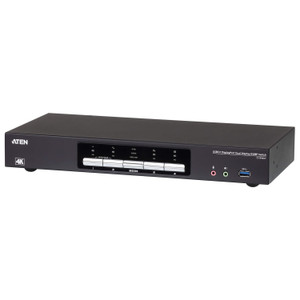
The CS1924M is a 4-port ATEN KVMP switch that shares a single DisplayPort monitor, USB keyboard, and USB mouse across four computers — plus routes USB 3.1 Gen1 peripherals to whichever computer is active. The defining spec here is the video ceiling: 4096 x 2160 at 60Hz, which means you can drive a true 4K display without resolution compromise. For environments running dual-display workstations or gaming-grade monitors at 1440p, the 2560 x 1440 @ 144Hz support keeps refresh rate intact. This is a rack-mountable unit, making it a practical fit inside a KVM switch rack alongside servers or editing workstations where desk space doesn't accommodate a desktop switch. If you're consolidating operator control across four production machines, broadcast workstations, or security monitoring desktops, the CS1924M handles the switching layer without downclocking your display.

Compatibility

Works with any computer that outputs DisplayPort video and connects via USB for keyboard and mouse — no proprietary connectors or drivers required for basic operation. The USB hub ports (USB 3.1 Gen1 Type-A) support standard peripherals: flash drives, card readers, or USB-connected devices that need to follow the active port. Port selection is available via four methods — front-panel pushbutton, hotkey sequences, mouse-based switching, or RS-232 commands — making it compatible with automation environments where a control system or serial controller handles switching. The scan interval (1–99 seconds, default 5) suits auto-scan monitoring setups common in multi-source video monitoring or IT operations centers. Firmware v1.1.107 (released 2023-12-07) is current as of the product file date. For KVM cabling and accessories, verify DisplayPort cable compatibility at the target resolution before deployment.

Installation Notes

Rack-mount form factor — confirm 1U clearance and cable management before installation. Humidity operating range is 0–80% RH non-condensing; avoid installations near HVAC discharge or in unconditioned spaces. USB keyboard and mouse connections are required at the console side; PS/2 is not supported. RS-232 command control requires a serial connection to the unit for integration with control systems. The USB 3.1 hub ports are split: one on the front panel, one on the rear — plan peripheral placement accordingly.

Specifications
Mount Type: Rack
Computer Connections: 4
Port Selection: Hotkey, Pushbutton, Mouse, RS-232 Commands
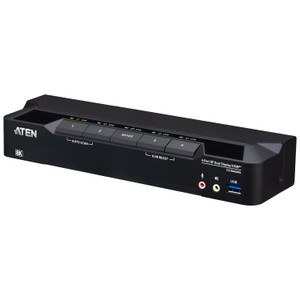
Usb Hub: 2 x USB3.1 Gen1 Type A Female (Blue; 1 x front panel; 1 x rear panel)
Selected: 4 x Pushbutton
Usb Link: 4 (Green)
Keyboard / Mouse: USB
Video: Up to 4096 x 2160 @ 60Hz, 2560 x 1440 @ 144Hz
Scan Interval: 1-99 seconds (Default: 5 seconds)
Humidity: 0-80% RH, Non-condensing
Firmware Upgrade: v1.1.107
Q&A
Reviews
Have Questions?

RELATED PRODUCTS

System Design, Deployment & Technical Support

Support services and planning resources for commercial surveillance, access control, and infrastructure deployments.

Fixed scope • Fixed price

System Design Assistance

  • Get help validating product compatibility
  • Coverage requirements
  • Storage planning and deployment architecture before you buy.
Request Design Help

Deployment & Configuration Support

  • Access fixed-scope support for rollout planning
  • User setup guidance
  • Migration and system standardization across single-site or multi-site deployments
View Support Services

Guides, Tools & Calculators

  • PoE requirements
  • Storage retention
  • Camera selection and deployment methodology
Open Technical Resources