ATEN CS1922 2-Port USB 3.0 4K DisplayPort KVMP Switch
Overview
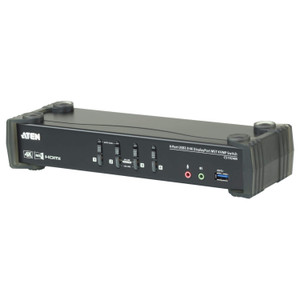
The ATEN CS1922 is a two-port KVMP switch designed for operators who need to share a single 4K DisplayPort monitor, keyboard, and mouse across two computers — without sacrificing display fidelity or adding a second USB hub to the desk. At up to 4096 x 2160 @ 60Hz, it handles full 4K UHD output, and the built-in USB 3.1 Gen 1 hub means peripherals like high-speed storage or barcode scanners stay accessible on whichever machine is active. For a dual-workstation setup — surveillance management software running on one box, back-office applications on another — the CS1922 consolidates the workspace without a KVM tray full of adapters.
Key Features
- 4K DisplayPort at 60Hz: The CS1922 passes up to 4096 x 2160 @ 60Hz over DisplayPort — that is full 4K UHD at a full refresh rate. For security operators reviewing high-resolution surveillance footage, this means no downscaling artifacts and no dropped frames. The switch also supports 2560 x 1440 @ 144Hz, so if your workstation runs a QHD gaming-class or high-refresh monitor, that bandwidth is there too.
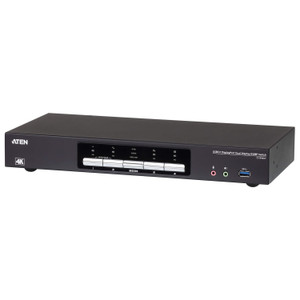
- Three switching methods: Hotkey, pushbutton, and mouse-based switching are all available simultaneously. Operators who keep hands on the keyboard can switch via hotkey; those who prefer tactile confirmation use the front-panel pushbutton; mouse-triggered switching lets you jump ports without lifting hands from the mouse. All three are active by default — you choose the one that fits the workflow.
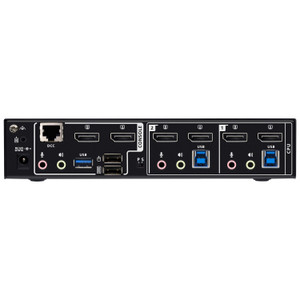
- USB 3.1 Gen 1 hub (two ports): Two USB Type-A 3.1 Gen 1 (blue) ports are built in — one on the front panel for easy plug-and-play access, one on the rear for semi-permanent peripherals. USB 3.1 Gen 1 tops out at 5 Gbps, fast enough for external SSDs, USB-connected cameras, or high-throughput barcode readers that would bottleneck on USB 2.0 KVMs.
- Keyboard and mouse via USB: The switch handles USB keyboard and mouse input natively. No PS/2 adapters, no legacy cabling — both computers share a single USB keyboard and mouse, and the switch arbitrates access cleanly on port change.
- USB Link indicators (x2, green): Two green USB Link LEDs confirm active USB connections per port. At a glance, you know whether both computers are recognized and communicating — useful during initial setup or when diagnosing whether a port change registered correctly.
- Configurable scan interval (1–99 seconds): Auto-scan mode cycles between connected computers at an interval you set from 1 to 99 seconds (default 5). For monitoring workflows where an operator needs to keep eyes across both systems, this removes the need to manually switch — the display alternates on its own schedule.
- Firmware upgrade path: The CS1922 ships with firmware v1.1.107 (released 2024-07-09), and ATEN provides the upgrade file directly. A field-upgradeable KVM means you can apply compatibility and security fixes without replacing hardware — relevant if DisplayPort protocol updates or new USB device classes require it.
- Environment tolerance: Rated for 0–80% relative humidity (non-condensing). Not an outdoor device, but sufficient for standard server rooms, control rooms, and operator stations where humidity is managed.
Integration and Compatibility
The CS1922 connects to host computers via USB for keyboard, mouse, and hub functions, and DisplayPort for video — both standard interfaces available on virtually any modern workstation or tower server. Port selection integrates with standard USB HID drivers; no custom software is required on the host. The USB 3.1 Gen 1 hub is bus-powered from the active host, so hub devices follow the active port. For KVM switch deployments in dual-workstation control rooms, the CS1922 fits alongside other ATEN console and AV management products. If your deployment involves PoE-powered IP cameras feeding into a surveillance workstation, pair the CS1922 with a managed network switch that can handle the PoE budget on the camera side — the KVM handles the operator console, not the camera network. For buyers evaluating monitor-side requirements, review a KVM selection guide to match resolution and refresh rate specs to your display hardware before purchasing.
Frequently Asked Questions
Q: What is the maximum video resolution the CS1922 supports?
A: The CS1922 supports up to 4096 x 2160 at 60Hz over DisplayPort. It also supports 2560 x 1440 at 144Hz for high-refresh QHD setups.
Q: How many ways can I switch between computers?
A: Three methods are available simultaneously: hotkey (keyboard shortcut), front-panel pushbutton, and mouse-triggered switching. You can use whichever fits your workflow without configuring anything.
Q: What USB standard do the hub ports use, and where are they located?
A: Both hub ports are USB 3.1 Gen 1 Type-A (blue, 5 Gbps). One is on the front panel for convenient access; one is on the rear panel for semi-permanent peripherals.
Q: Can the CS1922 automatically cycle through connected computers?
A: Yes. Auto-scan mode cycles between the two ports at an interval you configure from 1 to 99 seconds. The default interval is 5 seconds.
Q: Does the CS1922 support firmware upgrades in the field?
A: Yes. The current firmware is v1.1.107 (released 2024-07-09). ATEN provides the upgrade file for field installation, so you can apply future updates without replacing the unit.
Q: What keyboard and mouse interface does the CS1922 require?
A: The CS1922 uses USB for both keyboard and mouse. No PS/2 ports or adapters are involved.