ATEN CS1942DPA 2-Port 8K Dual-View DisplayPort 4-Computer KVMP Switch
Overview
The ATEN CS1942DPA is a 4-computer, dual-display KVM switch built for engineers and operators who need full 8K resolution control across multiple workstations without sacrificing desk real estate or switching speed. Supporting video up to 7680 x 4320 @ 60 Hz over DisplayPort, the CS1942DPA handles the highest-demand dual-monitor workflows — from video production suites to security operations centers running high-resolution analytics feeds. It integrates USB 3.1 Gen 1 hub ports and five switching methods into a single rack-mountable unit, removing the cable clutter of running separate KVM and USB switch infrastructure.
Key Features
- 8K DisplayPort Video at 60 Hz: The CS1942DPA supports up to 7680 x 4320 @ 60 Hz per display — true 8K throughput, not upscaled. For dual-display deployments running 5120 x 2880 @ 60 Hz or 4096 x 2160 @ 240 Hz, the switch handles all three tiers natively. If your workstation drives high-frame-rate 4K workflows (240 Hz), you will not hit a bottleneck at the switch layer.
- 4-Computer Connections: Four discrete computer ports mean you can share one dual-monitor, keyboard, and mouse setup across four workstations — eliminating three extra keyboards and monitor pairs. Useful in control rooms where a single operator manages multiple servers or appliances without spinning chairs between desks.
- Five Port-Selection Methods: Hotkey sequences, front-panel pushbuttons, mouse wheel scrolling, RS-232 serial commands, and a remote port selector give you switching flexibility regardless of physical access constraints. RS-232 command support is particularly useful for automation scripts or control systems that need to trigger KVM switching programmatically — rack-installed gear in locked cabinets benefits here.
- USB 3.1 Gen 1 Hub (2 Ports): Two USB 3.1 Gen 1 Type-A ports (one front, one rear, both blue) provide up to 5 Gbps throughput for shared peripherals — external drives, card readers, or USB licensing dongles. Having one port on the front panel means fast plug-in access without reaching behind the rack.
- Configurable Scan Interval (1–99 Seconds): Auto-scan cycles through connected computers at any interval from 1 to 99 seconds (default 5 seconds). For monitoring scenarios where an operator needs a visual sweep across multiple systems without manual input, this is a direct operational feature — set it and walk away.
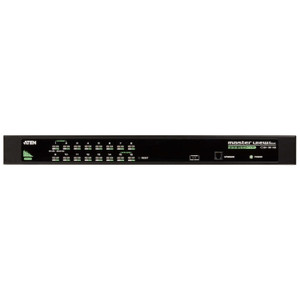
- Rack-Mount Form Factor: The unit mounts directly into a standard rack enclosure — no shelf adapter needed. In server rooms or operations centers where every inch of rack space is accounted for, a native rack-mount KVM avoids the awkward shelf-and-strap workarounds common with desktop-form switches. Pair it with a rack management solution for tidy cable routing.
- Slide Switch Station Selection: A dedicated physical slide switch handles station selection independently of software — useful in environments where a specific workstation must be locked in as primary and hotkey sequences could be accidentally triggered.
- Firmware Updatable (v1.0.062): Current firmware version v1.0.062 (released 2026-01-06) is available as a field update. Firmware upgradeability means the switch can receive compatibility patches or feature additions without hardware replacement — important for long-lifecycle enterprise deployments.
Integration and Compatibility
The CS1942DPA interfaces with computers via USB keyboard and mouse connections, making it compatible with any modern Windows, Linux, or macOS workstation that exposes standard USB HID inputs. The RS-232 command interface enables integration with serial control systems and automation platforms — building management systems or AV control processors that speak RS-232 can trigger port switching without operator intervention.
The dual DisplayPort video path requires DisplayPort-capable graphics outputs on each connected computer. If your workstations use HDMI or DVI outputs, you will need active adapter cables rated for the target resolution — passive adapters will not reliably pass 8K signals. Verify GPU DisplayPort version support (DisplayPort 1.4 minimum for 8K @ 60 Hz) before deployment.
The USB 3.1 Gen 1 hub operates at 5 Gbps and is shared across the active computer port — peripheral bandwidth is not split across all four computers simultaneously. Only the currently selected computer has access to the USB hub at any given time, which is standard KVM behavior but worth confirming if your workflow requires persistent USB connections on non-active machines.
For organizations deploying across multiple ATEN KVM switches, the CS1942DPA supports daisy-chaining via its station selection architecture, enabling scaled deployments without centralizing all switching logic in a single unit.
Frequently Asked Questions
Q: How many computers can the CS1942DPA control simultaneously?
A: The CS1942DPA connects to 4 computers. Only one computer is active at a time — all keyboard, mouse, and display input is routed to the selected computer. The other three remain connected but idle at the KVM layer.
Q: What is the maximum video resolution supported by the CS1942DPA?
A: The CS1942DPA supports up to 7680 x 4320 (8K) at 60 Hz over DisplayPort. It also supports 5120 x 2880 @ 60 Hz and 4096 x 2160 @ 240 Hz, depending on your monitor and GPU capabilities.
Q: Can the CS1942DPA be switched via software or automation systems?
A: Yes. In addition to front-panel pushbuttons, hotkeys, and mouse wheel, the CS1942DPA accepts RS-232 serial commands for programmatic switching. This makes it compatible with serial-based control systems and automation scripts.
Q: Does the CS1942DPA include USB hub ports, and what speed are they?
A: Yes — the switch includes 2 x USB 3.1 Gen 1 Type-A ports (5 Gbps), one on the front panel and one on the rear. These are shared with the active computer port only.
Q: Is the CS1942DPA rack-mountable?
A: Yes. The CS1942DPA has a rack-mount form factor for direct installation into standard rack enclosures without additional shelf hardware.
Q: Can the CS1942DPA auto-scan across connected computers?
A: Yes. The auto-scan interval is configurable from 1 to 99 seconds (default: 5 seconds), cycling through all connected computers automatically.
The CS1942DPA is one of the few rack-mount KVM switches that actually passes 8K DisplayPort at 60 Hz — 7680 x 4320 without frame-rate compromise. That spec matters specifically in dual-display environments where operators are running ultra-high-resolution analytics dashboards or GPU-intensive rendering workstations side by side. If your display chain tops out at 4K, the headroom is still useful: at 4096 x 2160, the switch will push 240 Hz, which eliminates the KVM as a bottleneck for high-refresh-rate professional displays.
Technical Highlights:
- 8K @ 60 Hz Dual DisplayPort: Passes 7680 x 4320 at full 60 Hz — verified spec from ATEN. Most competing units cap at 4K @ 60 Hz; this matters if your workstations are already driving 8K monitors or you are future-proofing a long-lifecycle control room build.
- RS-232 Command Switching: Five switching methods including RS-232 serial gives integrators a clean hook for control system automation — Crestron, AMX, or any serial-capable controller can trigger port changes without operator input. This is the spec that separates a desk accessory from a real infrastructure component.
- USB 3.1 Gen 1 Hub with Front + Rear Ports: Both ports run at 5 Gbps. Front-panel placement is a genuine ergonomic win in rack-dense deployments — no fishing behind the rack to plug in a USB drive or dongle while the system is live.
Deployment Considerations:
- RS-232 switching requires a serial controller or a USB-to-serial adapter on the control computer — confirm your control system has a free COM port or plan for the adapter in your BOM.
- DisplayPort 1.4 minimum is required on the GPU side to achieve 8K @ 60 Hz. Older DP 1.2 outputs will negotiate down — verify GPU firmware and cable certification before signing off on the resolution spec with a client.
This switch fits best in security operations centers, broadcast control rooms, or engineering labs where a single operator workstation must switch cleanly between 4 high-resolution compute nodes — and where the RS-232 integration hook lets the wider control system manage the switching logic without manual intervention.