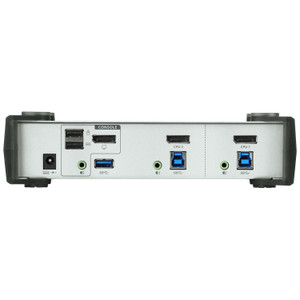
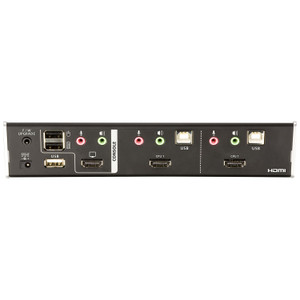
ATEN CS1922A 2-Port USB 3.0 8K DisplayPort KVMP Switch
The ATEN CS1922A is a 2-port KVMP switch built for workstations demanding maximum display fidelity — it drives a single DisplayPort monitor at up to 7680x4320 (8K) at 60Hz, letting you flip between two computers without touching a cable. If you're running dual-GPU render nodes, a high-resolution security or GIS workstation, or a developer rig that needs two machines sharing one 8K or 4K display, the CS1922A removes the KVM from the resolution ceiling equation entirely. Browse the full ATEN KVM and switching line to see where this model sits in the family.
Key Features
- 8K DisplayPort at 60Hz: The CS1922A supports 7680x4320 at 60Hz — the full native resolution of current 8K panels. Stepping down, it also handles 5120x2880 at 60Hz for 5K workflows and 4096x2160 at 240Hz if you need high-refresh 4K for motion-critical applications. One switch, every current display standard covered.
- Five Port-Selection Methods: Hotkey sequence, front-panel pushbutton, mouse wheel click, RS-232 serial command, and a remote port selector are all supported. The RS-232 path matters most in rack-mounted AV or broadcast setups where a control system (AMX, Crestron, or a custom script) needs to automate source switching without human interaction.
- USB 3.1 Gen1 Hub — Front and Rear: Two Type-A USB 3.1 Gen1 ports (one front-panel, one rear) share peripherals across both connected computers. USB 3.1 Gen1 delivers up to 5Gbps — enough for fast external SSDs, high-speed card readers, or powered hubs without the throughput bottleneck that plagues older KVM designs built on USB 2.0.
- USB Link x3: Three green USB Link ports handle keyboard, mouse, and one additional USB peripheral, keeping the hub ports free for storage or other devices. The physical separation between hub and link paths avoids the input-lag issues common when HID and storage share the same controller.
- Slide-Switch Station Selection: A dedicated slide switch on the unit provides a tactile, unambiguous way to lock to a specific port — useful in environments where hotkey sequences might interfere with application shortcuts (CAD software, video editors, or terminal emulators with aggressive keybindings).
- Configurable Auto-Scan: Scan interval is adjustable from 1 to 99 seconds (default 5). Set a short interval for monitoring two active systems, or extend it to minimize display re-sync delays when switching between workstations running demanding GPU workloads.
- Firmware Updatable: Version v1.0.063 (released 2025-12-26) is the current firmware revision. The published update package (cs1922a-cs1924a-v1.0.063.zip) applies to both CS1922A and CS1924A, so if you're managing a mixed fleet, one firmware file covers both models.
- Humidity Tolerance: Rated to 0–80% RH non-condensing. Adequate for standard office, studio, or server-room environments — not rated for high-humidity industrial or outdoor installations.
Integration and Compatibility
The CS1922A connects to USB-equipped computers via USB 3.0 upstream ports and outputs to any DisplayPort monitor supporting the target resolution. The RS-232 command interface makes it compatible with room-control systems commonly deployed in broadcast, command-and-control, and enterprise AV environments — no proprietary driver stack needed for serial control. The shared KVM switch category includes other ATEN models if you need four ports, dual-display output, or HDMI connectivity instead. For installations where two machines need to share a single high-resolution display and a common USB 3.1 peripheral pool, this is a direct fit. Pair it with a compatible ATEN KVM cable set to complete the installation without sourcing third-party adapters. If your workflow involves extended USB cable runs, review ATEN's signal extenders to maintain USB signal integrity beyond standard cable lengths.
Frequently Asked Questions
Q: What is the maximum resolution the CS1922A supports?
A: The CS1922A supports up to 7680x4320 (8K) at 60Hz over DisplayPort. It also handles 5120x2880 at 60Hz and 4096x2160 at 240Hz for high-refresh 4K workflows.
Q: Can the CS1922A be controlled by a room automation system like Crestron or AMX?
A: Yes. The CS1922A includes RS-232 command support, which allows integration with serial-capable control systems including Crestron, AMX, and custom automation scripts. A remote port selector is also supported for standalone remote switching.
Q: How many USB ports are available for peripherals?
A: The CS1922A provides two USB 3.1 Gen1 Type-A hub ports (one front, one rear) plus three USB Link ports for HID devices. The hub ports support up to 5Gbps throughput for storage or other high-speed peripherals.
Q: What is the scan interval for auto-switching between ports?
A: The scan interval is user-configurable from 1 to 99 seconds. The factory default is 5 seconds. You can adjust this to suit monitoring or workflow requirements.
Q: Is firmware update support available for the CS1922A?
A: Yes. Current firmware is v1.0.063, released 2025-12-26. The update package (cs1922a-cs1924a-v1.0.063.zip) applies to both the CS1922A and the CS1924A 4-port model.
Q: What switching methods does the CS1922A support?
A: Five methods are supported: front-panel pushbutton, hotkey sequences, mouse wheel, RS-232 serial commands, and a remote port selector. A slide switch is also provided for direct station locking.
The detail that stands out on the CS1922A is the 4096x2160 at 240Hz mode — most 8K-capable KVMs top out at 60Hz across the board, but this one adds a high-refresh 4K path that's genuinely useful for simulation, video analysis, or any workflow where motion clarity matters as much as pixel count. That's not a marketing footnote; it changes which monitor you spec for this switch.
Technical Highlights:
- 8K @ 60Hz DisplayPort output: Native 7680x4320 at 60Hz — matches the full spec of current 8K panels. No downscaling, no frame-rate compromise at native resolution.
- RS-232 serial control: Enables source switching via control system command strings, which is how broadcast racks and command-center consoles expect to drive KVM infrastructure. No USB HID dependency for switching automation.
- USB 3.1 Gen1 hub (5Gbps): Front and rear Type-A ports share high-speed peripherals across both hosts. At 5Gbps, you can run an NVMe enclosure or a multi-device hub without hitting the throughput wall that makes USB 2.0 KVMs frustrating for anything beyond mouse and keyboard.
Deployment Considerations:
- RS-232 control requires a serial interface on the control system or a USB-to-serial adapter — verify your automation controller has a COM port or budget for the adapter before installation.
- Humidity ceiling is 80% RH non-condensing. Fine for conditioned server rooms and studios, but not suited to unconditioned industrial spaces or environments with significant temperature swing that could cause condensation.
The CS1922A fits cleanly into a two-workstation broadcast editing suite or a dual-machine GIS/visualization bay where an 8K reference monitor is shared and the operator needs deterministic, control-system-driven source switching without touching the hardware.