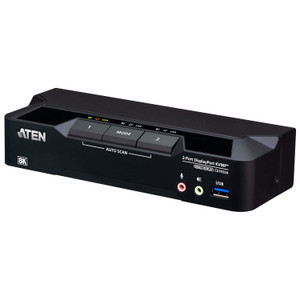
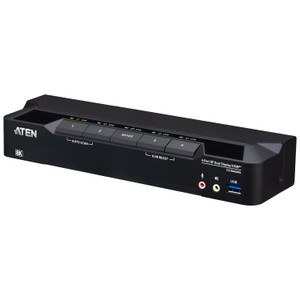
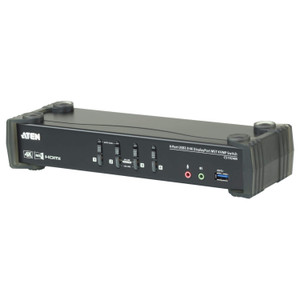
ATEN CS1924A 4-Port USB 3.0 8K DisplayPort KVMP Switch
Overview
The ATEN CS1924A is a 4-port USB 8K DisplayPort KVMP switch engineered for high-density workstation environments where operators need to control multiple computers from a single keyboard, monitor, and mouse without sacrificing display fidelity. Supporting resolutions up to 7680 x 4320 at 60Hz — true 8K — the CS1924A is the right tool when you're running a security operations center, broadcast editing suite, or engineering workstation cluster where image detail is non-negotiable. Five switching methods (hotkey, pushbutton, mouse wheel, RS-232 command, and remote port selector) mean you can integrate it into any workflow, whether the operator is hands-on at the console or the switch is being driven by an automation script.
Key Features
- 8K DisplayPort at 60Hz: Native support for 7680 x 4320 @ 60Hz means you're not downsampling on a premium 8K monitor — every pixel is driven correctly. For high-resolution video review, forensic image analysis, or large-format situational displays, this eliminates the compression artifacts that lower-tier KVM switches introduce. Also handles 5120 x 2880 @ 60Hz (5K) and 4096 x 2160 @ 240Hz (4K at 240fps) for high-refresh-rate workstation use.
- 4 Computer Connections: Control four independent systems from one console. In a security operations context, that might be a VMS workstation, a network management console, a recording server terminal, and an admin PC — all switchable in under a second without physically touching each machine.
- 5 Port Selection Methods: Hotkey sequences, front-panel pushbutton, mouse wheel scroll, RS-232 serial commands, and an external remote port selector give you flexibility to match the switching method to the environment. RS-232 command control is particularly useful for integration with room control systems or automated operator workflows.
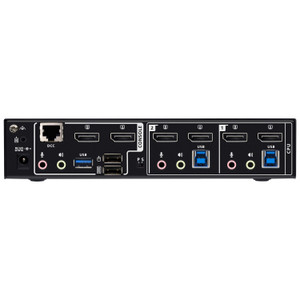
- USB 3.1 Gen1 Hub (2 ports): The built-in USB 3.1 Gen1 Type-A hub — one port on the front panel, one on the rear — provides up to 5Gbps throughput for peripheral sharing. Attach a USB drive, card reader, or external storage device and it follows the active port, so you're not re-plugging across four machines.
- 5 USB 3.0 Links (Green): Five dedicated USB links (identified by green color coding) connect to the host computers, supporting the full USB 3.0 speed tier. This matters when you're passing large files or running USB-attached storage across the switch.
- Slide Switch Station Selection: The physical slide switch for station selection adds a tactile, unambiguous fallback when hotkeys aren't practical — useful in high-stress environments where an operator needs certainty about which machine is active.
- Configurable Scan Interval (1–99 seconds): Auto-scan cycles through all connected ports on a timer you set between 1 and 99 seconds (default 5). For monitoring displays that need to cycle through multiple server consoles, this removes the need for manual switching entirely.
- Firmware Upgradeable: Current firmware is v1.0.063 (released 2025-12-26), upgradeable via the published zip package. Keeping firmware current matters for compatibility with new GPU drivers and DisplayPort protocol revisions — the CS1924A supports field updates so you're not locked to the factory build.
- Operating Humidity 0–80% RH Non-Condensing: Covers standard data center and server room humidity ranges without requiring additional environmental controls.
Integration and Compatibility
The CS1924A uses USB for keyboard and mouse connections, making it broadly compatible with modern workstations running any major OS that supports standard USB HID. The RS-232 command interface allows the switch to be integrated with room automation controllers, building management systems, or custom scripts — useful in NOC and SOC buildouts where switching needs to be triggered by external logic rather than an operator action. The remote port selector input extends physical control beyond the immediate console location, which matters in rack-mounted deployments where the front panel isn't accessible from the operator position.
For rack deployments: note that ATEN documents physical dimensions for some rack products using L x W x H format rather than the standard W x D x H — verify orientation before cutting rack space. The CS1924A uses KVM switch cabling that should be matched to the DisplayPort and USB 3.0 connector types on each connected host. Pair with a ATEN KVM accessories line for compatible cables and remote port selectors from the same platform.
If you're evaluating this against other options in the DisplayPort KVM switch category, the defining differentiator here is the 8K/60Hz ceiling — most competing units top out at 4K/60Hz. If your monitors are 4K or lower, a lower-cost 4-port unit in the same family may be sufficient. If you're running 5K or 8K displays, or you anticipate upgrading to them, the CS1924A is the correct model. For environments that need more than 4 ports, consider a higher-port-count variant in the ATEN KVMP line. For deployments requiring matrix switching (multiple monitors, multiple computers in a true any-to-any configuration), review ATEN's matrix KVM product family — a standard 4-port KVMP is point-to-point, not matrix.
Frequently Asked Questions
Q: What is the maximum resolution the CS1924A supports?
A: The CS1924A supports up to 7680 x 4320 (8K) at 60Hz over DisplayPort. It also supports 5120 x 2880 at 60Hz (5K) and 4096 x 2160 at 240Hz (4K high-refresh).
Q: How many computers can I connect to the CS1924A?
A: The CS1924A supports 4 computer connections, all switchable from a single keyboard, monitor, and mouse.
Q: What switching methods does the CS1924A support?
A: Five methods: front-panel pushbutton, hotkey sequences, mouse wheel, RS-232 serial commands, and an external remote port selector. This makes it compatible with both manual operator workflows and automated/integrated control systems.
Q: Does the CS1924A include a USB hub?
A: Yes. There are 2 x USB 3.1 Gen1 Type-A ports (one front, one rear) for peripheral sharing, plus 5 USB 3.0 links for host computer connections.
Q: Can the CS1924A auto-scan through connected computers?
A: Yes. The scan interval is configurable from 1 to 99 seconds, with a factory default of 5 seconds. This allows hands-free cycling through all connected ports.
Q: Is the CS1924A firmware upgradeable?
A: Yes. The current firmware is v1.0.063 (released 2025-12-26) and is field-upgradeable via a downloadable zip package from ATEN's support site.
The CS1924A's 7680 x 4320 @ 60Hz DisplayPort ceiling is what sets it apart from the bulk of 4-port KVM switches on the market — most cap at 4K/60Hz, which is already obsolete in a studio or SOC environment running 5K or 8K reference monitors. If you're building a 4-seat console for a security operations center with large-format displays, this is the switch to spec.
Technical Highlights:
- 8K/60Hz DisplayPort: Full 7680 x 4320 at 60Hz with no signal degradation — critical when the monitor investment exceeds the switch budget by an order of magnitude and you can't afford a KVM bottleneck dropping your display to 4K.
- RS-232 Command Control: Serial switching integration means the CS1924A can be driven by a Crestron, AMX, or custom room controller — useful when the KVM switch is part of a larger integrated console where manual pushbutton isn't the primary interaction model.
- Configurable Auto-Scan (1–99s): The wide scan interval range accommodates both rapid-cycle monitoring (1–3 seconds for quick health checks across servers) and slow-rotation display walls (30–60 seconds for unattended operator displays).
Deployment Considerations:
- The rack-mount form factor means the front panel pushbutton and front USB 3.1 port need to be accessible from the operator position — verify rack depth and cable management before finalizing console layout, especially in deep 2-post racks where the front panel recesses significantly.
- USB keyboard and mouse only — no PS/2 legacy support. This is a non-issue for any modern workstation build, but worth confirming if you're integrating with older server hardware that relies on PS/2 console ports via a separate adaptor chain.
Best fit: a 4-seat security operations center or broadcast editing suite where operators share high-end 5K or 8K DisplayPort monitors and need both hands-on console switching and the option to integrate port selection into a room control system via RS-232.