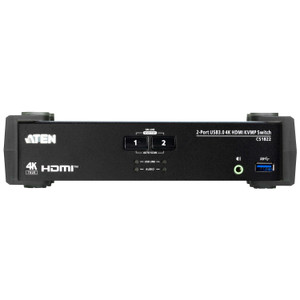
ATEN CS1792 2-Port HDMI KVMP Switch with USB Hub
The ATEN CS1792 is a 2-port USB HDMI KVMP switch designed for control room operators, integrators, and IT staff who need to drive a single HDMI monitor and a single USB keyboard/mouse setup across two computers — without the clutter of duplicate peripherals on the desk. With support for resolutions up to 1920x1200 @ 60Hz, the CS1792 handles full 1080p video and wide-format displays equally well, making it a practical fit for security workstations running a VMS alongside an administrative machine. Browse the full ATEN KVM and switching line to compare models in this family.
Key Features
- Dual-resolution HDMI video (1920x1080 and 1920x1200 @ 60Hz): The CS1792 supports both standard 1080p and the taller 1920x1200 wide-format resolution at 60Hz. That matters if your operator monitors are WUXGA-native — you won't be forced to downscale or compromise refresh rate. Both computers share a single HDMI display with no signal degradation between switches.
- Three switching methods — hotkey, pushbutton, and auto-scan: Operators can switch between computers using front-panel pushbuttons (three buttons total), keyboard hotkey sequences, or automated scanning across both ports. The scan interval is user-configurable from 1 to 99 seconds (default 5 seconds), so a single operator can monitor both systems passively without touching the switch. This flexibility suits environments where policy dictates hands-free monitoring during certain windows.
- Built-in 2-port USB hub (front and rear): Two USB Type-A female ports — one on the front panel, one on the rear — provide shared USB device access across both connected computers. Plug in a USB storage device, CAC reader, or other peripheral once and share it between both systems as you switch. The front port is convenient for temporary device connections; the rear suits fixed peripheral installs.
- USB keyboard and mouse support: The CS1792 handles USB HID input natively — no PS/2 adapters, no legacy connectors to manage. Standard USB keyboards and mice connect directly, and emulation is handled by the switch so both computers respond correctly even when not selected.
- Pushbutton port selection with LED status indicators: Three pushbuttons on the front face provide direct port selection, and USB status LEDs (green, 3 indicators) give an at-a-glance read on which computer is active and USB hub state. In a busy control room, visual confirmation of the active port matters.
- Auto-scan with configurable 1–99 second interval: Set the scan dwell time to match your workflow — a 10-second interval works for a two-screen security review; a longer interval suits a passive monitoring setup where the operator glances rather than acts. The default 5-second interval is aggressive enough to catch alerts but can be lengthened to reduce operator fatigue.
- Firmware upgradeable (v1.4.134, released 2023-04-14): The CS1792 supports firmware updates, meaning ATEN can push compatibility and stability fixes post-deployment. The current release (CS1792-94-v1.4.134.zip) is available from ATEN directly. Firmware updateability is a real operational advantage in enterprise environments with long refresh cycles — you're not locked to launch-day behavior.
- 0–80% non-condensing humidity tolerance: The humidity envelope covers most indoor commercial and light-industrial environments. This isn't a sealed industrial unit, so avoid deployments in unconditioned spaces with humidity swings — a temperature-controlled server room or operator workstation area is the intended habitat.
Integration and Compatibility
The CS1792 connects two KVM-ready computers via USB and HDMI — no proprietary cables required for the video run. The USB hub ports (Type-A female) accept standard USB 2.0 peripherals. Hotkey switching sequences are standard ATEN conventions, so operators familiar with other ATEN KVM products will not need retraining. This switch does not require driver installation for basic KVM operation; the USB HID emulation handles keyboard and mouse handoff natively.
For integrators building out a security operations center or an IT workstation with a primary and backup machine, pair the CS1792 with a quality HDMI display capable of 1920x1200 to take full advantage of the resolution headroom. Consider also reviewing KVM cables and accessories to ensure proper cable lengths for your rack or desk layout. If your deployment involves more than two sources, evaluate higher-port-count models in the ATEN desktop KVM family before committing.
The CS1792 is rack-mountable — note ATEN's spec sheet convention that physical dimensions for rack-mount products are expressed as LxWxH rather than the standard WxDxH format, so verify orientation before ordering a rack tray or shelf.
Frequently Asked Questions
Q: What video resolutions does the CS1792 support?
A: The CS1792 supports 1920x1080 @ 60Hz (standard 1080p) and 1920x1200 @ 60Hz (WUXGA wide-format). Both resolutions run at 60Hz over HDMI.
Q: How many computers can the CS1792 control?
A: The CS1792 connects two computers to a single HDMI monitor, USB keyboard, and USB mouse. It is a 2-port switch — for more than two sources, a higher-port-count model is required.
Q: What switching methods does the CS1792 support?
A: Three methods: front-panel pushbutton (3 buttons), keyboard hotkey sequences, and auto-scan. The auto-scan interval is configurable from 1 to 99 seconds, with a default of 5 seconds.
Q: Does the CS1792 include a USB hub, and how many ports does it have?
A: Yes. The CS1792 has two USB Type-A female hub ports — one on the front panel and one on the rear panel — for sharing USB peripherals between both connected computers.
Q: Can the CS1792 firmware be updated?
A: Yes. The current firmware version is v1.4.134 (released 2023-04-14). Firmware update files are available from ATEN's support site.
Q: Is the CS1792 rack-mountable?
A: Yes, the CS1792 supports rack mounting. ATEN notes that dimensions for rack-mount products in their line are expressed in LxWxH format rather than the conventional WxDxH — factor this in when planning your rack layout or ordering mounting hardware.
The CS1792 gets specified regularly in two-workstation control room builds where an operator needs to run a VMS machine and an admin or IT machine off one monitor and one input set. The 1920x1200 @ 60Hz ceiling is the spec that often closes the deal — WUXGA monitors are common in professional ops environments, and a switch that tops out at 1080p would either force a downscale or require a second display. The CS1792 avoids that compromise entirely.
Technical Highlights:
- 1920x1200 @ 60Hz HDMI output: Full WUXGA resolution at 60Hz — covers both standard 1080p and taller wide-format displays without needing to reconfigure the monitor on every switch. Critical when your operator display is WUXGA-native.
- Auto-scan, 1–99 second configurable interval: The adjustable dwell time is genuinely useful in single-operator monitoring scenarios. Set it to 15–20 seconds and the CS1792 cycles both computers passively — no manual switching required during low-activity windows.
- Front + rear USB hub ports (2x Type-A female): Having both a front and rear hub port means you can permanently wire a rear USB peripheral (smart card reader, authentication dongle) while keeping the front port free for temporary devices. A small detail that matters in credentialed-access environments.
Deployment Considerations:
- The CS1792 is USB HID only — no PS/2 support. Verify that both connected computers have available USB ports before deploying; legacy systems using PS/2 keyboards or mice are not compatible without an active adapter, which adds latency and a potential failure point.
- Humidity tolerance is rated to 80% non-condensing. This is fine for any conditioned office or control room, but do not deploy in an unconditioned equipment closet with temperature cycling — condensation risk is real and voids the operating envelope.
Best fit: two-seat security operations workstations where one machine runs the VMS (Milestone, Genetec, Exacq, or similar) and a second handles administrative or IT functions — the CS1792 keeps the desk clean and the monitor consistent without adding a second display or a second input set to manage.