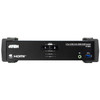
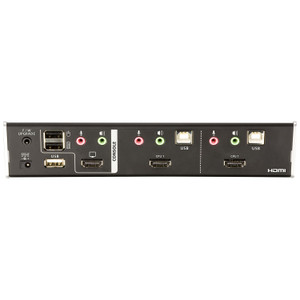
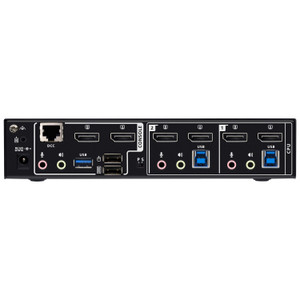
Product images are provided for reference and may not represent the exact model, configuration, or included components.

Overview

SKU: CS1822
UPC: 672792011160
Condition: New
Write a Review 30% OFF

ATEN 2-PORT 4K60 Single View HDMI Kvmp - CS1822

ATEN CS1822 2-Port 4K60 Single View HDMI KVMP SwitchOverviewThe ATEN CS1822 is a 2-port KVMP switch that lets a single keyboard, mouse, and HDMI displ…

$399.00 $280.99 SAVE $118
Ships same business day
In stock

Quantity:

Adding to cart… The item has been added
Compatibility guidance available for your deployment
Senior specialists for pre and post-sales support
Authorized sourcing and documentation support
Shipping and lead-time confirmation before install

Laura Bennett, IPSD Senior Specialist

Talk to Laura

200+ hrs training • U.S - based

Senior Specialist • 877-277-7147

ATEN 2-PORT 4K60 Single View HDMI Kvmp - CS1822

$399.00
$280.99

Overview

SKU: CS1822
UPC: 672792011160
Condition: New

No Bots, Just Experts

Questions about this product? Free pre-sales support from a senior specialist — product questions, compatibility checks, BOM quotes, price confirmation — typically answered within one business day. Need camera placement or system design work? Engineering time is $175 per hour (qty 1 = 1 hour). Hardware buyers get up to one hour ($175) credited back on their order.

Description

ATEN CS1822 2-Port 4K60 Single View HDMI KVMP Switch

Overview

The ATEN CS1822 is a 2-port KVMP switch that lets a single keyboard, mouse, and HDMI display control two computers without any re-cabling — practical in operator workstations, control rooms, or IT desks where desk space is limited but two systems need to stay accessible. It passes video at up to 4096 x 2160 @ 60Hz, so 4K content from either host renders without downscaling. The CS1822 also doubles as a USB 3.1 Gen1 hub, giving connected peripherals fast transfer speeds rather than forcing a separate hub onto the desk.

Compatibility

Connects any two computers with USB keyboard/mouse and HDMI video output — no proprietary connectors required. The USB 3.1 Gen1 Type-A hub ports (one front, one rear) support standard USB peripherals including external drives, card readers, and cameras. Port selection works via four methods: front-panel pushbutton, hotkey sequences, mouse switching, or RS-232 commands, making it compatible with automation and remote-management environments where physical button access isn't practical. Audio support is provided via 2 green 3.5mm analog audio connectors, compatible with standard headsets and powered speakers. The switch also supports 2560 x 1440 @ 144Hz for high-refresh-rate monitors, covering both 4K productivity and high-framerate display setups from the same unit.

Installation Notes

Rack-mount form factor — plan for standard 1U rack space. Scan interval is user-configurable from 1 to 99 seconds (default 5 sec.), adjustable via hotkey. Operating humidity limit is 0–80% RH non-condensing; avoid environments with condensation risk. Firmware is field-upgradeable; current release is v1.1.105 (released 2025-08-01), downloadable as cs1822-cs1824-v1.1.105.zip from the ATEN support site.

Specifications
Mount Type: Rack
Audio: 2 (Green)
Computer Connections: 2
Port Selection: Hotkey, Pushbutton, Mouse, RS-232 Commands
Usb Hub: 2 x USB3.1 Gen1 Type A Female (Blue; 1 x front; 1 x rear)
Selected: 2 x Pushbutton
Keyboard / Mouse: USB
Video: Up to 4096 x 2160 @ 60Hz, 2560 x 1440 @ 144Hz
Scan Interval: 1-99 Seconds (Default: 5 sec.)
Humidity: 0-80% RH, Non-condensing
Firmware Upgrade: v1.1.105
Q&A
Reviews
Have Questions?

RELATED PRODUCTS

System Design, Deployment & Technical Support

Support services and planning resources for commercial surveillance, access control, and infrastructure deployments.

Fixed scope • Fixed price

System Design Assistance

  • Get help validating product compatibility
  • Coverage requirements
  • Storage planning and deployment architecture before you buy.
Request Design Help

Deployment & Configuration Support

  • Access fixed-scope support for rollout planning
  • User setup guidance
  • Migration and system standardization across single-site or multi-site deployments
View Support Services

Guides, Tools & Calculators

  • PoE requirements
  • Storage retention
  • Camera selection and deployment methodology
Open Technical Resources