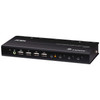
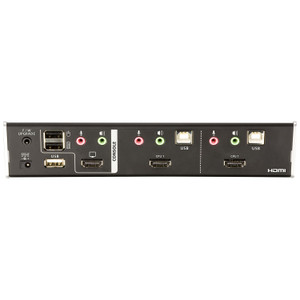
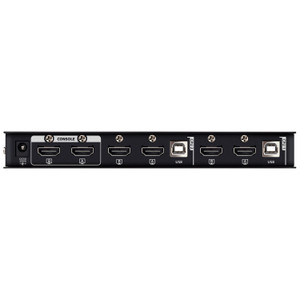
ATEN CS784H 4-Port USB 4K HDMI KVMP Switch
The ATEN CS784H is a 4-port USB KVMP switch built for professionals who need to drive a single 4K display from up to four computers without touching a cable. With support for resolutions up to 4096 x 2160 @ 60Hz and an integrated USB 2.0 hub, the CS784H consolidates your keyboard, mouse, and peripheral connections in one rack-mountable unit — a practical fit for trading desks, control rooms, broadcast suites, and server-adjacent workstations where desk space and cable discipline matter.
Overview
Browse the full ATEN KVM switch lineup to compare models by port count, resolution tier, and interface type. The CS784H sits in ATEN's desktop-to-rackmount 4K HDMI KVMP family, targeting users who need genuine 4K throughput — not downscaled 4K — at the display output. The 4096 x 2160 ceiling covers DCI 4K (cinema-standard), while the simultaneous 5120 x 1440 @ 60Hz capability means ultrawide monitor users aren't left out.
Four methods of port switching — pushbutton, hotkey, mouse (scroll-wheel port cycling), and a remote port selector — give you flexibility depending on whether the unit is mounted in a rack or sitting on a desk. The 1–99 second configurable scan interval lets you set up an automatic display rotation, useful for monitoring multiple systems from a single screen.
Key Features
- 4K DCI Resolution (4096 x 2160 @ 60Hz): Full DCI 4K passthrough at 60Hz means no frame-rate penalty on high-refresh 4K monitors. Suitable for color-critical workflows or any environment where 4K @ 30Hz is not acceptable. The CS784H also handles 5120 x 1440 @ 60Hz, covering dual-QHD ultrawide panels without compromise.
- 4-Computer Connections via USB: Four independent computer sources share one display, keyboard, and mouse. USB keyboard/mouse connectivity means broad OS compatibility without proprietary driver dependencies — connect Windows, Linux, or macOS hosts to the same switch.
- Four Switching Methods (Hotkey, Pushbutton, Mouse, Remote Port Selector): Pushbutton switching is front-panel immediate; hotkey sequences work without leaving the keyboard; mouse-based switching (scroll-wheel) is fast for power users; the remote port selector option allows switching from a distance when the unit is rack-mounted and the front panel isn't reachable.
- Front-Panel USB 2.0 Hub (2 x USB 2.0 Type-A): Two USB 2.0 ports on the front panel act as a shared hub across all connected computers. Plug in a USB drive, card reader, or dongle once — it follows whichever computer is currently selected. No need to re-plug peripherals when switching sources.
- Configurable Auto-Scan (1–99 Seconds): The default 5-second scan interval cycles through all active ports automatically. Extend it to 99 seconds for a slower visual sweep of connected systems, or tighten it to 1 second for rapid status checks. Useful in monitoring environments where unattended display rotation is needed.
- Orange LED Port Indicators (×4, On Line/Selected): Four dedicated orange LEDs show which ports are online and which is currently selected. At a glance — from across a rack row — you know the active source without reading a software dashboard.
- Rack-Mount Form Factor: The CS784H is designed for rack installation, keeping it out of the way in structured cable environments. Rack mounting also keeps it accessible for port switching without requiring the unit to occupy desk or monitor-arm real estate.
- Firmware Upgradeable (v1.1.101, released 2025-10-28): Field-upgradeable firmware means ATEN can push compatibility and feature updates post-deployment. The current release (v1.1.101) is current as of late 2025, and the upgrade path via zip file is straightforward for IT staff.
Integration & Compatibility
The CS784H connects to host computers via USB for keyboard and mouse input — no PS/2 adapters, no legacy connectors. Video output is HDMI, so the target display needs a native HDMI input or an active adapter; passive DisplayPort-to-HDMI adapters may not pass 4K @ 60Hz reliably, so verify your adapter's specification before deployment.
The USB 2.0 hub ports on the front panel are shared peripherals that switch with the active port selection. Note that USB 2.0 is the hub tier here — USB 3.x devices will enumerate and function at USB 2.0 speeds through the hub. For bandwidth-sensitive peripherals (fast SSDs, USB audio interfaces), connect them directly to the host rather than through the hub.
For environments running multiple KVM switches in a larger AV or IT control setup, check ATEN's cascade and daisy-chain documentation for the CS784H to confirm multi-unit topologies. The remote port selector option is particularly useful when integrating into a structured rack environment where front-panel access is limited.
Operating humidity is rated 0–80% RH non-condensing — standard for climate-controlled server rooms and control rooms. For deployments in environments with higher ambient humidity (industrial floors, certain broadcast facilities), confirm the installation space meets this threshold before commissioning.
For guidance on planning a multi-monitor KVM deployment or selecting the right switch for your workstation density, see the KVM switch selection guide. If you're pairing the CS784H with a rack-mounted display or KVM extender, consider reviewing compatible rack accessories in the same category. Additional ATEN switching and connectivity products are available for multi-port and extended-distance deployments.
Frequently Asked Questions
Q: How many computers can the CS784H connect to a single display?
A: The CS784H supports four computer connections. All four share one HDMI display, one USB keyboard, and one USB mouse through the switch.
Q: What is the maximum resolution supported by the CS784H?
A: The CS784H supports up to 4096 x 2160 @ 60Hz (DCI 4K) and also handles 5120 x 1440 @ 60Hz for ultrawide monitors.
Q: What switching methods does the CS784H support?
A: Four methods are available: front-panel pushbutton, hotkey sequences via keyboard, mouse-based switching (scroll-wheel), and a remote port selector for rack-mounted installations where front-panel access is limited.
Q: Does the CS784H include USB ports for peripherals?
A: Yes. Two USB 2.0 Type-A ports are located on the front panel and function as a shared hub. Connected peripherals (USB drives, card readers, etc.) switch to whichever computer is currently selected. Note that hub throughput is USB 2.0 speed.
Q: Can the CS784H be rack-mounted?
A: Yes, the CS784H is designed for rack mounting. It also supports a remote port selector accessory, which is useful when the front panel is not easily reachable in a rack installation.
Q: Is the CS784H firmware upgradeable in the field?
A: Yes. Firmware v1.1.101 (released 2025-10-28) is available as a downloadable zip file from ATEN. Field upgrades allow IT staff to apply compatibility and feature updates without replacing the unit.
When I spec a KVM switch for a control room or trading desk build, the display resolution ceiling is the first thing I confirm — and the CS784H clears the bar at 4096 x 2160 @ 60Hz, which means DCI 4K at full frame rate with no compromise. That spec matters the moment a client brings in a 4K reference monitor and wants every connected workstation to drive it natively.
Technical Highlights:
- 4096 x 2160 @ 60Hz HDMI output: True DCI 4K at 60fps — not upscaled, not 30Hz. For color-critical work (broadcast, post-production, financial display walls), this is the floor you need, not a stretch spec.
- Four switching methods including remote port selector: Pushbutton + hotkey + mouse cycling covers desktop use; the remote port selector is the one that changes the installation equation — it means the CS784H can sit deep in a rack and still be operated from the front of the room without a ladder or a reach.
- Configurable auto-scan (1–99 seconds, default 5 sec): For NOC or monitoring installs, set a 10–30 second rotation and the CS784H becomes a lightweight display multiplexer — no additional software, no VMS license overhead.
Deployment Considerations:
- The USB hub runs at USB 2.0 speeds regardless of the device plugged in. If a connected peripheral requires USB 3.x bandwidth (fast portable drives, USB audio at high sample rates), wire it directly to the host — don't route it through the CS784H hub ports.
- Operating humidity ceiling is 0–80% RH non-condensing. Standard for IT rooms, but worth confirming on industrial floor or outdoor-adjacent deployments before you mount it.
The CS784H is the right call for a 4-workstation 4K control room or broadcast monitoring suite where a rack-mounted KVM with full DCI 4K throughput and flexible remote switching is the requirement — and where you don't need to step up to a matrix switch just to handle four sources.