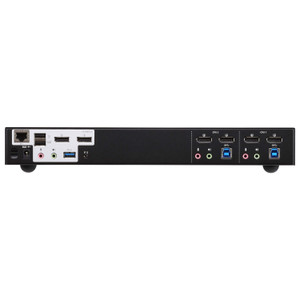
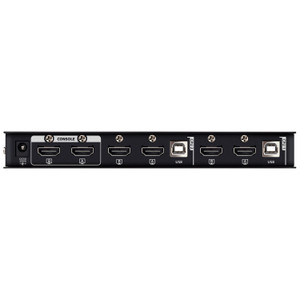
ATEN CS1844 4-Port USB 3.0 4K Dual Display KVMP Switch
The ATEN CS1844 is a 4-port KVMP switch that lets a single operator control four computers through one pair of USB keyboard and mouse inputs and two 4K HDMI displays — without re-cabling, reconfiguring, or compromising on resolution. Targeted at broadcast editing suites, control rooms, and dense workstation environments where monitor real estate is fixed but the number of systems is not, the CS1844 keeps every connected machine at full 4096 x 2160 @ 60 Hz across both displays.
Overview
Running four independent computers from a single console is standard practice in network operations centers, financial trading desks, and production editing bays — but most KVM solutions force a resolution compromise or limit you to a single display. The CS1844 resolves both constraints: dual independent HDMI outputs at true 4K/60Hz, four computer connections, and a USB 3.1 Gen1 hub accessible from any active port. Switching between systems takes under two seconds via pushbutton, hotkey, mouse trigger, RS-232 command, or remote port selector — whichever fits your workflow. Scan mode cycles stations at a user-configurable 1–99 second interval (default 5 sec), useful for monitoring multiple systems without touching the keyboard.
Key Features
- Dual 4K HDMI at 60 Hz: Both outputs support up to 4096 x 2160 @ 60 Hz — that is full DCI 4K, not UHD 3840 x 2160. For high-refresh applications like CAD or gaming workstations, 2560 x 1440 @ 144 Hz is also supported. You are not giving up display bandwidth just because you are sharing a console.
- Four Computer Connections: Connect four discrete PCs, workstations, or servers and switch between them without swapping cables. Each port maintains its connection state when not active, so all four machines stay running, logged in, and network-visible.
- Five Port-Selection Methods: Hotkey sequences, front-panel pushbuttons, mouse-triggered switching, RS-232 serial commands, and an external remote port selector all supported simultaneously. In a rack installation where the front panel is behind a door, RS-232 command switching or the remote selector keeps operations accessible without opening the enclosure.
- USB 3.1 Gen1 Hub (Two Ports): Two Type-A USB 3.1 Gen1 ports (one front, one rear, both blue) are available to the active computer — transfer speeds up to 5 Gbps. Plug in a USB storage device, CAC reader, or peripheral once; it follows whichever computer is currently selected. No separate USB switch required.
- Configurable Auto-Scan (1–99 Seconds): Auto-scan sweeps through all connected stations at an interval you set between 1 and 99 seconds. Operators monitoring multiple servers or render nodes can watch all four systems cycle on screen without a second person at the console. Default is 5 seconds — fast enough to catch a fault, slow enough to read status.
- RS-232 Command and Remote Selector Support: Beyond the local panel, switching can be triggered over RS-232 serial — useful for integration into control system platforms (AMX, Crestron, custom scripts) where KVM port selection needs to follow an automation workflow rather than manual input.
- Single Slide Switch Station Selection: A physical slide switch on the unit provides direct, tactile station selection. In environments where a missed hotkey sequence or a software hang makes software-driven switching unreliable, the hardware slide gives you a guaranteed fallback.
- Audio — 5 × 3.5mm Green Jacks: Five green 3.5mm audio connections accommodate stereo speaker output for each console position. Active audio follows the selected computer port — no separate audio matrix required for standard two-channel monitoring.
- Humidity Tolerance to 80% RH Non-Condensing: Rated to 0–80% relative humidity non-condensing. Adequate for standard computer room and rack enclosure environments; not rated for outdoor or high-condensation industrial spaces.
- Active Firmware (v1.1.107, Released 2025-08-01): Firmware is current and publicly downloadable. An actively maintained firmware revision history indicates ongoing platform support — relevant if display compatibility or USB enumeration issues arise with newer operating systems or graphics cards.
Integration and Compatibility
The CS1844 uses USB keyboard and mouse inputs, making it broadly compatible with Windows, macOS, and Linux workstations without driver installation. The RS-232 command interface opens direct integration paths to room control systems and custom automation scripts — a meaningful feature for broadcast, control room, and AV-over-IP deployments where switching events need to be scripted or triggered by an external controller. The dual HDMI outputs pair naturally with any monitor, capture card, or display processor accepting HDMI 2.0 input at 4K/60Hz. For deployments with KVM switch infrastructure across multiple racks, the remote port selector accessory extends switching capability without requiring physical access to the unit. Explore the full ATEN switching and connectivity catalog for compatible extenders and accessories. If your console setup involves mixed DisplayPort and HDMI displays, note that the CS1844 is HDMI-only on both outputs — factor that into monitor selection or budget for active adapters. For rack planning guidance, the network infrastructure category covers complementary switching and cabling options. Those building out operator console environments should also review KVM accessories for compatible cables, extenders, and port selector hardware.
Frequently Asked Questions
Q: How many computers can the ATEN CS1844 control simultaneously?
A: The CS1844 supports four computer connections. Only one computer is active at the console at a time, but all four remain powered and network-connected when not selected.
Q: What is the maximum video resolution the CS1844 supports?
A: The CS1844 supports up to 4096 x 2160 (DCI 4K) at 60 Hz on both HDMI outputs. It also supports 2560 x 1440 at 144 Hz for high-refresh-rate displays.
Q: Can the CS1844 be switched remotely without using the front panel?
A: Yes. The CS1844 supports five switching methods: hotkey sequences, front-panel pushbuttons, mouse-triggered switching, RS-232 serial commands, and an external remote port selector. RS-232 and the remote selector work without physical access to the front panel.
Q: What USB standard does the CS1844 hub support?
A: The integrated USB hub provides two USB 3.1 Gen1 Type-A ports (one front-panel, one rear) running at up to 5 Gbps. Both ports are available to whichever computer is currently selected.
Q: What is the auto-scan interval on the CS1844?
A: Auto-scan interval is user-configurable from 1 to 99 seconds. The factory default is 5 seconds.
Q: Is the CS1844 rack-mountable?
A: Yes, the CS1844 is designed for rack mounting. Note that ATEN expresses rack-mount product dimensions in L x W x H format rather than the standard W x D x H convention.
The CS1844 earns its place in dense operator console builds specifically because of dual independent 4K/60Hz HDMI outputs — not single-monitor switching padded with a second passive output, but two full-bandwidth 4096 x 2160 channels simultaneously. For a four-machine console that's a meaningful spec, and it's what separates this unit from the lower-end ATEN 1842 which tops out at a single display path.
Technical Highlights:
- Dual 4K/60Hz HDMI: Both outputs run full 4096 x 2160 at 60 Hz — or 2560 x 1440 at 144 Hz for high-refresh workstations. Neither display is a secondary or mirrored output; both are independent signal paths to the selected computer.
- Five Switching Methods incl. RS-232: Most operators will use hotkeys or the pushbutton, but RS-232 command switching is the one that matters in AV control room installs — it lets a Crestron or AMX controller trigger KVM port changes as part of a larger scene macro without anyone touching the physical unit.
- USB 3.1 Gen1 Hub (Front + Rear): The front-panel USB port is the practical one — plug in a CAC reader, a USB key, or a hardware token and it follows the active session at up to 5 Gbps. The rear port suits a fixed peripheral you want always available but out of the way.
Deployment Considerations:
- The RS-232 command interface requires a serial connection to the controlling system — budget for a USB-to-RS-232 adapter at the controller end if your automation platform doesn't have a native COM port.
- The CS1844 is HDMI-only on both display outputs. If your monitors or capture cards use DisplayPort, you will need active HDMI-to-DP adapters rated for 4K/60Hz — passive adapters will not carry 4K at this bandwidth reliably.
This unit fits best in broadcast edit suites, NOC operator consoles, and financial trading environments where an operator legitimately runs three to four workstations from a fixed dual-monitor desk and cannot afford the display resolution or refresh-rate penalty that cheaper KVM solutions impose.