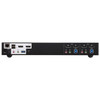
ATEN CS1942DP 2-Port USB 3.0 4K Dual Display DisplayPort KVMP Switch
Overview
The ATEN CS1942DP is a 2-port KVMP switch engineered for dual-monitor 4K DisplayPort workstation environments where a single operator needs clean, fast control of two computers — without swapping cables or accepting compromised resolution. Supporting up to 4096 x 2160 @ 60Hz per display, the CS1942DP keeps native 4K on both screens across both sources, which matters when your secondary computer feeds a high-resolution reference display or a second CAD viewport. Browse the full ATEN KVM and control solutions line for additional port counts and form factors.
Key Features
- 4K UHD Dual-Display Output (4096 x 2160 @ 60Hz): Both DisplayPort outputs run full 4K at 60Hz — not downscaled, not interlaced. If you're driving two 4K monitors from two workstations, you stay at native resolution on both displays at all times. The switch also supports 2560 x 1440 @ 144Hz for users running high-refresh QHD panels, so gaming workstations or motion-graphics rigs stay in sync at full frame rate.
- Four Port-Selection Methods (Hotkey, Pushbutton, Mouse, RS-232): Switching happens however your workflow demands — a physical button on the unit, a keyboard hotkey sequence, a mouse-trigger, or RS-232 serial commands for scripted or rack-managed environments. RS-232 control in particular is useful in broadcast or operations-center racks where KVM switches are managed alongside other serial-controlled gear from a central console.
- USB 3.1 Gen1 Hub (2 x Type-A, Blue): The integrated USB hub provides two SuperSpeed USB 3.1 Gen1 Type-A ports — one on the front panel for fast peripheral access (thumb drives, card readers), one on the rear for a permanently wired device. Both follow the active computer, so your USB storage or DAC is always connected to whichever source is in focus without replugging.
- 3 USB Link Ports (Green): The three green USB link ports handle keyboard, mouse, and a dedicated peripheral that persists across the switch — letting you keep a shared input device (such as a USB audio interface or security dongle) active regardless of which computer is selected. This is distinct from the hub ports: link ports are always-on, hub ports follow the active source.
- Configurable Scan Interval (1–99 Seconds): Auto-scan cycles through both connected computers at an operator-defined interval from 1 to 99 seconds (default 5 seconds). For monitoring workflows where both machines need periodic visual checks — build servers, log dashboards, render nodes — this removes the need for manual switching.
- Slide Switch Station Selection: A dedicated slide switch on the unit provides tactile, at-a-glance station selection independent of software state. In environments where the host OS may be unresponsive or mid-boot, the physical slide switch still routes the display and input correctly.
- RS-232 Command Control: Serial command integration means the CS1942DP can be scripted into a larger control system — AV control processors, IP-to-serial converters, or NOC automation scripts. This is not a feature you find on consumer-grade 2-port switches and it's one of the key differentiators for professional KVM switch deployments.
- Firmware Field-Upgradeable (v1.1.106, October 2025): ATEN ships firmware updates for the CS1942DP — the current release is v1.1.106 (2025-10-01). Field-upgradeable firmware means bug fixes and compatibility updates can be applied without hardware replacement, which extends the useful life of the switch in long-cycle IT environments.
Integration and Compatibility
The CS1942DP connects to computers via USB (keyboard and mouse) and DisplayPort video — both of which are standard on modern workstations, CAD systems, and video conferencing infrastructure. The RS-232 command interface integrates with serial-capable control systems for automated source switching in broadcast, operations, or managed AV environments. The USB 3.1 Gen1 hub is compatible with any USB 3.0/3.1 host, with backward compatibility to USB 2.0 peripherals. Operating humidity tolerance is 0–80% RH non-condensing, which covers standard office and light-industrial control-room environments without additional climate control requirements.
For rack-deployed configurations, note that ATEN documents physical dimensions for certain rack-mount products using an L x W x H format rather than the conventional W x D x H — verify orientation when planning rack mount depth clearance.
Frequently Asked Questions
Q: How many computers can the CS1942DP control simultaneously?
A: The CS1942DP supports 2 computer connections. It switches keyboard, mouse, and dual DisplayPort video between two sources — one active at a time.
Q: Does the CS1942DP support 4K at 60Hz on both displays?
A: Yes. Both DisplayPort outputs support up to 4096 x 2160 @ 60Hz. It also supports 2560 x 1440 @ 144Hz for high-refresh-rate QHD configurations.
Q: What are the four ways to switch between computers?
A: You can switch using a front-panel pushbutton, keyboard hotkey sequence, mouse trigger, or RS-232 serial commands. The slide switch on the unit also provides direct station selection.
Q: What is the difference between the blue USB hub ports and the green USB link ports?
A: The two blue USB 3.1 Gen1 Type-A ports form the hub — they follow the active computer source and switch with it. The three green USB link ports are always-on connections that remain active regardless of which computer is currently selected, suitable for shared peripherals like audio interfaces or security dongles.
Q: Can the CS1942DP be controlled via serial commands in a managed rack environment?
A: Yes. RS-232 command control is a supported port-selection method, making it compatible with AV control processors, IP-to-serial gateways, and scripted NOC automation.
Q: Is the firmware on the CS1942DP field-upgradeable?
A: Yes. ATEN provides firmware updates for the CS1942DP. The current firmware version is v1.1.106, released 2025-10-01, and is available as a downloadable package from ATEN's support portal.
The spec that defines the CS1942DP's use case is its dual DisplayPort output running at 4096 x 2160 @ 60Hz — not 4K at 30Hz, not downscaled on the second output. If you're putting this switch in front of a pair of 4K reference monitors shared between two workstations, you get full-resolution, full-frame-rate output on both screens across both machines. That's not a given on 2-port switches at this price tier.
Technical Highlights:
- Dual 4K @ 60Hz DisplayPort: 4096 x 2160 at 60Hz per output means no compromise on resolution or refresh — critical when one of your two computers is running a 4K video edit timeline or a high-density CAD model that can't tolerate a downscaled monitor.
- RS-232 Port Selection: Serial command switching integrates the CS1942DP into control systems — useful in broadcast booths or NOC racks where a Crestron or AMX processor already manages source routing. No one else on the desk needs to touch the unit.
- USB 3.1 Gen1 Hub + Always-On Link Ports: The color-coded port design (blue follows source, green stays live) solves a real shared-workspace problem: keep a security key or audio interface on a green link port and it never drops, while your fast USB storage on the blue port automatically migrates to whichever machine is active.
Deployment Considerations:
- RS-232 control requires a serial cable and a control system or terminal script on the managing host — plan that wiring run before rack installation, especially if the switch is mounted at the rear of a 2-post rack.
- The 0–80% RH non-condensing humidity rating covers standard office and control-room environments, but this switch is not rated for harsh or outdoor enclosures — keep it in a climate-controlled rack or desktop installation.
The CS1942DP is well-positioned for dual-workstation creative or engineering desks — specifically video production suites, architectural design stations, or security operations centers where two operators share a dual-4K monitor array and need sub-second, no-lag switching without display handshake delays.