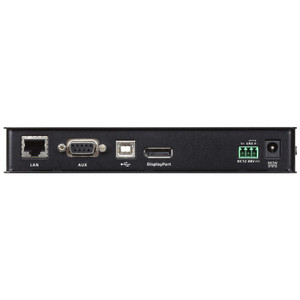
ATEN CN9950 Single-Port 4K DisplayPort KVM over IP Switch
Overview
The ATEN CN9950 is a single-port KVM over IP switch built for IT teams that need full 4K DCI resolution (4096 x 2160 at 30 Hz) over a network connection — without stepping foot in the server room. Whether you're managing a rack-mounted workstation in a remote data center closet or a dedicated engineering workstation locked in a controlled-access area, the CN9950 delivers keyboard, video, mouse, and audio access from anywhere on the network. Up to 32 users can share access to the connected system simultaneously, making it practical for NOC environments or IT support teams that need concurrent visibility without fighting over a single remote session.
The CN9950 uses DisplayPort as its video interface — the right call for environments where the target machine drives a high-resolution display natively via DP, such as CAD workstations, rendering nodes, or any system where HDMI adapters introduce signal overhead you'd rather avoid.
Key Features
- 4K DCI DisplayPort at 30 Hz: 4096 x 2160 resolution transmitted over IP means you're not downsampling the signal to manage a remote session — useful when the target machine runs precision graphics or multi-monitor layouts that depend on native DP output. At 30 Hz this is a solid fit for configuration, monitoring, and BIOS work; it's not designed for latency-sensitive real-time graphics.
- Single-Port Architecture: One server or workstation per CN9950 unit. This keeps the deployment clean in rack environments where you're pairing one KVM-over-IP node per critical machine rather than running a shared KVM matrix. Pair multiple CN9950s with a centralized management layer to scale across a rack.
- 32 Concurrent Remote Users: Up to 32 operators can connect to the same target simultaneously — practical for NOC watch floors, IT help desks, or training environments where multiple engineers need read-level visibility into the same system without standing in the server room.
- BIOS-Level Access: The CN9950 passes keyboard input before the OS loads, so you can enter BIOS/UEFI, change boot order, recover from a failed OS update, or run pre-boot diagnostics entirely over IP. This eliminates the need for a crash cart or on-site technician for many failure scenarios.
- Virtual Media Support: Mount ISO images, USB drives, or network shares as virtual media on the target machine over the IP connection — deploy OS images, run firmware updates, or transfer configuration files without physical USB access to the server.
- Dual Ethernet LAN (RJ-45): Two Ethernet ports provide network redundancy or allow the unit to sit on separate management and production VLANs simultaneously — useful in environments with strict network segmentation requirements between in-band and out-of-band management traffic.
- 5-Pin DI Control Terminal for External Sensors: A discrete input terminal accepts signals from external sensors (door contacts, temperature alarms, environmental monitors), triggering system alerts directly through the CN9950. This makes it a practical edge node for monitoring physical conditions in unmanned data closets or remote equipment rooms.
- Full Audio I/O: Two 3.5mm headphone outputs and two microphone inputs on both the local console and remote side allow two-way audio alongside the video session — relevant for video conferencing setups or systems where audio feedback from the target machine is operationally significant.
- USB 2.0 Connectivity: USB Type-B port on the computer side and USB-A console ports handle keyboard, mouse, and virtual media traffic. The Mini-USB connector supports auxiliary connectivity. This covers standard HID peripherals without requiring proprietary hardware on the target machine.
- Serial Management via RJ-45: Two RJ-45 serial ports provide out-of-band serial console access for network equipment, storage arrays, or embedded systems that expose a serial management interface — extending the CN9950's utility beyond pure KVM to cover serial-attached devices in the same rack.
- PS/2 Port: Legacy PS/2 support means the CN9950 can connect to older server hardware that lacks USB HID support — relevant in environments running legacy infrastructure alongside modern systems.
Integration and Compatibility
The CN9950 connects to any target machine with a DisplayPort video output and USB HID support, covering the broad range of modern servers, workstations, and embedded systems built on standard PC architecture. The dual-Ethernet design integrates into managed network environments with VLAN segmentation. The RJ-45 serial ports extend reach to network-attached serial devices, making the unit useful in mixed KVM-plus-serial rack management scenarios. The KVM over IP connectivity model means any operator with network access and appropriate credentials can reach the target machine — no proprietary client hardware required on the remote end. Manufactured in Taiwan.
For teams building out a KVM switch infrastructure across multiple racks, the CN9950 pairs naturally with centralized ATEN KVM management solutions and complements a broader data center networking strategy. If your environment spans multiple remote sites, consider pairing units with a managed PoE or network switch with VLAN support to enforce management-plane isolation. Teams evaluating remote access for physical infrastructure may also want to review a KVM over IP selection guide to match unit count to site topology.
Frequently Asked Questions
Q: How many users can access the CN9950 simultaneously?
A: The CN9950 supports up to 32 concurrent local and remote users sharing access to the connected system at the same time.
Q: What video resolution does the CN9950 support?
A: The CN9950 supports 4K DCI resolution — 4096 x 2160 — at 30 Hz over its DisplayPort interface.
Q: Does the CN9950 provide BIOS-level access to the connected machine?
A: Yes. The CN9950 delivers keyboard input before the OS loads, enabling full BIOS/UEFI access, boot order changes, and pre-boot diagnostics entirely over the IP connection.
Q: What is the 5-pin DI control terminal used for?
A: The 5-pin DI terminal accepts signals from external sensors such as door contacts or environmental monitors, allowing the CN9950 to generate system alerts based on physical conditions at the remote site.
Q: Does the CN9950 support virtual media?
A: Yes. Virtual media support allows you to mount ISO images or USB drives as virtual storage on the target machine over the network — useful for OS deployment, firmware updates, and file transfers without physical access.
Q: Does the CN9950 support serial console access in addition to KVM?
A: Yes. Two RJ-45 serial ports provide out-of-band serial console access for network equipment, storage arrays, or embedded systems with a serial management interface in the same rack.
The CN9950 is the unit I'd specify when a site has DisplayPort-native workstations — CAD nodes, rendering machines, or any system where adapting to HDMI means introducing a conversion step you don't need. The 4K DCI 4096 x 2160 at 30 Hz over IP is the specific capability that separates it from lower-resolution KVM-over-IP options in the ATEN line, and the 32-user concurrent access ceiling is genuinely useful on watch-floor deployments where you need multiple engineers looking at the same system without a session conflict.
Technical Highlights:
- 4K DCI at 30 Hz over IP: 4096 x 2160 transmitted over the network without downsampling — meaningful for precision workstations where anything less degrades the operator's ability to read system state accurately from a remote session.
- Dual RJ-45 Ethernet: Two LAN ports let you put the CN9950 on separate management and production VLANs simultaneously — a real advantage in environments with strict out-of-band management requirements where the IP KVM traffic must not traverse the production network.
- 5-Pin DI Sensor Input: The discrete input terminal for external sensors turns the CN9950 into a lightweight environmental monitor node — door contacts, temperature sensors, or rack alarm systems can push alerts through the unit without a separate monitoring device in the rack.
Deployment Considerations:
- Plan your network segmentation before deploying: the dual-Ethernet design is only useful if your switch infrastructure supports separate VLANs on those ports. If you're dropping this onto a flat network, you're leaving the redundancy/segmentation benefit on the table.
- The 30 Hz ceiling is a real constraint for any operator who needs to interact with high-frame-rate content on the target machine — this unit is purpose-built for configuration, monitoring, and management tasks, not real-time graphics or video playback workflows.
The CN9950 fits cleanest in a data center or secure equipment room where unmanned DP workstations need reliable remote management — specifically where the combination of BIOS-level access, virtual media, serial console, and environmental sensor integration eliminates the need for any on-site support visit for the majority of maintenance and recovery scenarios.