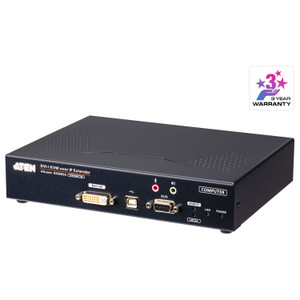
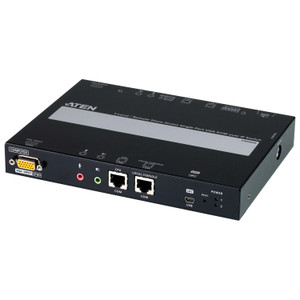
Product images are provided for reference and may not represent the exact model, configuration, or included components.

No Bots, Just Experts

Questions about this product? Free pre-sales support from a senior specialist — product questions, compatibility checks, BOM quotes, price confirmation — typically answered within one business day. Need camera placement or system design work? Engineering time is $175 per hour (qty 1 = 1 hour). Hardware buyers get up to one hour ($175) credited back on their order.

Description

ATEN KE9900ST Slim DisplayPort KVM Over IP Transmitter

Overview

The KE9900ST is a slim-form KVM over IP transmitter that extends a DisplayPort video source — along with USB keyboard and mouse — across a standard IP network to a paired receiver unit. Designed for deployments where rack space or wall-cavity depth is constrained, the KE9900ST handles resolutions up to 1920x1200 @ 60Hz with a measured latency under 48ms, making it a practical fit for control rooms, broadcast suites, and secure server room access scenarios where an operator console must be physically separated from the host machine. A single RJ-45 port carries all video, USB HID, and control data over your existing LAN infrastructure — no dedicated cabling run required beyond standard Cat5e/6.

Compatibility

The KE9900ST operates within the ATEN KE Series KVM over IP ecosystem. It pairs with compatible KE Series receiver units and is supported under the ATEN ATEN KVM and AV over IP line. Firmware version v7.5.741.002 (released 2023-07-24) is shared across the KE6900ST, KE8900ST, and KE9900ST slim matrix platform, confirming cross-model firmware parity within this sub-family. For centralized management of multiple transmitter/receiver pairs, the KE9900ST integrates with ATEN's matrix management software. Verify receiver model compatibility against ATEN's KE Series KVM switch and extender compatibility matrix before ordering — not all KE receivers support the DisplayPort input variant.

Installation Notes

The unit includes a semi-recessed pushbutton reset and supports both recessed and rack rack mounting configurations, giving flexibility for flush-panel installs or standard 19-inch rack integration. Humidity tolerance runs 0–95% RH non-condensing — suitable for most conditioned equipment rooms but not uncontrolled outdoor or high-moisture environments. USB keyboard and mouse connect directly to the transmitter; no additional driver installation is required on the host side beyond standard USB HID enumeration. Refer to ATEN's KVM over IP network planning guide for bandwidth and QoS recommendations when deploying across shared LAN segments.

Specifications
Resolution: 1920x1200
Mount Type: Recessed; Rack
Operating System: Description | Ver. | Release Date | File Name
Lan Ports: 1 x RJ-45 (Black)
Reset: 1 x Semi-recessed Pushbutton
Power: 1 (Blue)
Keyboard / Mouse: USB
Video Resolution: Up to 1920 x 1200 @ 60Hz
Latency: < 48ms
Humidity: 0–95% RH, Non-condensing
Firmware Upgrade: v7.5.741.002
Os: Description
Q&A
Reviews
Have Questions?

ATEN Slim Displayport Single Display KVM Over IP Transmitter - KE9900ST

$674.00
$546.99

RELATED PRODUCTS

Save $334.01
ATEN 4K Displayport Single Display KVM Over IP Transmitter
Add to Cart The item has been added

ATEN KE9950T

ATEN 4K Displayport Single Display KVM Over IP Transmitter - KE9950T

Transmitter (local) unit in ATEN's KE9950 KVM over IP extender system, designed to capture and forward 4K DisplayPort video, USB keyboard/mouse, and

    In stock · Ships same business day Free shipping over $499
    $1,706.00 $1,371.99 Save $334.01
    The item has been added Add to quote
    $1,706.00 $1,371.99 Save $334.01
    Save $334.01 Add to cart Add to quote

    System Design, Deployment & Technical Support

    Support services and planning resources for commercial surveillance, access control, and infrastructure deployments.

    Fixed scope • Fixed price

    System Design Assistance

    • Get help validating product compatibility
    • Coverage requirements
    • Storage planning and deployment architecture before you buy.
    Request Design Help

    Deployment & Configuration Support

    • Access fixed-scope support for rollout planning
    • User setup guidance
    • Migration and system standardization across single-site or multi-site deployments
    View Support Services

    Guides, Tools & Calculators

    • PoE requirements
    • Storage retention
    • Camera selection and deployment methodology
    Open Technical Resources