Product images are provided for reference and may not represent the exact model, configuration, or included components.

Overview

SKU: KE9950T
UPC: 672792008450
Condition: New
Write a Review 20% OFF

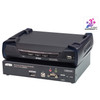
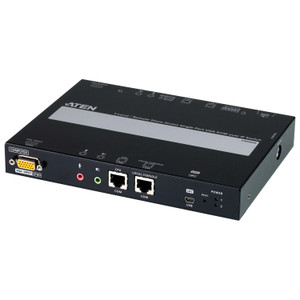
ATEN 4K Displayport Single Display KVM Over IP Transmitter - KE9950T

ATEN KE9950T 4K DisplayPort KVM Over IP TransmitterOverviewThe KE9950T is the transmitter (local) unit in ATEN's KE9950 KVM over IP extender system, d…

$1,706.00 $1,371.99 SAVE $334
Ships same business day
In stock

Quantity:

Adding to cart… The item has been added
Compatibility guidance available for your deployment
Senior specialists for pre and post-sales support
Authorized sourcing and documentation support
Shipping and lead-time confirmation before install

Laura Bennett, IPSD Senior Specialist

Talk to Laura

200+ hrs training • U.S - based

Senior Specialist • 877-277-7147

ATEN 4K Displayport Single Display KVM Over IP Transmitter - KE9950T

$1,706.00
$1,371.99

Overview

SKU: KE9950T
UPC: 672792008450
Condition: New

No Bots, Just Experts

Questions about this product? Free pre-sales support from a senior specialist — product questions, compatibility checks, BOM quotes, price confirmation — typically answered within one business day. Need camera placement or system design work? Engineering time is $175 per hour (qty 1 = 1 hour). Hardware buyers get up to one hour ($175) credited back on their order.

Description

ATEN KE9950T 4K DisplayPort KVM Over IP Transmitter

Overview

The KE9950T is the transmitter (local) unit in ATEN's KE9950 KVM over IP extender system, designed to capture and forward 4K DisplayPort video, USB keyboard/mouse, and serial signals across an IP network. It targets deployments where operators need to control workstations, servers, or media systems from a centralized or remote location — common in broadcast control rooms, secure server rooms, and distributed AV-over-IP installations. Maximum video output reaches 3840 x 2160 @ 30Hz, and end-to-end latency stays under 5ms, which is usable for interactive desktop control without perceptible lag.

Compatibility

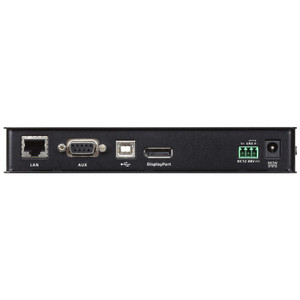
The KE9950T pairs exclusively with the ATEN KE9950R receiver unit to form a complete point-to-point KVM over IP link. It is part of ATEN's KE9950/KE9952 platform and shares firmware with the KE9952T (dual-display variant) — both units run the same firmware line (ke9950-ke9952-v2.1.201.zip, released 2025-02-27). Keyboard and mouse connectivity is USB. Network transport uses either the onboard 1 x RJ-45 Gigabit LAN port or the 1 x SFP slot — the SFP slot allows fiber uplinks where copper distance limits or electrical isolation are a factor. This transmitter is not compatible with KVM switches or extenders outside the KE9950/KE9952 family.

Installation Notes

Mount options include recessed and rack configurations — confirm rack-unit clearance before installation, and note that ATEN expresses physical dimensions for rack products in L×W×H order rather than the standard W×D×H, which affects cabinet planning. The semi-recessed reset pushbutton requires a pin or slim tool to actuate, preventing accidental resets in live environments. Operating humidity tolerance runs 0–95% RH non-condensing; do not install in environments with condensing moisture. Firmware is field-upgradeable via the v2.1.201 package available from ATEN's support portal.

Specifications
Mount Type: Recessed; Rack
Lan Ports: 1 x RJ-45 (Black)1 x SFP Slot
Reset: 1 x Semi-recessed Pushbutton
Remote: 1 (Green)
Keyboard / Mouse: USB
Video Resolution: Up to 3840 x 2160 @ 30Hz
Latency: < 5ms
Humidity: 0–95% RH, Non-condensing
Firmware Upgrade: v2.1.201
s: Description
Q&A
Reviews
Have Questions?

RELATED PRODUCTS

System Design, Deployment & Technical Support

Support services and planning resources for commercial surveillance, access control, and infrastructure deployments.

Fixed scope • Fixed price

System Design Assistance

  • Get help validating product compatibility
  • Coverage requirements
  • Storage planning and deployment architecture before you buy.
Request Design Help

Deployment & Configuration Support

  • Access fixed-scope support for rollout planning
  • User setup guidance
  • Migration and system standardization across single-site or multi-site deployments
View Support Services

Guides, Tools & Calculators

  • PoE requirements
  • Storage retention
  • Camera selection and deployment methodology
Open Technical Resources