ATEN CS1912 2-Port USB 3.0 DisplayPort KVMP Switch
The ATEN CS1912 is a 2-port DisplayPort KVMP switch designed for workstation environments where two computers share a single 4K-capable display, keyboard, mouse, and USB peripherals without any manual cable swapping. Supporting resolutions up to 3840×2160 at 30Hz, the CS1912 handles today's standard 4K DisplayPort monitors without a separate display adapter, making it a practical choice for dual-workstation desks in security operations centers, engineering stations, and dual-PC CAD setups. Explore the full ATEN KVM switch line for multi-port and rack-scale options.
Key Features
- 4K DisplayPort Video at 3840×2160 @ 30Hz: Drives a single 4K display from either of two connected computers at full UHD resolution — enough pixel density for detailed CAD work, multi-window security dashboards, or high-resolution content review without downscaling to 1080p.
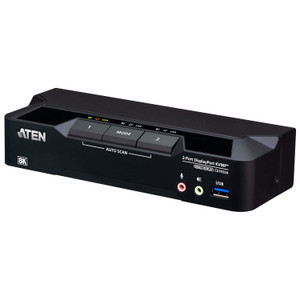
- Three Port-Selection Methods — Hotkey, Pushbutton, Mouse: Switch between computers via front-panel pushbuttons, keyboard hotkey sequences, or mouse-click (port scroll). The pushbutton method is fastest for non-keyboard switching; hotkeys suit users who prefer hands-on-keyboard workflows. No reaching for a hardware button mid-workflow.
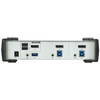
- USB 3.1 Gen 1 Hub with Front and Rear Ports: The built-in USB hub provides two Type-A ports (one on the front panel, one on the rear), both running USB 3.1 Gen 1 — that's up to 5Gbps throughput, fast enough for external SSDs, card readers, or high-speed USB dongles without a separate hub on the desk. The front port is especially useful for transient device connections like USB drives.
- 2-Computer KVMP Architecture: Both computers share keyboard, video, mouse, and USB peripherals through a single switch. Only one set of peripherals needed for a two-PC desk — eliminating the cost and clutter of duplicated keyboards, mice, and USB hubs per seat.
- Auto-Scan with Configurable Interval (1–99 Seconds): Auto-scan mode cycles between ports on a configurable timer (default 5 seconds, adjustable 1–99 seconds). Useful in monitoring contexts where an operator needs periodic visual confirmation of activity on both connected systems without manual switching.
- USB Keyboard and Mouse Support: Keyboard and mouse input is USB-based — compatible with any standard USB HID keyboard and mouse without needing PS/2 adapters or legacy input hardware.
- USB Link Indicators (Green LEDs): Two green USB Link LEDs on the unit provide at-a-glance confirmation of which port is active and that USB connectivity is established — useful during initial setup and for quick operational status checks without logging into either machine.
- Humidity Tolerance 0–80% RH Non-Condensing: Covers standard office and light industrial environments. Not rated for outdoor or high-humidity industrial spaces, but suitable for most climate-controlled equipment rooms and workstation deployments.
Integration & Compatibility
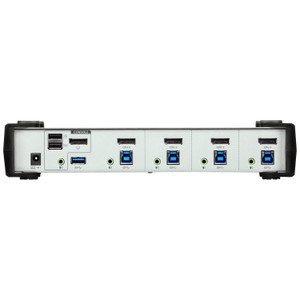
The CS1912 connects to computers via DisplayPort and USB — both connected PCs require a DisplayPort output and USB host port. The switch does not require dedicated drivers on most modern operating systems; plug-and-play KVM operation is standard for USB HID devices. The KVM switch category covers additional port counts and multi-display configurations if your deployment grows beyond two seats.
For environments running a network video recorder alongside a workstation — a common layout in security operations where the NVR management console and a separate workstation share one operator desk — the CS1912 cleanly handles that two-computer, single-display topology. If your setup requires sharing across more than two computers or needs HDMI connectivity, consider a higher-port-count or HDMI-variant model within the ATEN CS-series family.
The firmware on this unit was at v1.1.104 (released 2019-05-27) at time of sourcing. If your deployment requires the latest firmware, the update file is available directly from ATEN. Firmware updates are applied via the USB connection — no serial or proprietary flash tool required.
Frequently Asked Questions
Q: What is the maximum video resolution supported by the CS1912?
A: The CS1912 supports DisplayPort video up to 3840×2160 at 30Hz. This is standard 4K UHD resolution suitable for most professional 4K monitors. Note the 30Hz refresh rate ceiling — if your workflow requires 4K at 60Hz, you will need a different switch model.
Q: How many computers can the CS1912 connect?
A: The CS1912 supports exactly 2 computers. Both share a single DisplayPort display, USB keyboard, USB mouse, and the built-in USB 3.1 Gen 1 hub ports.
Q: What USB standard does the CS1912 hub support?
A: The CS1912 includes a 2-port USB 3.1 Gen 1 hub (up to 5Gbps), with one Type-A port on the front panel and one on the rear. Both ports are shared between the two connected computers based on which port is currently selected.
Q: What switching methods does the CS1912 support?
A: Three methods: front-panel pushbutton, keyboard hotkey, and mouse-click switching. All three are available out of the box — no software installation required for basic switching operation.
Q: Can the CS1912 auto-cycle between connected computers?
A: Yes. Auto-scan mode cycles between both ports on a configurable interval from 1 to 99 seconds (default is 5 seconds). This is useful in monitoring scenarios where periodic visibility of both connected systems is needed.
Q: Does the CS1912 require any special drivers?
A: For standard USB HID keyboard and mouse operation, no dedicated drivers are required. The switch operates as a plug-and-play USB HID device on modern operating systems. Firmware updates (current version v1.1.104) are applied via USB connection if needed.
The CS1912 is a straightforward two-computer KVMP switch, and the spec that defines its deployment ceiling is the 3840×2160 @ 30Hz DisplayPort output. That 30Hz cap is the first thing I check when a customer calls — if they're driving a 4K display and running any kind of video playback, real-time feed review, or animation work, 30Hz will feel sluggish. For static dashboards, document work, or security console management, it's a non-issue.
Technical Highlights:
- USB 3.1 Gen 1 Hub (5Gbps): The front-panel USB port on the CS1912 is genuinely useful — operators can plug in a USB drive or authentication token without reaching around to the back. Both hub ports share the 5Gbps Gen 1 bandwidth, which handles any typical peripheral without bottlenecking.
- Triple Switching Methods: Hotkey, pushbutton, and mouse switching give operators flexibility — no forced workflow. In SOC environments where operators keep hands on keyboard, hotkey switching is typically fastest; the pushbutton suits shared-desk situations where a second operator takes over.
- Auto-Scan 1–99 Second Interval: The configurable scan interval (default 5 seconds) is underused — adjusting it to match the monitoring cadence of a specific deployment keeps operators oriented without constant manual switching.
Deployment Considerations:
- Both connected PCs must have a native DisplayPort output. DP-to-HDMI or DP-to-VGA adapters on the PC side are not supported through this switch — verify display outputs before ordering.
- The 30Hz ceiling at 4K is a hard limit of this model. If a connected application (video playback, live camera feeds at high frame rates) needs 4K @ 60Hz, this unit will not deliver it — spec up to a model that supports 60Hz DisplayPort 1.4 instead.
The CS1912 fits cleanly in a two-PC security operations workstation where an operator manages an NVR console on one machine and a workstation OS on the other — both sharing one 4K display, keyboard, and mouse with no cable swapping. That specific two-seat, single-display layout is where this switch earns its place.