Product images are provided for reference and may not represent the exact model, configuration, or included
components.
Build a complete system in one click
Manufacturer-verified compatible cameras, recorders, mounts, accessories, and licenses for this product.
Build Your Complete System
Manufacturer-verified compatible cameras, recorders, mounts, accessories, and licenses for this product. Adjust quantities and add the entire bundle to your cart in one click.
ItemQtyStatusPrice
Mounts & Accessories recommended
Recorders, NVRs & Storage recommended
Licenses & Software where applicable
Services & Training optional
$0.00$0.00$0.00$0.00$0.00$0.00
No Bots, Just Experts
Questions about this product? Free pre-sales support from a senior specialist — product questions, compatibility checks, BOM quotes, price confirmation — typically answered within one business day. Need camera placement or system design work? Engineering time is $175 per hour (qty 1 = 1 hour). Hardware buyers get up to one hour ($175) credited back on their order.
ATEN CS1914 4-Port USB 3.0 DisplayPort KVMP Switch
Overview
The ATEN CS1914 is a 4-port DisplayPort KVMP switch that lets you control four computers from a single keyboard, monitor, and mouse — with full 4K resolution support up to 3840×2160 @ 30Hz on each source. If you're running a workstation environment where engineers or analysts need rapid access to multiple high-resolution systems without a forest of peripherals, the CS1914 consolidates that into a single desk footprint. The integrated USB 3.1 Gen1 hub means peripherals connected to the switch stay accessible across all four machines, not just the one in focus.
Port selection works three ways: dedicated front-panel pushbuttons (one per port), hotkey sequences from the keyboard, or mouse-triggered switching — giving operators the flexibility to switch however suits their workflow without reaching for a hardware button every time.
Key Features
4K DisplayPort Output (3840×2160 @ 30Hz): Drives a single 4K monitor from any of the four connected PCs at full UHD resolution — critical for CAD workstations, video editing suites, or security operator consoles running high-resolution video management software where detail at the display matters. Note that this tops out at 30Hz, not 60Hz, so it's not suited for high-refresh-rate gaming or fast-motion video preview workflows.
4-Computer Connections: Switches keyboard, video, and mouse control across four independent computers. In a control room or trading desk scenario, that eliminates four separate input sets — reducing desk clutter and standardizing the operator interface to a single peripheral stack.
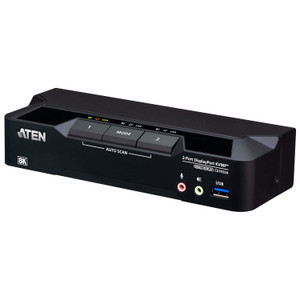
Triple Port-Selection Methods (Hotkey / Pushbutton / Mouse): Four front-panel pushbuttons provide direct one-press access per machine. Hotkey sequences let operators stay hands-on-keyboard. Mouse-based switching suits environments where keyboard shortcuts are impractical. All three methods work independently, no software install required.
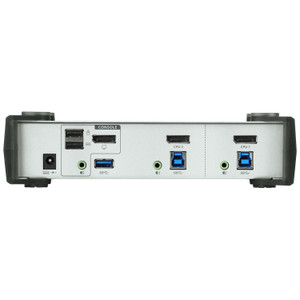
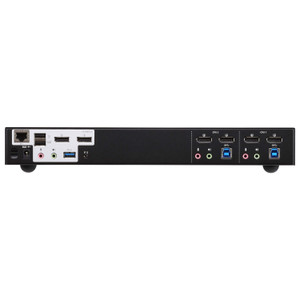
USB 3.1 Gen1 Hub (2 Ports — Blue): Two USB 3.1 Gen1 Type-A ports (one front panel, one rear panel) provide shared high-speed peripheral access across all connected PCs. Plug in a USB drive, card reader, or 3D mouse once — it follows the active KVM selection. Front-panel placement makes hot-swapping storage straightforward during multi-machine workflows.
4 USB Link Ports (Green): Four dedicated USB link connections — one per computer — carry the keyboard/mouse data independently of the hub ports. This separation keeps HID traffic clean and ensures input doesn't lag or drop when the hub port is under load from a large USB transfer.
Configurable Scan Interval (1–99 Seconds, Default 5 sec.): Auto-scan cycles through all four ports on a user-defined interval. The 1–99 second range gives meaningful flexibility: set it tight for active monitoring rounds, or long enough that operators can work on a machine without the view jumping mid-task. Default 5-second interval is usable out of the box for most display-monitoring applications.
Rack-Mount Form Factor: Designed for rack installation, which keeps it off the desk entirely in multi-station deployments. Integrates cleanly into AV or IT rack enclosures alongside patch panels and switches.
Humidity Tolerance (0–80% RH, Non-Condensing): Covers standard indoor environments including non-climate-controlled server rooms and control rooms that see seasonal humidity variation. Not rated for condensing environments — keep it out of areas with active temperature cycling that could cause moisture buildup.
Integration and Compatibility
The CS1914 uses standard USB keyboard and mouse connectivity — no proprietary drivers are required for basic KVM operation. The USB 3.1 Gen1 hub ports support any USB 3.x or backward-compatible USB 2.0 peripheral. DisplayPort source connections require a DisplayPort-capable output on each connected PC; DisplayPort-to-adapter configurations are not addressed in the product evidence and should be verified before deployment. Firmware v1.1.104 (released 2019-05-27) is the current available version and is downloadable as cs1912_1914_v1.1.104.zip — the shared firmware file covers both the CS1912 and CS1914 models.
Frequently Asked Questions
Q: What is the maximum display resolution supported by the CS1914?
A: The CS1914 supports up to 3840×2160 (4K UHD) at 30Hz over DisplayPort. It does not support 4K @ 60Hz.
Q: How many computers can the CS1914 control simultaneously?
A: The CS1914 connects to four computers. Only one computer is active (in control) at a time — it is not a multi-viewer; it switches one-at-a-time between four sources.
Q: What are the three ways to switch between ports on the CS1914?
A: You can switch using front-panel pushbuttons (one per port), keyboard hotkey sequences, or mouse-triggered switching. All three methods work independently.
Q: Does the CS1914 include a USB hub, and what speed is it?
A: Yes. The CS1914 includes two USB 3.1 Gen1 Type-A ports (one front panel, one rear panel) for shared peripheral access. USB 3.1 Gen1 delivers up to 5 Gbps.
Q: Can the CS1914 auto-scan through connected computers?
A: Yes. The auto-scan interval is configurable from 1 to 99 seconds, with a default of 5 seconds. It cycles through all active ports sequentially.
Q: What firmware version is current for the CS1914?
A: The latest available firmware is v1.1.104, released 2019-05-27. The firmware file (cs1912_1914_v1.1.104.zip) is shared between the CS1912 and CS1914 models.
ATEN 4-PORT USB 3.0 Displayport Kvmp Switch Support UP to 3840X2160 30HZ - CS1914
$400.00
$252.99
Save
$147.01
Send Laura a Message
Senior Specialist · Typically replies within 1 business day
Message sent!
A representative will reply to your email within one business day.
Build a complete system in one click
Manufacturer-verified compatible cameras, recorders, mounts, accessories, and licenses for this product.
Build Your Complete System
Manufacturer-verified compatible cameras, recorders, mounts, accessories, and licenses for this product. Adjust quantities and add the entire bundle to your cart in one click.