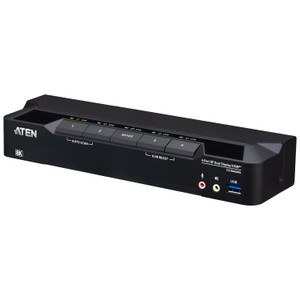
ATEN CS1944DP 4-Port USB 3.0 4K Dual-View DisplayPort KVMP Switch
Overview
The ATEN CS1944DP is a 4-port, dual-display DisplayPort KVMP switch that consolidates four computers onto a single keyboard, mouse, and dual-monitor workstation — eliminating the desk clutter and context-switching friction that slows down operators in control rooms, security monitoring stations, and engineering workspaces. With support for resolutions up to 4096 x 2160 at 60Hz (true 4K) and 2560 x 1440 at 144Hz, the CS1944DP is built for environments where display fidelity and smooth motion matter: think video wall operator consoles, multi-source surveillance review stations, or broadcast engineering desks running dual high-refresh monitors.
The KVMP designation means this switch handles USB peripherals beyond just keyboard and mouse — two USB 3.1 Gen 1 ports (one front-panel, one rear) let you share USB 3.0 storage or peripherals across connected systems without unplugging and re-plugging. Port selection is flexible: front-panel pushbutton, keyboard hotkey, mouse-based switching, or RS-232 commands for integration into automated control systems. That last option matters in rack-mounted AV and control room builds where scripted switching is part of the room automation workflow.
Key Features
- 4K @ 60Hz DisplayPort Output: Drives dual displays up to 4096 x 2160 at 60Hz — sufficient for 4K source content at full frame rate on both monitors simultaneously. If you're running 1440p high-refresh gaming or simulation workstations, the 2560 x 1440 @ 144Hz mode keeps motion sharp without tearing.
- Four Computer Connections: Four source computers share one dual-monitor workstation. Each connected system gets full keyboard, mouse, and dual-video representation — no reduced-resolution compromises for secondary sources.
- USB 3.1 Gen 1 Hub (Two Ports): The two Type-A USB 3.1 Gen 1 ports (one accessible from the front panel, one at the rear) share USB storage or peripherals across all four computers. Front-panel placement is practical for operators who swap USB drives frequently during shift handoffs.
- RS-232 Command Switching: Beyond hotkeys and pushbuttons, the CS1944DP accepts RS-232 serial commands for port selection. This is the spec that matters for integrated control rooms — pair it with a Crestron, AMX, or Q-SYS controller to automate source switching as part of a broader room control sequence.
- Configurable Scan Interval: Auto-scan cycles through connected ports on a 1–99 second interval (default 5 seconds). Useful for unattended monitoring stations that need to rotate through multiple sources without operator input.
- Hotkey and Mouse Port Selection: Operators can switch sources without leaving the keyboard or reaching for front-panel buttons — hotkey sequences or a mouse-based trigger handle it. Reduces operator fatigue on long shifts where source switching is frequent.
- Rack-Mount Form Factor: Designed for 19-inch rack installation — integrates into equipment racks alongside NVRs, video decoders, and AV processing gear without occupying separate desk or shelf space. Note: physical dimensions follow LxWxH (not the standard WxDxH) format per ATEN rack product convention.
- Firmware Upgradeable: Current firmware v1.1.106 (released 2025-10-01) is field-upgradeable via the cs1942dp-1944dp firmware package, meaning security patches and feature updates don't require hardware replacement.
Integration and Compatibility
The CS1944DP connects source computers via USB for keyboard/mouse and DisplayPort for video. All four ports accept USB keyboard and mouse input; the built-in USB hub extends to USB 3.1 Gen 1 speeds for peripheral sharing. RS-232 control integration makes the CS1944DP compatible with third-party room control systems — any controller with a serial output can trigger port selection, making it a natural fit in control rooms where Crestron, Extron, or similar automation platforms are already present.
The Station Selection slide switch on the unit provides a hardware-level port indicator, useful in rack environments where front-panel visibility is limited. For KVM switch deployments where multiple operators share a console, the scan and hotkey modes reduce dependence on physical interaction with the rack itself. Browse the full ATEN switching and connectivity line for complementary matrix switches, extenders, and console solutions. If your deployment requires long-distance extension rather than local consolidation, review the KVM extender category — the CS1944DP is a local-switching device only, with no built-in extension capability.
For installations requiring DisplayPort cable management in dense racks, pair this unit with appropriate KVM cables and accessories sized for your rack depth. If your workflow demands video capture or recording alongside KVM switching, pair the CS1944DP with a video capture solution on one of the four connected source computers rather than inline.
Frequently Asked Questions
Q: What is the maximum resolution the CS1944DP supports?
A: The CS1944DP supports up to 4096 x 2160 at 60Hz on DisplayPort, and also supports 2560 x 1440 at 144Hz for high-refresh-rate workflows.
Q: How many computers can be connected to the CS1944DP simultaneously?
A: Four computers can be connected simultaneously. All four share the same dual-monitor workstation, keyboard, and mouse — only one computer has active control at a time.
Q: What port-switching methods does the CS1944DP support?
A: Four methods are available: front-panel pushbutton, keyboard hotkey, mouse-triggered switching, and RS-232 serial commands. RS-232 enables integration with room automation controllers for scripted switching.
Q: Does the CS1944DP include a USB hub, and what speed does it support?
A: Yes — two USB 3.1 Gen 1 Type-A ports are included: one on the front panel and one on the rear. Both operate at USB 3.0 speeds, suitable for sharing external drives or peripherals across connected computers.
Q: Can the CS1944DP firmware be updated in the field?
A: Yes. The current firmware is v1.1.106 (released 2025-10-01). The firmware package (cs1942dp-1944dp-v1.1.106.zip) is designed for field upgrade, so the unit does not need to be returned for updates.
Q: Is the CS1944DP designed for rack mounting?
A: Yes. The CS1944DP is a rack-mount form factor designed for standard 19-inch equipment racks. ATEN notes that physical dimensions for this product follow LxWxH rather than the conventional WxDxH format.