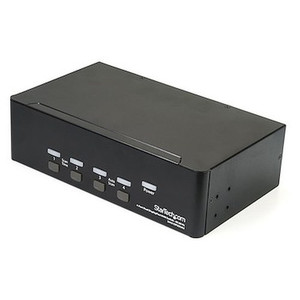
StarTech P4DD46A2-KVM-SWITCH 4-Port Dual-Monitor DisplayPort KVM Switch
Overview
The StarTech P4DD46A2-KVM-SWITCH is a 4-port, dual-monitor DisplayPort KVM switch built for multi-system workstations where running separate peripherals per machine is not practical. It connects up to four hosts — each via USB 3.2 Gen 1 and dual DisplayPort — to a single pair of 4K monitors, a USB hub, keyboard, mouse, and audio setup. If you manage engineering workstations, trading desks, control rooms, or secure multi-domain computing environments, this is the kind of hardware that eliminates desk clutter and peripheral duplication without sacrificing resolution or data throughput.
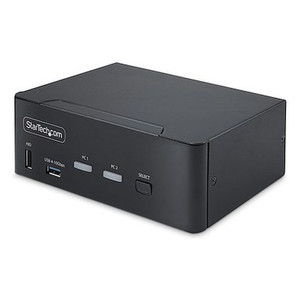
Switching between connected hosts is handled by front-panel push buttons or keyboard hotkeys, so operators stay in the chair rather than reaching behind racks. The steel enclosure, TAA compliance, and wide-range AC power input (100–240V) make this a practical fit for enterprise and government procurement where build quality and compliance matter. For a broader look at desktop KVM solutions and how to size them for your environment, the KVM switch category covers both single-monitor and multi-monitor options across port counts.
Key Features
- Dual 4K@60Hz DisplayPort Outputs: Both console display ports drive up to 3840×2160 at 60Hz via DisplayPort 1.2 — full 4K on both monitors simultaneously. For CAD, GIS, video production, or financial analysis workflows where monitor real estate matters, you keep native resolution on every screen without dropping to 30Hz or scaling down.
- 4-Port Host Connectivity: Eight DisplayPort inputs (two per host), four USB 3.2 Type-B ports, and eight 3.5mm audio jacks on the host side mean all four machines stay fully wired. No re-plugging when switching — the KVM handles signaling state for every connected system.
- USB 3.2 Gen 1 at 5Gbps: The console USB hub includes two USB Type-A ports running at 5Gbps. That's fast enough to run an external NVMe enclosure, high-speed flash drive, or USB video capture device from whichever host is active — no USB 2.0 bottleneck on peripheral transfers.
- USB 2.0 for HID Devices: Two additional USB 2.0 Type-A console ports handle keyboard and mouse without consuming bandwidth on the 5Gbps ports. Low-latency HID polling stays consistent regardless of what's moving through the 3.2 ports.
- Integrated Audio Switching: Two 3.5mm stereo jacks on the console side — one for headphones, one for microphone — switch in sync with the active host. All four hosts have dedicated 3.5mm ports wired in, so no audio adapters or manual cable swaps are needed during host transitions.
- Push-Button and Hotkey Switching: Port selection by front-panel button or keyboard hotkey keeps hands on the desk. For operators cycling between hosts frequently — trading analysts, control room engineers, multi-domain security personnel — hotkey switching avoids interrupting workflow.
- 8kV Air / 6kV Contact ESD Protection: Rated ESD protection on the switch circuitry means a static discharge event from a user or peripheral is less likely to cause data corruption or hardware damage. Worth noting in environments with low humidity or frequent physical interaction with the desk setup.
- TAA Compliant: Qualifies under the Trade Agreements Act, making it eligible for GSA schedule procurement and federal agency purchasing where TAA compliance is a contract requirement.
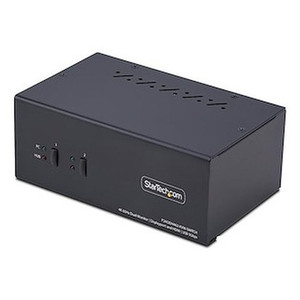
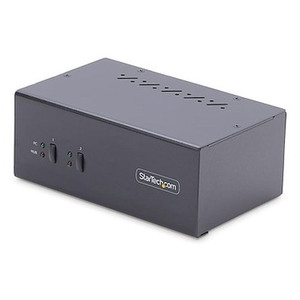
- Steel Enclosure: At 2.2 lb in a steel chassis measuring 10.0 × 3.9 × 2.6 inches, it sits flat on a desk without shifting when buttons are pressed, and holds up to the mechanical wear of daily use better than plastic alternatives.
- Universal AC Power: The included AC adapter accepts 100–240V input and delivers 12V DC at 3A to the switch. Works without a voltage converter on any standard outlet internationally — relevant for deployments in multi-country organizations or government facilities with non-standard power infrastructure.
- Low Idle Power Draw: Rated at 0.1W power consumption, it draws almost nothing at idle. In 24/7 operations environments, that's negligible heat addition to a desk or AV rack and no meaningful contribution to facility power budgets.
Integration and Compatibility
The P4DD46A2-KVM-SWITCH (often searched as P4DD46A2 KVM SWITCH) uses standard DisplayPort 1.2 and USB 3.2 Gen 1 interfaces — both widely supported by workstation graphics cards and motherboards produced in the last several years. No proprietary drivers are required for basic switching operation; HID devices are recognized natively by the connected operating systems. The USB 3.2 Type-B host ports use a standard connector, compatible with the cables typically supplied with monitors or available through any structured cabling supplier.
Audio passthrough uses standard 3.5mm TRRS/TRS connections — compatible with most headsets and analog speakers. If your workflow requires USB audio devices (USB headsets, USB audio interfaces), note that only the USB Type-A console ports will carry that traffic, and the active device will depend on which host has focus. Plan peripheral assignments accordingly before deployment.
For control room or operations center builds pairing this switch with a DisplayPort cable run and a pair of 4K displays, verify monitor compatibility with DisplayPort 1.2 MST or SST modes depending on your display configuration. The switch operates across a 0°C to 50°C range, suited for conditioned office and server room environments — not rated for industrial or outdoor deployment.
If you need USB-C host connectivity or a higher port count, review the broader multi-monitor KVM options to find a model that matches your host interface. For desk ergonomics planning alongside this switch, monitor mounting solutions paired with a dual-display KVM can significantly reduce desk footprint.
Frequently Asked Questions
Q: What is the maximum resolution the P4DD46A2-KVM-SWITCH supports?
A: The switch supports up to 3840×2160 at 60Hz (4K UHD) on both console DisplayPort outputs simultaneously, using DisplayPort 1.2.
Q: Is the P4DD46A2-KVM-SWITCH TAA compliant?
A: Yes. The P4DD46A2-KVM-SWITCH carries TAA compliance, making it eligible for federal procurement under GSA schedules and contracts requiring Trade Agreements Act conformance.
Q: How many hosts can I connect to this KVM switch?
A: Four hosts. Each host connects via two DisplayPort cables, one USB 3.2 Type-B cable, and up to two 3.5mm audio cables (mic and headphone). All four remain wired simultaneously; switching changes which host drives the console peripherals.
Q: Can I switch between hosts using keyboard shortcuts?
A: Yes. The P4DD46A2-KVM-SWITCH supports both front-panel push-button switching and keyboard hotkey sequences, so you can change the active host without taking your hands off the keyboard.
Q: What is the warranty on this switch?
A: StarTech provides a 2-year manufacturer warranty on the P4DD46A2-KVM-SWITCH.
Q: Does the switch include a power supply?
A: Yes. An AC adapter is included. It accepts 100–240V AC input and outputs 12V DC at 3A, covering standard outlets in North America, Europe, and most international locations.
The P4DD46A2-KVM-SWITCH is one of the more straightforward choices when you need genuine dual 4K output — both console ports run 3840×2160 at 60Hz simultaneously over DisplayPort 1.2, which rules out a lot of budget KVMs that either drop to 30Hz at 4K or only drive one monitor at full resolution. I recommend it most often in multi-domain workstation builds and operations centers where the operator never actually wants to look at a cable.
Technical Highlights:
- Dual 4K@60Hz Console Output: DisplayPort 1.2 on both console ports — 3840×2160 at 60 frames, no compromise on the second display. Critical for dual-screen CAD and video editing where a half-resolution secondary monitor creates a real workflow problem.
- USB 3.2 Gen 1 at 5Gbps: Two console-side USB-A ports running at 5Gbps means peripheral throughput isn't the bottleneck. Attaching a fast external drive or USB capture device to the active host works without the USB 2.0 speed ceiling that plagues older KVMs.
- 8kV Air ESD Protection: Not a spec that comes up in demos, but in dry climates or facilities with significant foot traffic, ESD events at the console are common enough that having rated protection on the switching circuitry matters for long-term reliability.
Deployment Considerations:
- The operating temperature ceiling is 50°C — fine for conditioned office and server room environments, but do not deploy this in an uncooled equipment closet in a warm climate without verifying ambient temperatures stay below that threshold.
- The host-side connectors require USB 3.2 Type-B cables, which are not as common as Type-A or Type-C. Budget for cable procurement separately; the included accessories list does not confirm cables are in the box.
This switch fits best in secure government workstation environments, financial trading floors, and broadcast operations centers where four separate systems need to share a single high-resolution dual-monitor console — and where TAA compliance is a purchasing requirement rather than an optional checkbox.