StarTech P2DD46A2-KVM-SWITCH 2-Port Dual-Monitor DisplayPort KVM Switch
Overview
The P2DD46A2-KVM-SWITCH is a 2-port, dual-monitor DisplayPort KVM switch designed for professionals who need to drive two 4K displays from two separate computers without touching a cable. It pushes 3840x2160 at a true 60Hz on both outputs simultaneously — no frame-rate compromise on large-format monitors — while consolidating your keyboard, mouse, and USB peripherals into a single shared hub. For engineers, developers, or IT ops running a workstation plus a server console side by side, this is the straightforward hardware answer to desk sprawl.
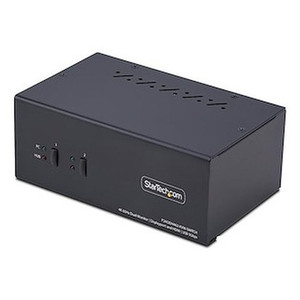
The switch sits in a compact steel enclosure measuring 6.4 x 3.9 x 2.6 in and weighing 1.7 lb — small enough to mount behind a monitor or sit flat on a desk without taking up meaningful real estate. Two USB 5Gbps (USB 3.2 Gen 1) hub ports give attached peripherals up to 5Gbps throughput, which matters when you're cycling an external SSD or high-speed capture device between machines.
Key Features
- 4K 60Hz Dual-Display Output: Both monitors run at 3840x2160 at 60Hz via DisplayPort 1.2 — not 30Hz like earlier-generation KVMs. If you're running color-graded design work or high-refresh engineering displays, the difference between 30Hz and 60Hz at 4K is immediately noticeable. Supported resolutions also include 2560x1440, 1920x1200, and 1920x1080 for mixed monitor setups.
- USB 3.2 Gen 1 at 5Gbps: The PC interface runs at USB 3.2 Gen 1 (5Gbps max data rate), meaning peripherals like external drives, docking stations, or fast card readers pass through at full USB 3 speeds rather than throttling back to USB 2. Transfers that would take minutes on older KVMs stay measured in seconds here.
- Two Integrated USB 5Gbps Hub Ports: The built-in hub means you don't lose USB ports at the switch — plug in a USB drive or webcam and it follows the active machine automatically on switch. No need to replug peripherals when toggling between computers.
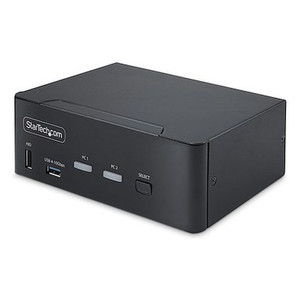
- Push Button and Hotkey Switching: Switch between computers with a front-panel button or a keyboard hotkey sequence — no reaching under a desk. Hotkey switching is the practical day-to-day method once you're set up; the physical button is there when you need it or when software locks the hotkey listener.
- 8kV Air / 6kV Contact ESD Protection: Built-in ESD protection rated to 8kV air discharge and 6kV contact discharge protects the switch — and by extension, both connected computers — from static spikes. In dry office environments or industrial spaces where electrostatic discharge is a real threat to USB and display interfaces, this is meaningful protection that basic passive switches lack.
- Universal AC Input (100–240V): The switch accepts 100–240V AC input, so it works on North American, European, and Asian mains without an external converter. Output is 12V DC at 3A. At 0.1W idle power consumption, it draws essentially nothing when both hosts are parked.
- Max Cable Length 24.6 ft: Supported cable runs up to 24.6 ft (7.5m) give you enough reach for under-desk rackmount servers or equipment closets within the same room — without needing active extension hardware.
- Operating Range 0°C to 40°C: Rated for standard office and light industrial environments (0–40°C operating, -20–60°C storage). Not designed for outdoor or high-heat equipment rooms without supplemental cooling.
Integration and Compatibility
The P2DD46A2-KVM-SWITCH uses DisplayPort 1.2, which supports 4K 60Hz, HBR2, and multi-stream transport — compatible with the DisplayPort outputs found on most current workstation-class GPUs and business laptops with DP ports. It does not include HDMI or USB-C video inputs natively, so verify your computers have DisplayPort outputs before ordering. The USB 3.2 Gen 1 hub is backward-compatible with USB 2.0 and USB 1.1 peripherals, so legacy input devices will still work — just at their native speeds. The switch is compatible with Windows, macOS, and Linux hosts that enumerate standard HID devices; no driver installation is required for basic KVM and USB hub functions.
For buyers building out a KVM switch setup across a larger environment, note that this is a 2-port model. If you need to share displays across three or more computers, you'll need a higher-port-count unit from the StarTech switching and connectivity line. For single-monitor 4K setups or environments where only one display is needed, a single-head KVM will cost less and is simpler to cable. If USB-C video input is required (Thunderbolt laptops, for example), look for a variant with USB-C or Thunderbolt host connectivity rather than adapting the DisplayPort inputs — signal integrity through passive adapters at 4K 60Hz is inconsistent. For reference on planning USB peripheral sharing in multi-workstation environments, a KVM selection guide covers port budgeting and cable distance planning. If you need extended USB connectivity beyond the two hub ports, pair this switch with a USB 3.2 hub on the shared port side.
Frequently Asked Questions
Q: Does the P2DD46A2-KVM-SWITCH support 4K at 60Hz on both monitors simultaneously?
A: Yes. Both DisplayPort outputs support 3840x2160 at 60Hz concurrently via DisplayPort 1.2. This is a true 60Hz output on both screens — not a shared bandwidth limitation that drops one display to 30Hz.
Q: What is the warranty on the P2DD46A2-KVM-SWITCH?
A: StarTech provides a 2-year manufacturer warranty on this switch.
Q: Does this KVM switch require drivers or software to operate?
A: No driver installation is required for standard KVM and USB hub operation. The switch enumerates as standard HID devices on Windows, macOS, and Linux hosts.
Q: Can I switch between computers using a keyboard shortcut?
A: Yes. The switch supports both push-button switching via the front panel and hotkey switching from the keyboard — you can toggle the active computer without touching the unit once it's set up.
Q: What USB speed do the hub ports support?
A: Both hub ports run at USB 3.2 Gen 1 (5Gbps max), which supports fast external drives, webcams, and other high-bandwidth USB devices. They are backward-compatible with USB 2.0 and USB 1.1 devices.
Q: Does the P2DD46A2-KVM-SWITCH work with USB-C or Thunderbolt laptops?
A: The video inputs are DisplayPort — not USB-C or Thunderbolt. Laptops with only USB-C/Thunderbolt video output would require a USB-C to DisplayPort adapter cable. Verify signal compatibility at 4K 60Hz before committing to passive adapter cables, as results can vary by GPU and adapter quality.
The spec that makes the P2DD46A2-KVM-SWITCH worth specifying over budget alternatives is the simultaneous 3840x2160 60Hz output on both DisplayPort heads — not 30Hz, not one monitor at full res and the other stepped down. I see a lot of integrators get burned by KVMs that advertise '4K support' but throttle to 30Hz when both outputs are active. That distinction matters on engineering workstations where display latency is noticeable and for anything involving video playback or CAD rendering across dual screens.
Technical Highlights:
- DisplayPort 1.2 Dual-Head at 4K 60Hz: Both outputs hit 3840x2160 at 60Hz simultaneously — supported resolutions step down cleanly to 2560x1440 and 1080p for mixed-monitor environments without requiring manual configuration.
- USB 3.2 Gen 1 Hub at 5Gbps: The two hub ports deliver up to 5Gbps each, which keeps external SSDs and capture cards performing at their rated speeds rather than bottlenecking at USB 2 speeds like older KVM hubs.
- 8kV Air / 6kV Contact ESD Protection: This isn't a spec you'll find on bargain-shelf KVMs. In environments where static buildup is a concern — raised floors, carpeted offices, light industrial spaces — this protection matters for the longevity of both the switch and connected host USB interfaces.
Deployment Considerations:
- Cable runs are supported up to 24.6 ft, which covers most single-room deployments comfortably. Beyond that, you're into active cable or extender territory — plan your cable routing before committing to a fixed mount location behind a monitor arm or under a desk.
- The unit runs on 12V DC at 3A from the included AC adapter (100–240V input), so verify the power supply is included in your order. At 0.1W idle, power draw is negligible, but the switch does require external power — it is not bus-powered from the host USB connection.
This switch is the right fit for a dual-workstation developer or engineering desk where both machines run DisplayPort-native outputs and the operator needs zero-latency toggling between systems without recabling. It is not the right call for multi-user rackmount KVM over IP environments or for laptop users relying solely on USB-C/Thunderbolt video — for those scenarios, specify accordingly upstream.