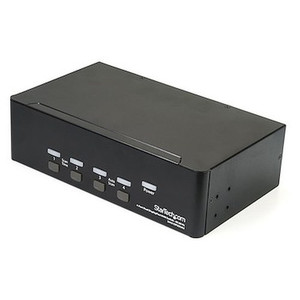
StarTech P2ADDH462-KVM-SWITCH 2-Port Dual-Monitor DisplayPort + HDMI KVM Switch
Overview
The StarTech P2ADDH462-KVM-SWITCH is a 2-port dual-monitor KVM switch designed for workstation environments where one operator needs fast, clean switching between two computers — each driving a DisplayPort and an HDMI display simultaneously. It supports resolutions up to 3840x2160 at 120Hz, making it a practical choice for video monitoring stations, dual-screen engineering workstations, and security operations centers where display fidelity and low-latency peripheral sharing matter. If you're running dual screens and need to share a keyboard, mouse, USB peripherals, and audio between two hosts without rearranging cables every time you switch, this is the hardware to look at.
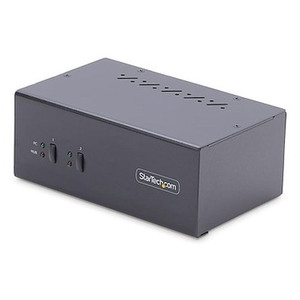
The zinc-plated casing gives the unit meaningful structural rigidity for a device that lives on a desk or rack shelf long-term, and the AC-powered design (100–240V universal input, 12V DC / 3A output) means it isn't drawing from your host or monitor's power — a common point of instability in bus-powered KVM switches at higher resolutions.
Key Features
- 4K 120Hz Dual-Monitor Output: Supports 3840x2160 at 120Hz simultaneously across one DisplayPort and one HDMI output. At 120Hz, cursor movement and video playback stay smooth on both displays — important when the same operator is watching live surveillance feeds or running simulation software on one screen while managing a second host on the other.
- Mixed DisplayPort + HDMI Host Connectivity: Each host connects via one DisplayPort and one HDMI input (two of each total), so you can pair hosts with different GPU output configurations without adding adapters. No forced standardization on a single connector type — a real time saver in mixed-hardware environments.
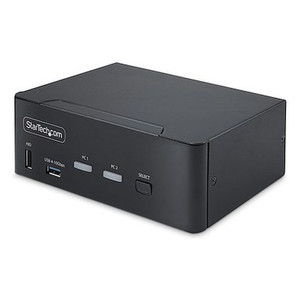
- USB 3.2 Gen 1 (5Gbps) Hub Ports: Two USB 3.2 Type-A ports on the console interface provide 5Gbps throughput to shared peripherals. A USB drive, external SSD, or high-resolution webcam won't get bottlenecked the way it would on a legacy USB 2.0 KVM — throughput stays consistent regardless of which host is active.
- Dedicated HID USB Ports: Two separate USB Type-A HID ports handle keyboard and mouse independently from the high-speed hub. Keeping HID and data paths separate reduces latency on input devices and avoids enumeration delays common when KVMs try to multiplex HID and storage over the same controller.
- Flexible Port Selection — Push Button and Hotkeys: Switch between hosts via the front-panel push button or keyboard hotkeys. Hotkey switching is the practical choice in production environments where reaching across the desk to hit a button breaks workflow. Both methods are supported simultaneously, so operators can work however they prefer.
- Quad Audio I/O (4x 3.5mm): Four 3.5mm stereo female jacks on the host side (two per computer) let you route headset and speaker audio per-host. Audio follows the active KVM port, so you're not manually replugging headsets when switching hosts — useful for operators running voice comms on one machine and system audio on the other.
- ESD Protection — 8kV Air / 6kV Contact: Built-in ESD protection to 8kV air discharge and 6kV contact handles electrostatic events typical of data center and operations room environments. This is a meaningful spec in dry climates or environments with synthetic flooring where ESD events are frequent.
- Universal AC Input (100–240V): Ships ready for US and international deployments without a separate power converter. The 36W power draw is consistent and self-contained — the KVM is not dependent on host USB power, which is the common failure mode for bus-powered units running 4K displays.
- Operating Temperature 0°C to 40°C: Rated for standard office and control room conditions. Not rated for outdoor or industrial-temperature environments — keep that in mind if you're deploying in an equipment room that runs warm.
Integration and Compatibility
The P2ADDH462-KVM-SWITCH connects to each host via USB 3.2 Type-B ports (two total — one per host), so both hosts require an available Type-B USB port for the KVM data link. The console side provides two USB 3.2 Type-A ports for peripherals plus two dedicated HID ports, giving you flexibility to connect a keyboard, mouse, and up to two USB 3.2 data devices simultaneously without a secondary hub. Verify that both host machines have DisplayPort and HDMI outputs available — the switch does not support DP-only or HDMI-only host configurations. The unit is compatible with any operating system that recognizes standard USB HID devices, which covers Windows, macOS, and Linux without driver installation for basic keyboard/mouse function. High-speed USB 3.2 device compatibility may vary by host OS and driver state. The KVM switch is also referenced as P2ADDH462 KVM SWITCH in some procurement systems — both variations refer to the same unit.
Frequently Asked Questions
Q: Does the P2ADDH462-KVM-SWITCH require drivers to function?
A: For standard keyboard and mouse (HID) operation, no drivers are required — the switch uses standard USB HID, which is natively recognized by Windows, macOS, and Linux. High-speed USB 3.2 data devices connected to the hub ports may require host-side drivers depending on the device type and operating system.
Q: Can the P2ADDH462-KVM-SWITCH support two different hosts with different display output types (one with only HDMI, one with only DisplayPort)?
A: No. Each host connection requires both a DisplayPort and an HDMI output to drive the dual-monitor setup. If a host only has one display output type, you would need an active adapter to supply the missing signal — passive adapters may not support 4K 120Hz reliably.
Q: What is the maximum supported display resolution and refresh rate?
A: The P2ADDH462-KVM-SWITCH supports up to 3840x2160 (4K UHD) at 120Hz on both the DisplayPort and HDMI console outputs simultaneously.
Q: What is the warranty on the P2ADDH462-KVM-SWITCH?
A: StarTech covers this unit with a 2-year manufacturer warranty.
Q: Does this KVM switch support audio switching?
A: Yes. Four 3.5mm stereo female jacks on the host-facing side (two per host) handle audio. Audio follows the active KVM port automatically when you switch between computers — no manual audio replugging required.
Q: Is the P2ADDH462-KVM-SWITCH bus-powered or does it need external power?
A: It requires an external AC adapter (included). Input is 100–240V AC at 1A; output is 12V DC at 3A. Total power consumption is 36W. This self-powered design ensures the KVM operates reliably at 4K 120Hz without depending on host USB power delivery.
The spec that immediately stands out on the P2ADDH462-KVM-SWITCH is 4K at 120Hz across both outputs simultaneously — not just the DisplayPort, but the HDMI console output as well. That combination matters in security operations and video monitoring environments where operators can't afford choppy playback or scaled-down resolution on a secondary screen. Most dual-monitor KVMs in this class cap the HDMI side at 60Hz or drop to 4K 30Hz under load. This unit holds 3840x2160 at 120Hz on both outputs with an AC-powered design that doesn't lean on the host for power stability.
Technical Highlights:
- USB 3.2 Gen 1 Hub (5Gbps): Two Type-A ports at 5Gbps mean you can share a USB SSD or high-res capture device between hosts without the bandwidth ceiling that kills legacy KVM hub performance. Real-world benefit: no more separate USB switches for storage devices.
- ESD Protection 8kV Air / 6kV Contact: Built into the signal path — not just on the power input. In control rooms with synthetic flooring or HVAC-driven low humidity, this level of ESD tolerance is what keeps a KVM switch from becoming a periodic support ticket.
- Separated HID and Data Paths: Dedicated HID USB ports for keyboard and mouse run independently from the two USB 3.2 hub ports. Input latency stays low and deterministic — enumeration delays from a large USB storage device won't stall keyboard input mid-switch.
Deployment Considerations:
- Both host machines must provide a DisplayPort AND an HDMI output — verify GPU specs before ordering. A host with dual DisplayPort outputs requires an active HDMI adapter, and passive adapters are unlikely to sustain 4K 120Hz without signal issues.
- Operating temperature ceiling is 40°C. Equipment rooms with poor airflow or high ambient heat can exceed this during summer months — plan airflow or consider the unit's placement in relay racks accordingly.
This switch is a strong fit for dual-operator security control stations or engineering workstations where two machines share a single high-res monitor array — specifically environments running 4K displays at high refresh where monitor output type is mixed (one DP, one HDMI per machine) and USB peripheral sharing at full USB 3.2 speeds is a hard requirement.