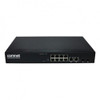
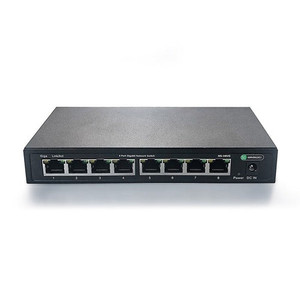
Comnet CNFE8FX8US Unmanaged Fiber Switch
Overview
The Comnet CNFE8FX8US is an 8-port unmanaged switch designed for surveillance and industrial network deployments where you need to extend or split 100Mbps camera and access-control traffic across mixed copper and single-mode fiber infrastructure. No management overhead, no IP assignment, no learning curve—plug it in and it works. The CNFE8FX8US handles both RJ45 Ethernet ports and SFP fiber modules (sold separately), making it ideal for sites where you need to bridge short copper runs to cameras with longer fiber backbone runs back to a central NVR or headend.
Key Features
- 8 Ports, mixed copper/fiber capacity: Six RJ45 ports and two SFP slots let you mix media types in a single chassis—no separate converters or media-conversion cards to manage. If you're running copper to a group of four cameras on the south side and fiber back to the head-end 2 miles away, this switch handles both in one footprint.
- 100 Mbps data rate: Backplane speed supports standard surveillance bitrates from 4–20 Mbps per camera without congestion, even with 8 cameras simultaneously recording. Not bleeding-edge speed, but sufficient for H.264 or H.265 streams at typical IP camera resolutions (1080p, 3MP, 5MP). Overkill for older MJPEG systems; adequate for modern deployments.
- Unmanaged operation: No VLAN, no QoS, no STP—it passes every frame between all ports at line rate. Simplicity is the point: install, power, forget. Useful on closed networks where you control every device and don't need traffic isolation.
- 9–12 VDC power input: Draws 2A at nominal voltage, totaling roughly 18–24W depending on rail voltage. Runs off a standard -48VDC telecom supply, a 12V DC industrial PSU, or even a PoE injector if you have a spare 802.3af injection point. Wide input range means you can power it from existing camera power buses on industrial sites.
- Standalone or rack module form factor: Ships as a standalone box, but integrates into 19-inch relay racks or control enclosures without additional chassis. Mounts flat on a shelf or DIN rail in a cabinet. No fans, no moving parts—passive cooling suitable for outdoor electronics enclosures up to elevated ambient temperatures.
- SFP fiber slots (modules sold separately): Two SFP slots accept 100BASE-FX single-mode or multimode fiber modules. You choose the fiber type (single-mode for distance, multimode for shorter runs) and optical wavelength (typically 1310nm or 1550nm) at purchase time. This flexibility lets you optimize fiber span and cost per site—don't overpay for single-mode on a 500-meter run when multimode works.
Integration & Compatibility
The CNFE8FX8US operates at Layer 2 (learning bridge), so it works transparently with any IP camera, NVR, or access-control panel that speaks Ethernet. No driver, no firmware update, no protocol negotiation. If your cameras use ONVIF, RTSP, HTTP, or proprietary streaming, the switch passes all of it unchanged. Pairs seamlessly with Comnet fiber media converters, Comnet managed switches, or third-party PoE+ injectors upstream. Since it's unmanaged, you cannot configure it for VLAN isolation, priority queuing, or redundant ring topologies—if you need those features, step up to a managed switch in the Comnet line.
Frequently Asked Questions
Q: Does the CNFE8FX8US support PoE passthrough on the RJ45 ports?
A: Yes. The switch passes PoE voltage (802.3af, 802.3at, or 802.3bt) from an upstream injector through any RJ45 port to a powered device downstream. The switch itself does not inject PoE; it simply does not strip it. This is useful if you have a PoE+ switch upstream and want to power cameras directly off the CNFE8FX8US ports.
Q: What fiber modules do I need for the SFP slots?
A: The SFP slots accept standard 100BASE-FX fiber optics modules. You must purchase separate SFP transceivers—Comnet sells these, as do most optical component vendors. Decide whether you need single-mode (longer distance, ~10–40 km) or multimode (shorter distance, ~2 km) and specify the wavelength (1310nm or 1550nm) when you order the SFP module.
Q: Is the CNFE8FX8US managed or unmanaged?
A: Unmanaged. There is no management interface, no web UI, no CLI. It floods all frames to all ports and learns MAC addresses in real-time. If you need VLAN tagging, STP, or port statistics, choose a managed switch instead.
Q: Can I mount the CNFE8FX8US on a DIN rail?
A: The CNFE8FX8US is designed as a standalone or rack-mount module. Specific DIN-rail compatibility depends on mounting accessory availability; confirm with your supplier or integrator before assuming it fits a standard DIN rail.
Q: What is the operating temperature range of the CNFE8FX8US?
A: The unit is rated for elevated ambient temperature operation. Exact temperature range (e.g., 0°C to 50°C or -10°C to 60°C) is not specified in available documentation. Contact the manufacturer or your integrator for precise thermal limits before installing in a non-climate-controlled enclosure.
Q: Can I daisy-chain multiple CNFE8FX8US switches?
A: Yes. Connect the output of one switch to an input port of another using either copper RJ45 or fiber SFP. The switches will learn and forward frames between all connected ports. This is useful for extending reach across large facilities, but keep in mind that each hop adds latency and reduces effective bandwidth due to store-and-forward operation.
The CNFE8FX8US is a straightforward tool for bridging camera networks where you need to mix copper and fiber without the overhead of a managed switch. I've deployed it on remote sites where a single fiber backbone carries traffic from dozens of cameras back to a central NOC, and the unmanaged passthrough behavior eliminates the single point of failure that a managed switch can introduce if its processor hangs or memory gets fragmented. The 2A power draw at 9–12 VDC is the real win here—it means you can power this switch from the same industrial DC supply that feeds your access-control panel, no separate AC-to-DC converter needed.
Technical Highlights:
- 100 Mbps backplane: Sufficient for simultaneous streaming from 8 cameras at 2–3 Mbps each (H.265 transcoding a typical retail or office floor). If you're running high-bitrate 5MP @ 15 fps, you'll see some queuing on the 8th port, but the unmanaged architecture keeps latency predictable and avoids the jitter you'd see with VLAN tag-strip overhead on a managed device.
- SFP fiber slots (modules sold separately): Buy the fiber optics you need after the switch arrives. This delays capex and lets you tune distance and wavelength per site. I typically spec single-mode for runs over 1 km, multimode for shorter campus links. The CNFE8FX8US accepts both; you're not locked into one or the other.
- 9–12 VDC input, 2A max: Runs cool and silent in a non-climate-controlled cabinet. No fans mean nothing to fail in a dusty warehouse. If you're feeding it from a PoE injector or a -48V telecom supply via a buck converter, confirm your power source can handle 2A continuous without sagging below 9V under load.
Deployment Considerations:
- Unmanaged means no broadcast storm protection—if a camera driver or access-control panel floods the network with frames, the switch will relay every single one to all ports and can briefly saturate the 100 Mbps backplane. On a closed, well-controlled network this is not a problem; on an open LAN with legacy or misbehaving devices, a managed switch with spanning tree is safer.
- The two SFP slots are fixed-configuration—you cannot hot-swap a fiber module while the switch is powered and expect graceful failover. If you need redundant paths or ring topology failover, you need a managed switch with STP support.
Deploy the CNFE8FX8US on closed surveillance or access-control networks where you control every endpoint and need a dumb, reliable conduit between copper camera runs and a fiber backbone. It shines on remote sites or industrial plants where you're bridging a handful of devices across long distances and power simplicity is a priority.