Ubiquiti UCG-ULTRA Compact Multi-WAN Cloud Gateway
Overview
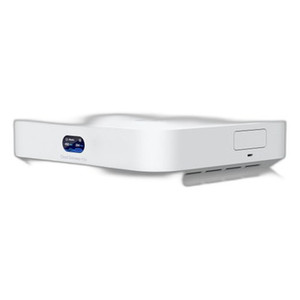
The Ubiquiti UCG-ULTRA is a desktop cloud gateway built for organizations deploying network infrastructure that require advanced routing, security, and centralized management without sacrificing physical footprint. At 5.6 x 5 x 1.2 inches, this device delivers genuine enterprise-grade security and uptime in a form factor that fits on a desk, shelf, or wall mount in branch offices, retail locations, or remote facilities.
The UCG-ULTRA processes 1 Gbps of IDS/IPS throughput—meaning it can inspect and protect inbound and outbound traffic at wire speed without becoming a bottleneck—across up to 30+ UniFi Network devices and 300+ simultaneous clients. Four WAN ports (one 2.5 GbE, three 1 GbE) enable multi-WAN load balancing and failover, so if one internet connection drops, traffic automatically shifts to a backup without operator intervention. This matters in environments where continuous connectivity is a business requirement, not a preference.
Key Features
- 1 Gbps IDS/IPS Throughput: 55,000+ CyberSecure signatures inspect packets in real time. This prevents intrusion attempts and malware outbound exfiltration from consuming your WAN capacity—the throughput stays available for legitimate traffic.
- Multi-WAN Load Balancing & Failover: Distributes traffic across four WAN ports or fails over to LTE backup (with compatible modem) if wired connections drop. No manual intervention, no service disruption.
- Zone-Based Firewalling & DPI: Segment networks by department, device class, or risk profile and apply layer-7 rules. Deep packet inspection identifies and throttles bandwidth hogs, P2P applications, or streaming services without relying on port numbers alone.
- SD-WAN Without Licensing Fees: Dynamic routing (OSPF), policy-based traffic steering, and application-aware routing work out of the box. No per-site or per-year subscription for basic SD-WAN functionality.
- Content Filtering & Ad Blocking: Built-in DNS filtering blocks malicious domains and optional ad servers before they reach client browsers. Reduces malware surface and improves user experience without deploying a separate appliance.
- VPN Options (Site-to-Site & Remote Access): Site Magic simplifies branch-to-headquarters connectivity; IPsec, OpenVPN, WireGuard, L2TP, and Teleport zero-config VPN cover legacy and modern requirements. Choose the tunnel type your environment demands without licensing restrictions.
- VLAN-Based Traffic Segmentation: Guest networks, IoT devices, or sensitive workstations stay isolated even on the same physical switch. Guest traffic never touches production data.
- Low Power Consumption: Draws only 6.2W via USB-C power (adapter included). Reduces cooling load, extends uptime on battery backup, and simplifies power provisioning in remote or outdoor enclosures.
- 0.96" LCM Status Display: Local screen shows WAN connectivity, CPU/memory utilization, and device status at a glance. Useful for on-site troubleshooting without console access.
- UniFi Cloud Integration: Manages the gateway alongside cameras, access points, and switches from a single cloud or on-premises controller. Pushes firmware, policies, and security definitions to all devices without manual site visits.
Integration & Compatibility
The UCG-ULTRA (often searched as UCG ULTRA) integrates with the UniFi ecosystem: UniFi NVRs, UniFi IP cameras, and UniFi switches communicate through its firewall and routing rules. If you deploy non-UniFi devices, standard network switch configurations and VLAN tagging still apply—the gateway is vendor-agnostic at the networking layer. Uplink to an ISP, failover to an LTE modem, or bond multiple WAN carriers without vendor lock-in beyond the UniFi management plane.
What's in the Box
- Ubiquiti UCG-ULTRA gateway unit
- USB-C power adapter (5V/3A)
When to Choose a Different Model
The UCG-ULTRA is sized for small to mid-market deployments (up to 300 simultaneous clients). If you require sub-millisecond latency for real-time applications, redundant power supplies, or sustained 10 Gbps+ throughput, consider higher-tier Ubiquiti gateway models in the UniFi Dream Machine or enterprise routing lines. For single-office sites under 50 devices with no advanced threat inspection, a basic UniFi PoE switch with integrated routing may suffice and cost less.
Frequently Asked Questions
Q: Does the UCG-ULTRA support VPN from remote employees?
A: Yes. Teleport enables zero-config remote access without configuring firewall rules or public IPs. Site Magic, OpenVPN, WireGuard, and IPsec are also available for site-to-site or client VPN use cases.
Q: What happens if my primary WAN connection fails?
A: The UCG-ULTRA automatically failover to a secondary WAN port or LTE backup (with a compatible modem). Load balancing distributes traffic across multiple WAN links proactively, so you don't lose all connectivity if one carrier goes down.
Q: Is IDS/IPS included or does it require a subscription?
A: CyberSecure threat signatures (55,000+ rules) are included. UniFi controller updates push new signatures as threats evolve—no per-device licensing.
Q: Can I wall-mount the UCG-ULTRA?
A: Yes. The compact form factor (5.6 x 5 x 1.2 inches) and low weight support desktop, shelf, or wall placement. No special mounting kit is required for standard wall surfaces.
Q: Does the UCG-ULTRA work with non-UniFi cameras and access points?
A: The gateway routes and secures traffic for any IP device on your network. Non-UniFi gear won't appear in the UniFi controller dashboard, but firewalling, DPI, and failover apply equally to all traffic.
Q: What is the power consumption and do I need a UPS?
A: The UCG-ULTRA consumes 6.2W, drawing negligible power from a standard USB-C charger. A small battery backup can sustain it for hours if uptime during WAN restoration is critical.
Ted PerryPerspective based on aggregated IP Security Depot and affiliated engineering team experience.
The UCG-ULTRA occupies a sweet spot for remote and branch deployments where you need enterprise security (1 Gbps IDS/IPS) without enterprise rack real estate or power consumption. Six watts is the standout metric here—that's basically a large USB charger's idle state. Pair it with a small PoE injector or a standard 5V battery backup and you've solved uptime for branch gateways that might otherwise be vulnerable to power hiccups.
Technical Highlights:
- 1 Gbps Throughput on IDS/IPS Inspection: Threat inspection doesn't bottleneck your WAN link. You get real-time packet analysis across 55,000+ CyberSecure signatures without the throughput hit that smaller appliances incur.
- Four-Port WAN (2.5 GbE + 3x 1 GbE): Load balancing across multiple carriers or failover to LTE means you're not betting your site uptime on a single ISP circuit. The 2.5 GbE port absorbs gigabit fiber or fixed wireless uplinks without undersizing.
- Multi-WAN Failover & SD-WAN Without Licensing: Zero per-site fees for dynamic routing (OSPF) and policy-based steering. You pay once, deploy anywhere, and no renewal invoices from the vendor.
Deployment Considerations:
- The device manages up to 30+ UniFi devices and 300+ simultaneous clients. If you're targeting a 500-device campus or dense retail chain with thousands of devices, escalate to the Dream Machine Pro or enterprise routing tier.
- The 0.96" LCM display is useful for status checks but doesn't offer granular troubleshooting feedback. Plan on cloud or SSH console access for deep diagnostics—don't expect the local screen to do everything.
Deploy the UCG-ULTRA at any multi-WAN site where you can't justify a full rack—retail locations with MPLS + broadband failover, warehouse distribution centers with LTE backup, or maritime vessel gateways where space and power are scarce. It delivers the security posture of much larger appliances in a form factor that doesn't dominate the IT closet.