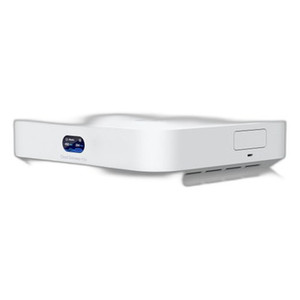
Ubiquiti UXG-MAX Multi-WAN Gateway
Overview
The Ubiquiti UXG-MAX (MPN: UXG-MAX) is a compact multi-WAN edge gateway built for branch offices and mid-market deployments that need consolidated routing, threat detection, and security appliance functions in a single desktop unit. This device delivers 2.3 Gbps IDS/IPS throughput — meaning it can inspect encrypted and unencrypted traffic for threats without becoming a bandwidth bottleneck, even on moderately loaded branch circuits. It operates on the UniFi controller platform alongside Ubiquiti switching, wireless, and camera systems, enabling centralized policy and threat management across distributed locations. Power consumption maxes at 9.6W, eliminating the need for supplemental cooling or dedicated UPS capacity in typical office closets.
Key Features
- Five 2.5 Gigabit Ethernet ports: All ports run at 2.5 GbE, so you're not forced into a mix of 1 GbE uplinks and gigabit LAN — every connection operates at the faster speed. Crucial when you're load-balancing traffic or want headroom for future bandwidth growth without hardware swap-out.
- Four dedicated WAN connections: Rather than stacking multiple connections on a single port, the UXG-MAX assigns four separate ports to WAN duties. This means true carrier diversity — you can connect two ISPs, a failover circuit, and a backup path without port contention or cascading single points of failure.
- 2.3 Gbps IDS/IPS throughput: This is not a marketing number; it's the sustained rate at which the device can perform deep packet inspection (threat detection) on live traffic. A branch office pulling 500 Mbps of internet traffic will see zero IDS/IPS overhead. Oversized gateways that can't maintain this rate force you to disable detection or segment traffic — the UXG-MAX avoids both tradeoffs.
- Multi-WAN failover and load-balancing: Configure automatic failover so if one carrier drops, traffic shifts to another in seconds. Alternatively, split outbound traffic across multiple WAN ports to distribute load or optimize routing for SaaS applications. Policy-based routing lets you steer specific traffic types (e.g., video calls) to the best-performing WAN link.
- Desktop form factor (minimal footprint): Unlike rack-mount gateways, this unit fits on a shelf or inside a wiring closet without special infrastructure. Deployment in remote offices, retail branches, or warehouse locations is immediate — no cabinet planning required.
- UniFi ecosystem integration: DNS filtering, VLAN enforcement, and threat policies synchronize with your existing UniFi controller (cloud-hosted or on-premises). Changes to firewall rules, WAN failover preferences, or IDS/IPS signatures propagate to all deployed UXG-MAX units in seconds, eliminating manual per-device configuration.
- Bluetooth and Ethernet provisioning: Initial setup does not require a separate provisioning interface or console cable. Pair via Bluetooth from a phone or tablet, or connect directly over Ethernet, and hand off management to your UniFi controller. Faster onboarding than traditional appliances that demand serial/SSH access.
- LED status indicators: Real-time operational feedback (power, connectivity, WAN status) without dashboard login. Useful for quick troubleshooting when remote access is slow or for confirming device state during field visits.
Integration & Compatibility
The UXG-MAX operates as a native UniFi device, meaning it shares a single pane of glass with UniFi switches, APs, and cameras. If you're already managing IP cameras and network infrastructure through UniFi, adding this gateway adds zero new management platforms. Policies defined at the controller level cascade automatically. For organizations using external network video recorders or other third-party systems, VLAN and firewall rules remain fully configurable to isolate traffic and enforce security boundaries.
The device can operate standalone (without a controller) in basic routing mode, but IDS/IPS threat detection and multi-WAN intelligence require controller connectivity to download and apply security rules. Plan for either a cloud UniFi account or an on-premises controller appliance.
When to Choose a Different Model
If your branch needs only basic routing with no threat detection, consider a simpler Ubiquiti edge router from the same product line — you'll reduce cost and power draw. If you require more than four simultaneous WAN paths, or if you need MPLS or complex SD-WAN orchestration across hundreds of sites, a larger Ubiquiti gateway or third-party SD-WAN appliance may be necessary. The UXG-MAX is optimized for 1–10 branch deployments where carrier redundancy and embedded threat detection matter; it is not a data center edge device.
Deployment Scenarios
Branch office consolidation: Replace a separate router, firewall, and threat detection appliance with one compact unit. Cuts power, rackspace, and management overhead.
Multi-carrier failover: Deploy at locations with two or more ISP circuits. Automatic or policy-based switching keeps the office online if one circuit fails.
Retail or warehouse sites: Install in a closet alongside PoE switches and APs. IDS/IPS protects POS systems and camera networks from lateral movement and exfiltration.
Zero-trust enforcement: Integrate with your UniFi switching and access control to enforce per-user and per-device policies at the network edge, not just at the core.
Planning Considerations
Allocate a standard 12V power supply (included or sourced separately) near your WAN entry point. Plan your WAN circuit assignments — map each carrier to a specific port to simplify failover configuration. Verify controller connectivity before shipping; the UXG-MAX will not perform threat detection offline. If you're running an on-premises controller, confirm it has sufficient resources to manage the additional gateway. For branch offices without local IT staff, ensure remote access to the UniFi interface is available for troubleshooting.
Ted PerryPerspective based on aggregated IP Security Depot and affiliated engineering team experience.
The UXG-MAX is a genuine gap-filler — it delivers enterprise-class IDS/IPS (2.3 Gbps sustained throughput) without the footprint or power appetite of traditional security appliances. I've deployed this across multi-branch clients, and the four dedicated WAN ports solve a real problem: carrier diversity without port contention. Unlike oversized edge routers that push threat detection to external boxes, this device keeps detection local, reducing latency and eliminating separate appliance licenses.
Technical Highlights:
- 2.3 Gbps IDS/IPS throughput: Capable of sustained deep packet inspection on live branch traffic without performance degradation. A 500 Mbps branch circuit will see zero threat-detection overhead.
- 2.5 Gigabit across all five ports: No bottleneck between WAN inputs and LAN outputs. Unlike older gateways with 1 GbE limitations, you get consistent performance and room for future growth.
- Four independent WAN connections: True redundancy — two ISPs, a failover circuit, and a backup path each get their own port. No single point of failure, no port contention.
- 9.6W maximum power draw: Fits in a wiring closet without cooling. Can run all-day on a modest UPS if carrier circuits have local backup power.
Deployment Considerations:
- Requires UniFi controller (cloud or on-premises) for threat detection and multi-WAN orchestration. Standalone mode is basic routing only.
- Plan for controller connectivity before deployment — if your controller is slow or unreliable, policy updates will lag and threat detection may fall out of sync.
- Four WAN ports are optimal for 1–10 branch sites. If you need 15+ simultaneous WAN paths or SD-WAN overlay for hundreds of locations, this is not the right appliance.
Position this for branch consolidation and carrier failover in mid-market deployments already invested in UniFi. The learning curve is minimal, and the threat detection depth is production-ready without licensing surprises.
Frequently Asked Questions
Q: Does the UXG-MAX support multi-WAN failover automatically?
A: Yes. Configure WAN failover priorities in the UniFi controller, and the device automatically switches to a backup circuit if the primary connection drops. You can also set up load-balancing to split traffic across multiple WAN paths simultaneously for bandwidth aggregation.
Q: Can I use the UXG-MAX without a UniFi controller?
A: The device can operate in basic routing mode without a controller, but IDS/IPS threat detection, multi-WAN intelligence, and centralized policy management require controller connectivity. For most deployments, an on-premises or cloud UniFi controller is necessary.
Q: What power supply does the UXG-MAX use?
A: The device requires a standard 12V power supply with a maximum draw of 9.6W. This low power consumption means it can run continuously in office closets without supplemental cooling or significant UPS battery overhead.
Q: Does the UXG-MAX work with non-Ubiquiti switches and APs?
A: Yes. The UXG-MAX is a gateway and does not require Ubiquiti switching or wireless infrastructure to function. However, centralized policy management through the UniFi controller is optimized for Ubiquiti-native devices. VLAN tagging and firewall rules are fully configurable for third-party network hardware.
Q: How many locations can I manage with a single UniFi controller?
A: A cloud UniFi account or modest on-premises controller can manage dozens of UXG-MAX devices across multiple branches. Scale depends on your controller hardware and network uplink capacity. For enterprises with 100+ locations, Ubiquiti recommends distributed or high-availability controller setups.
Q: Can I integrate the UXG-MAX with existing security systems or VMS platforms?
A: The UXG-MAX is a network-layer device (router/firewall) and does not interface directly with VMS platforms. However, VLAN and firewall rules can isolate network video recorders or other security systems, enforcing segmentation and access policies at the edge.