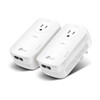
TP-Link TL-PA9020P KIT AV2000 Passthrough Powerline Starter Kit
Overview
The TP-Link TL-PA9020P KIT is a 2-pack AV2000 powerline adapter system that delivers 2000Mbps data rate over existing AC wiring — solving the problem of extending network connectivity to surveillance cameras, NVRs, and access control hardware in spaces where running Ethernet cable is impractical. Each adapter includes a passthrough power outlet, allowing you to keep existing devices plugged in without losing an electrical socket. This kit is designed for plug-and-play deployment: no software setup, no configuration interface — pair the two units and add Ethernet.
Compatibility
Works with any IP surveillance camera, NVR, access control reader, or network device that accepts standard Gigabit Ethernet. The TL-PA9020P KIT adapters pair automatically and support any 110–240V AC mains in residential or commercial buildings. Compatible with standard PoE injectors and PoE switches if you need to power cameras remotely; the passthrough outlet does not degrade power delivery to connected devices. Integrates into existing ONVIF-compliant VMS platforms since it presents as standard Ethernet connectivity.
Installation Notes
Plug each adapter directly into a wall outlet on different AC circuits or the same circuit if they are within reasonable distance (powerline performance degrades with circuit length and electrical noise). Avoid plugging into power strips, surge protectors, or outlets downstream of dimmer switches or high-noise equipment (motor controllers, plasma TVs, microwave inverters) — these degrade signal. Once plugged in, the units auto-pair within 2–3 minutes; press the Pair button on the second unit if pairing does not complete automatically. Connect Ethernet cables to the Gigabit ports on each adapter and configure IP addressing on your devices. For best results in electrically noisy environments (industrial facilities, data centers), test powerline speed before committing to full surveillance deployment.
What's in the Box
- 2x TP-Link TL-PA9020P powerline adapters
- 2x Gigabit Ethernet cables (1 meter each)
- Quick-start guide and pairing instructions