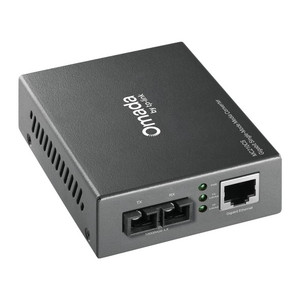
TP-Link MC100CM Fiber Converter Multi-Mode 10/100
The TP-Link MC100CM is a copper-to-fiber media converter designed to extend Fast Ethernet connectivity over multimode SC fiber up to 2 kilometers. In security and industrial deployments, fiber isolation eliminates electromagnetic interference from power distribution, motor drives, and high-frequency equipment—a critical advantage in plants, substations, and sprawling outdoor perimeter installations where copper cable performance degrades or EM noise corrupts video streams and NVR heartbeats. Full-duplex operation preserves bidirectional throughput without bottleneck; the compact adapter form factor integrates directly into patch panels or mounts into a TL-MC1400 19-inch chassis for centralized fiber breakout.
Key Features
- 10/100Mbps Copper Input: Standard RJ45 connector accepts 10BaseT or 100BaseTX from any Fast Ethernet switch, edge device, or PoE-powered IP camera NVR. Full compatibility with managed and unmanaged switching infrastructure.
- Multimode SC Fiber Output: 850nm wavelength over multimode SC connector rated to 2 kilometers. Eliminates copper cable distance constraints and EM noise susceptibility on long runs across industrial floors or outdoor perimeter fencing.
- Full-Duplex Flow Control: IEEE 802.3x flow control prevents packet loss during transient congestion, preserving video stream integrity on surveillance systems handling simultaneous multi-camera playback and live view.
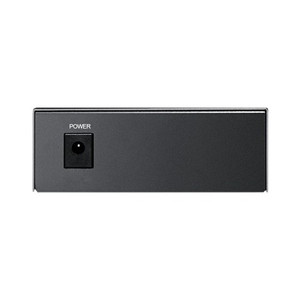
- Low Power Consumption: 2.4W maximum draw via 9V/0.6A or 5V/1A switching adapter—negligible load on facility power circuits; no UPS battery strain in unstaffed remote cabinet deployments.
- LED Status Indicators: Link and activity LEDs on both copper and fiber sides provide instant visibility into connection health and data flow, enabling rapid troubleshooting without terminal access.
- Compact Adapter Design: Fits directly into patch panels or slots into optional TL-MC1400 chassis for rack-mount consolidation of multiple converter pairs, reducing footprint in crowded IDF or MER closets.
- Industrial Operating Range: 0°C–40°C operating, −40°C–70°C storage temperature rating handles unheated equipment sheds and temperature-variable outdoor cabinets typical in perimeter and remote site surveillance.
- CE/FCC Certified: Regulatory compliance for North American and European deployment; no licensing restrictions for integrator or end-user installation.
The MC100CM bridges copper and fiber networks where distance or noise isolation is mandatory. A typical deployment: multisite parking garage surveillance where each floor or remote lot hosts a PoE switch feeding IP cameras. Copper runs from the switch to a fiber breakout point exceed 100 meters or pass near high-current electrical conduit—both scenarios degrade unshielded twisted-pair (UTP) performance or introduce jitter into video streams. A pair of MC100CM converters (one at the switch, one at the remote breakout) transparently extends the link 2 kilometers over fiber, eliminating the need for expensive shielded Category 7 cable or active repeaters.
Integration with enterprise NVR platforms (Milestone, Genetec, Axis Companion, etc.) is seamless: the converter operates at Layer 1 (physical) and presents no configuration overhead. The NVR sees a standard Fast Ethernet connection; multimode fiber is invisible to the application stack. ONVIF-compliant IP cameras and edge analytics appliances requiring Gigabit backhaul can also be provisioned behind the MC100CM—the converter handles 100Mbps symmetrically, sufficient for 4–8 concurrent 1080p H.264 streams or 2–4 2MP cameras with edge metadata. For higher aggregate bandwidth (e.g., 4K PTZ cameras or 16+ legacy analog encoders), a Gigabit fiber media converter (MC115CS or MC116CS single-mode variant) is recommended.
Fiber cabling discipline is essential to reliability. Multimode SC jumpers must be terminated to industry standard (IEC 61754-4) and tested for continuity and reflectance before deployment. A 2 km run in an outdoor aerial or conduit path with temperature cycling (0°C to 40°C) demands quality patch cable: cheap jumpers introduce insertion loss and connector creep, causing intermittent link flaps. Allocate 0.5–1.0 dB margin on the fiber budget (typical multimode SC link insertion loss is 1–2 dB over 2 km); if your link budget is marginal, verify with an optical power meter before go-live. Power the MC100CM from a regulated supply (the included 9V/0.6A or 5V/1A adapter is adequate); noisy or undersized 12V industrial supplies can cause jitter or occasional packet loss on the Ethernet side.
The TP-Link MC100CM is the entry-level choice for integrators seeking reliable, low-cost fiber extension in surveillance and industrial control deployments. It carries CE and FCC regulatory approval and integrates directly with Milestone, Genetec, Axis Camera Station, and any ONVIF-compliant management suite. For single-mode fiber (20+ km range) or Gigabit throughput, explore the MC115CS (single-mode, Gigabit-rated). For more information on TP-Link's fiber media converter line, visit the TP-Link catalog.
Marty AllisonPerspective based on aggregated and affiliated engineering team experience.
We've deployed the TP-Link MC100CM across dozens of surveillance and industrial sites where standard copper Ethernet either runs out of distance budget or encounters intolerable EM noise. The multimode SC fiber interface at 850nm is the real workhorse—it's the sweet spot between cost and performance for runs under 2 kilometers. Unlike single-mode fiber (MC115CS), multimode allows slightly higher insertion loss and uses cheaper, more forgiving termination practices, which means faster field splicing and fewer callbacks during initial link-up. Against the Netgear MC108 or the D-Link DMC-1000, the MC100CM holds its own on reliability and comes in at a lower street price. Where it hits a wall: if your fiber run exceeds 2 km or you need Gigabit throughput (e.g., four simultaneous 2K video streams or a busy data center backhaul), you'll outgrow it. For 2–4 megapixel H.264 cameras or edge recording over fiber, however, it's plenty.
Technical Highlights:
- 850nm Wavelength (Multimode SC): Multimode fiber at 850nm is the industry standard for short-to-medium runs (under 3 km). Insertion loss is approximately 0.5–1.0 dB per kilometer on quality cable; at 2 km with good termination, you're well within the 3–4 dB total loss budget typical for 100Mbps asynchronous operation. This translates to stable link status even with aging cables or field splices.
- Full-Duplex 100Mbps Symmetrical: Unlike half-duplex copper repeaters, full-duplex operation means transmit and receive happen simultaneously without collision detection overhead. For streaming video, this eliminates the artificial throughput ceiling you'd hit with older hub-based networks—important when pulling live view from four 1080p cameras at once.
- 2.4W Maximum Power Draw: Negligible compared to a typical PoE+ switch outlet (30W) or industrial PLC (15–50W). In remote, battery-backed cabinet scenarios (e.g., perimeter gate with solar + 12V lead-acid), the MC100CM is invisible to power budget; the real load is the switch or camera behind it.
- Passive Adapter vs. Chassis Mount: The unit can sit inline in a patch panel (smallest footprint, minimal cable routing) or slot into the optional TL-MC1400 19-inch chassis (consolidates 14 converters per rack unit). Choose based on whether you're upgrading a single remote site (inline) or building a central fiber demux facility (chassis).
- IEEE 802.3x Flow Control: Flow control prevents buffer overrun when the fiber link is momentarily congested. In practice, surveillance systems don't stress this heavily, but on a busy LAN with both video ingest and data backup running simultaneously, it prevents frame drops and packet retransmission.
- LED Link/Activity Indicators: Dual-side (copper and fiber) LEDs are your first line of diagnosis. Link amber/green on both sides means the transceiver is operational; activity blinking confirms data flow. No serial console required for basic troubleshooting on site.
Deployment Considerations:
- Fiber Cabling Spec & Termination: Multimode fiber at 850nm must be OM3 or OM4 rated; OM1 (older 62.5 µm core) is marginal over 2 km due to modal dispersion. Insist on IEC 61754-4 SC connector terminations and factory-polished ferrules, not field-spliced jumpers, if you're running the full 2 km. Budget $200–400 for professional fiber termination; a cheap jumper will cost you in troubleshooting callbacks.
- Link Budget Margin: Typical multimode SC insertion loss is 0.8 dB/km at 850nm. For a 2 km run with two connectors, assume 2.0–2.5 dB total loss. A 100Mbps asynchronous link can tolerate up to 4 dB; you have a safety margin, but not much. If your link is intermittent or slow, measure optical power at both ends with a power meter before calling it a cable problem.
- Power Supply Quality Matters: The included 9V/0.6A switching adapter is adequate, but in electrically noisy industrial settings (VFD drives, arc welders nearby), run the MC100CM on a separate, regulated 5V or 9V supply isolated from the NVR or switch. Noisy ground return paths can cause link flaps or corrupted frames, especially on marginal fiber links.
- Full 2 km Range Requires Field Planning: The 2 km spec assumes multimode OM3+ cable in conduit or aerial with minimal bend radius violations. If your fiber path includes multiple patch panels, floor penetrations, or outdoor aerial runs with temperature cycling (−20°C to +60°C in real-world outdoor), test the link at commissioning and re-test seasonally for any creep in insertion loss.
- No Gigabit Uplink Option: The MC100CM is capped at 100Mbps on the copper side. If you later need to feed a Gigabit switch or a higher-bitrate camera (e.g., 4K PTZ or JPEG burst from an edge AI appliance), you'll need to replace this with a Gigabit fiber converter. Plan your fiber infrastructure accordingly; single-mode fiber runs can be future-proofed with Gigabit SFP modules, but multimode SC is a 100Mbps ceiling.
The TP-Link MC100CM is the right choice for security integrators building fiber-extended perimeter or multi-building surveillance networks where 100Mbps is sufficient and distance or EM isolation is the primary driver. If your fiber cabling discipline is strong and you're comfortable with multimode SC termination standards, this converter delivers years of trouble-free operation at a fraction of the cost of a Gigabit fiber platform. Explore the full range at the TP-Link catalog.