Product images are provided for reference and may not represent the exact model, configuration, or included components.

Overview

SKU: EAP613
Condition: New
Availability: Backorder Available — Contact for ETA
Warranty Manufacturer Warranty
Write a Review

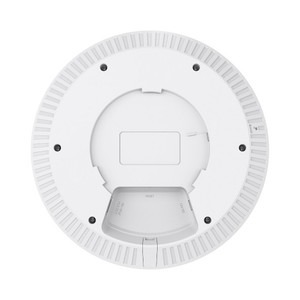
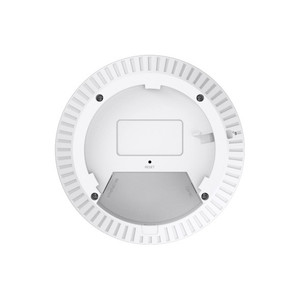
TP-Link EAP613 AX1800 Ceiling Mount Dual-Band Wi-Fi 6

TP-Link EAP613 AX1800 Dual-Band Wi-Fi 6 Ceiling Mount Access Point Overview The EAP613 is a dual-band 802.11ax access point designed for enterprise ce…

$84.99
Usually Ships Same Business Day
In stock

Quantity:

Adding to cart… The item has been added
Compatibility guidance available for your deployment
Experts for pre and post-sales support
Technical and documentation support
Shipping and lead-time confirmation before install

Laura Bennett, IPSD Senior Specialist

Talk to Laura

Specialized training • U.S - based

Senior Specialist • 877-277-7147

TP-Link EAP613 AX1800 Ceiling Mount Dual-Band Wi-Fi 6

$84.99

Overview

SKU: EAP613
Condition: New
Availability: Backorder Available — Contact for ETA
Warranty Manufacturer Warranty

No Bots, Just Experts

Questions about this product? Free pre-sales support from a senior specialist — product questions, compatibility checks, BOM quotes, price confirmation — typically answered within one business day. Need camera placement or system design work? Engineering time is $175 per hour (qty 1 = 1 hour). Hardware buyers get up to one hour ($175) credited back on their order.

Description

TP-Link EAP613 AX1800 Dual-Band Wi-Fi 6 Ceiling Mount Access Point

Overview

The EAP613 is a dual-band 802.11ax access point designed for enterprise ceiling deployment where wired backhaul and centralized management are available. It delivers 574 Mbps on 2.4 GHz and 1201 Mbps on 5 GHz, supporting dense client loads through MU-MIMO and airtime fairness — meaningful when deploying across multiple floors or large open spaces where coverage overlap is unavoidable. A single Gigabit RJ45 port handles both data and PoE (802.3at or 12VDC alternative), eliminating the need for separate power runs.

Key Deployment Features

Band steering and beamforming optimize client association and signal strength without manual intervention. Seamless roaming reduces handoff latency when mobile devices move between APs — critical for warehouse automation systems and real-time asset tracking. Load balancing distributes traffic across bands, preventing saturation on the 5 GHz side when multiple high-bandwidth clients are active. Omada SDN Controller integration (or standalone Omada app) centralizes configuration, firmware updates, and RF monitoring across the entire deployment — eliminating per-AP management overhead.

Compatibility

The EAP613 integrates into any Omada-managed network via the Omada Controller or cloud-based management portal. It works alongside other 802.11ax and 802.11ac TP-Link access points in the same deployment to extend coverage. PoE power delivery requires either an 802.3at-compliant PoE injector or switch; the included power adapter is not supplied, so verify your power sourcing before installation.

When to Choose a Different Model

If outdoor weatherproofing (IP66+) is required, consider TP-Link's outdoor-rated access point line. For environments demanding higher throughput density or 6 GHz support, evaluate newer Wi-Fi 6E variants from the same family.

Specifications
Source: 1
Product Type: Dual-Band Wi-Fi 6 Access Point
Frequency: 2.4 GHz, 5 GHz
Managed: Omada SDN Controller / App
PoE_Budget: 802.3at compatible
Ports: 1
Speed: 574 Mbps (2.4 GHz) + 1201 Mbps (5 GHz)
Throughput: 1775 Mbps aggregate
Q&A
Reviews
Have Questions? Ask an Expert.

RELATED PRODUCTS

System Design, Deployment & Technical Support

Support services and planning resources for commercial surveillance, access control, and infrastructure deployments.

Fixed scope • Fixed price

System Design Assistance

  • Get help validating product compatibility
  • Coverage requirements
  • Storage planning and deployment architecture before you buy.
Request Design Help

Deployment & Configuration Support

  • Access fixed-scope support for rollout planning
  • User setup guidance
  • Migration and system standardization across single-site or multi-site deployments
View Support Services

Guides, Tools & Calculators

  • PoE requirements
  • Storage retention
  • Camera selection and deployment methodology
Open Technical Resources