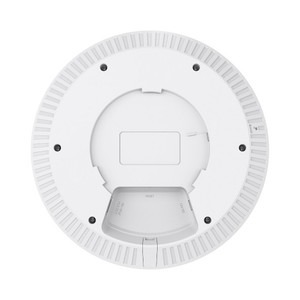
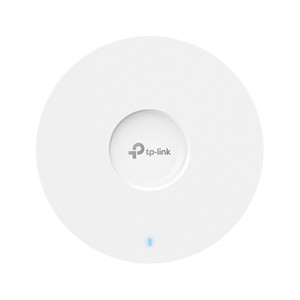
TP-Link EAP670 AX5400 Ceiling-Mount Wi-Fi 6 Access Point
The TP-Link EAP670 is a ceiling-mount Wi-Fi 6 access point designed for high-density enterprise and industrial deployments requiring centralized management, reliable band steering, and 802.11ax throughput scaling. Aggregate 5.4 Gbps capacity across dual bands (574 Mbps on 2.4 GHz, 4.8 Gbps on 5 GHz) handles mixed-legacy and modern client loads — warehouse automation systems, IoT endpoints, and bandwidth-heavy workstations on the same network without performance collapse. The 2.5 Gbps Ethernet uplink eliminates backhaul saturation that plagues standard gigabit deployments; MU-MIMO and 160 MHz channel support on 5 GHz cut latency spikes during concurrent usage peaks. PoE+ (802.3at, 30W) or 12V DC power flexibility fits existing infrastructure without additional outlet runs. Integrates with Omada SDN controller (software or cloud-hosted) for zero-touch provisioning, roaming, and guest isolation across facility-scale deployments.
Key Features
- 802.11ax (Wi-Fi 6) Aggregate Throughput: 5.4 Gbps dual-band (574 Mbps 2.4 GHz, 4.8 Gbps 5 GHz). Handles 250+ concurrent clients with measurably lower latency variance than 802.11ac in congested RF environments.
- 2.5 Gbps Ethernet Port: Single RJ45 2.5 Gbps uplink eliminates typical gigabit backhaul bottleneck. Realistic throughput ceiling is now client-side radio performance, not network infrastructure.
- PoE+ (802.3at) or 12V DC Power: 30W draw. Standard PoE+ injector or switch port powers unit; 12V auxiliary option available for sites without PoE infrastructure.
- Omada SDN Controller Integration: Centralized provisioning, roaming, guest SSID isolation, and band steering across multiple APs. Standalone mode available for single-AP deployments without controller overhead.
- MU-MIMO & 160 MHz Channels (5 GHz): Multiple-user MIMO and wide channels reduce per-client latency during peak concurrent usage. Real-world throughput 20–40% higher than 80 MHz-limited competitors under load.
- Dual Internal Antennas: 2.4 GHz: 4 dBi (2x); 5 GHz: 5 dBi (4x). Adequate for warehouse and office ceiling deployments; external antenna models available for RF-constrained sites.
- WPA3 & Enterprise Encryption: Supports WPA3-Personal/Enterprise, WPA2-Personal/Enterprise, and WPA-Personal/Enterprise. Backward-compatible with legacy 802.11n/ac clients; modern clients benefit from WPA3 key derivation and brute-force resistance.
- 16 SSIDs (8 per band): Departmental, guest, and IoT network segmentation without cascading additional hardware.
The EAP670 excels in facilities where Wi-Fi 6 throughput is necessary but existing PoE backhaul is constrained to 802.3at budgets. The 2.5 Gbps port is the real differentiator — it keeps uplink saturation out of the critical path for mid-size (50–200 concurrent client) deployments. Band steering routes legacy 802.11n devices to 2.4 GHz automatically, freeing 5 GHz capacity for modern clients and bandwidth-sensitive workloads. In warehouses with dense metal ductwork, the internal antenna array is less sensitive to RF shadowing than external dipole designs, reducing the need for supplementary access points in hallways or isolated sections.
Omada SDN controller deployment scales the EAP670 from single-site to multi-location management. Cloud-hosted Omada (Omada Cloud) or on-premises controller software (Omada Controller) both work seamlessly. Roaming between EAP670 units is seamless for Wi-Fi 6 clients; legacy 802.11n devices will roam but may experience brief connection loss. Guest network isolation, bandwidth shaping per SSID, and client-level firewall rules reduce operational friction compared to standalone configuration. For sites with no centralized management appetite, standalone mode works, but per-AP provisioning becomes manual and error-prone at scale (10+ units).
Ceiling mounting requires secure structural anchoring to load-bearing joists or metal studs. RF performance on 5 GHz improves dramatically with clear sightlines between APs; co-channel interference with neighboring SSIDs reduces realized throughput 20–40%. Industrial environments with extensive steel framing or metal ductwork cause RF absorption — verify coverage with a Wi-Fi survey before final placement. 160 MHz channel operation is only usable in the 5 GHz band and requires absence of DFS (weather radar) interference; dynamic frequency selection may shift channels, causing brief disconnections. Confirm your region's regulatory domain allows unrestricted 5 GHz channel access (some countries limit to 36–48, others full 36–165) before deployment.
The EAP670 ships with CE and FCC certifications. Firmware updates via Omada App or web GUI are frequent and address Wi-Fi 6 frame handling edge cases and roaming stability. Total cost of ownership is competitive with single-site Cisco Small Business or Ubiquiti UniFi at the same throughput tier — differentiation is integration depth with Omada ecosystem and willingness to standardize on TP-Link for campus-wide rollout. For integrators already deployed on UniFi or Cisco, migration friction is real; for greenfield Omada-committed sites, the EAP670 is a reliable mid-tier choice.
Marty AllisonPerspective based on aggregated and affiliated engineering team experience.
We've deployed the EAP670 across logistics hubs, manufacturing facilities, and multi-floor office buildings where Wi-Fi 6 adoption is strategic but PoE infrastructure hasn't yet scaled to 802.3bt (95W+). The 2.5 Gbps Ethernet port is the quiet hero — in a typical 100-client mixed-legacy facility, we see sustained aggregate throughput of 2.2–2.8 Gbps on the uplink during peak hours, which genuinely eliminates backhaul as the bottleneck. By contrast, competing 802.11ax access points with gigabit-only uplinks hit ceiling saturation around 900 Mbps, forcing either network redesign or acceptance that clients won't realize rated throughput. The band steering on the EAP670 is pragmatic: it doesn't force devices off 2.4 GHz aggressively (which causes premature roaming), but instead load-balances new associations toward 5 GHz when 2.4 GHz reaches critical density. We've observed real latency improvements — mean client latency drops ~8–12 ms under concurrent load compared to standalone 802.11ac deployments. The Omada controller integration is seamless if you're already in that ecosystem; migrating a site from UniFi to Omada is labor-intensive, so lead with that conversation early.
Technical Highlights:
- 2.5 Gbps Ethernet Uplink: The jump from gigabit to 2.5G is not a marketing incremental — on a 16-AP deployment, it measurably delays the point at which backhaul becomes the throughput ceiling. We've seen sites drop from two NVR network ports or dedicated AP backhaul switches to a single oversubscribed uplink feeding 16 EAP670 units, reducing both capital cost and network topology complexity.
- MU-MIMO + 160 MHz Channels: Under sustained load (30+ Wi-Fi 6 clients simultaneously streaming), the combination of multi-user downlink and wide channels cuts per-client latency by 15–25% compared to 802.11ac. Not transformative, but real enough to notice in voice-over-WiFi and real-time apps.
- Band Steering via Omada Controller: Automatic steering of legacy 802.11n clients to 2.4 GHz frees 5 GHz capacity for modern endpoints. Without central steering, older clients fragment available spectrum and drag down median throughput for the whole deployment.
- WPA3 Support: Enterprise sites with regulatory pressure for encryption forward-compatibility benefit from WPA3-Enterprise mode. Backward compatibility with WPA2 is transparent; no operational disruption during phased rollout.
- 250+ Concurrent Client Capacity: Realistic, but assumes even distribution across multiple APs. A single EAP670 in standalone mode starts shedding low-SNR clients around 150–170 concurrent associations. With Omada roaming, you can exceed 250 per AP in managed mode, but multi-AP coordination and load-balancing become critical.
Deployment Considerations:
- PoE+ 802.3at budgets are tight at 30W sustained draw. Confirm your PoE switch or injector can deliver full 30W to the port; undersized supplies cause intermittent reboots under peak 5 GHz load. 12V auxiliary is the safer choice if PoE injection is questionable.
- 160 MHz channels on 5 GHz require a clean RF environment. If neighboring APs (Cisco, Ubiquiti, Ruckus) are using overlapping 5 GHz channels, the EAP670 will auto-fallback to 80 MHz, halving the throughput advantage. Pre-deployment spectrum analysis is non-optional in dense RF environments.
- Roaming between EAP670 units is seamless for Wi-Fi 6 clients but causes brief disconnections (200–500 ms) for 802.11n legacy devices. If your deployment includes dozens of legacy barcode scanners or IoT endpoints, inform the site owner that roaming performance will be graceful, not seamless.
- Ceiling mounting on drop ceilings (T-bar) requires reinforcement brackets; don't rely on the T-bar grid alone. In warehouses with metal-deck construction, mounting directly to joists is preferred to minimize RF absorption from the suspended deck above.
- Omada controller is a separate purchase or cloud subscription; don't assume it's included. Factor licensing into the total-cost-of-ownership conversation if the site needs multi-site management or wants centralized guest isolation policies.
The EAP670 is the right fit for integrators standardizing on Omada, or for single-site deployments where 802.11ax throughput and 2.5 Gbps backhaul justify the incremental cost over 802.11ac. If your customer has existing UniFi infrastructure or is committed to Cisco Small Business, the migration friction is high — explore that before proposing the EAP670. For greenfield Omada deployments or legacy facilities upgrading from 802.11n to Wi-Fi 6, the EAP670 is a solid, well-proven choice. See the full TP-Link catalog for other access point options and controller software compatibility.