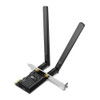
Product images are provided for reference and may not represent the exact model, configuration, or included components.

Overview

SKU: ARCHER TX20E
Condition: New
Availability: Usually Ships Same Business Day
Warranty Manufacturer Warranty
Write a Review

TP-Link ARCHER TX20E AX1800 Dual Band Wi-Fi 6 Bluetooth 5.2

TP-Link ARCHER TX20E AX1800 Wi-Fi 6 PCIe AdapterOverviewThe TP-Link ARCHER TX20E is an AX1800 dual-band Wi-Fi 6 PCI Express adapter with integrated Bl…

$41.99
Usually Ships Same Business Day
In stock

Quantity:

Adding to cart… The item has been added
Compatibility guidance available for your deployment
Experts for pre and post-sales support
Technical and documentation support
Shipping and lead-time confirmation before install

Laura Bennett, IPSD Senior Specialist

Talk to Laura

Specialized training • U.S - based

Senior Specialist • 877-277-7147

TP-Link ARCHER TX20E AX1800 Dual Band Wi-Fi 6 Bluetooth 5.2

$41.99

Overview

SKU: ARCHER TX20E
Condition: New
Availability: Usually Ships Same Business Day
Warranty Manufacturer Warranty

No Bots, Just Experts

Questions about this product? Free pre-sales support from a senior specialist — product questions, compatibility checks, BOM quotes, price confirmation — typically answered within one business day. Need camera placement or system design work? Engineering time is $175 per hour (qty 1 = 1 hour). Hardware buyers get up to one hour ($175) credited back on their order.

Description

TP-Link ARCHER TX20E AX1800 Wi-Fi 6 PCIe Adapter

Overview

The TP-Link ARCHER TX20E is an AX1800 dual-band Wi-Fi 6 PCI Express adapter with integrated Bluetooth 5.2. It delivers 1201 Mbps on 5 GHz and 574 Mbps on 2.4 GHz — useful when you need to retrofit existing surveillance infrastructure with modern Wi-Fi 6 connectivity without replacing the host system. The adapter includes two high-gain external antennas and supports MU-MIMO and OFDMA, which reduce latency when multiple surveillance cameras or edge devices stream simultaneously over the same network.

Compatibility

The ARCHER TX20E is a standard PCIe x1 adapter; compatibility depends on your host system having an available PCIe slot and drivers for Windows or Linux. It is not directly compatible with pre-built surveillance appliances (NVRs, video management servers) unless the specific system exposes PCIe expansion. Verify your target platform supports third-party PCIe Wi-Fi adapters before purchase — many enterprise NVR platforms do not allow or officially support expansion cards. If your deployment requires Wi-Fi for cameras themselves, use network cameras with built-in Wi-Fi instead of retrofitting a server adapter.

Installation Notes

Install the adapter into an available PCIe x1 (or x4/x16) slot inside your system. Install the latest driver from TP-Link before powering on; older or missing drivers will prevent detection. The two external antennas should be oriented perpendicular to each other and positioned away from metal enclosures to maximize signal. Power consumption is minimal (typically under 2W idle); no external power connector is required. Ensure adequate airflow around the adapter if mounted in a confined system chassis.

What's in the Box

  • 1x TP-Link ARCHER TX20E PCIe adapter
  • 2x high-gain external antennas
  • 1x antenna extension cable (if included in regional variant)
  • Driver CD or QR code for online driver download
Specifications
Source: 1
Brand: TP-Link
MPN: ARCHER TX20E
Type: Power Supply
Connectivity: Bluetooth
Q&A
Reviews
Have Questions? Ask an Expert.

RELATED PRODUCTS

System Design, Deployment & Technical Support

Support services and planning resources for commercial surveillance, access control, and infrastructure deployments.

Fixed scope • Fixed price

System Design Assistance

  • Get help validating product compatibility
  • Coverage requirements
  • Storage planning and deployment architecture before you buy.
Request Design Help

Deployment & Configuration Support

  • Access fixed-scope support for rollout planning
  • User setup guidance
  • Migration and system standardization across single-site or multi-site deployments
View Support Services

Guides, Tools & Calculators

  • PoE requirements
  • Storage retention
  • Camera selection and deployment methodology
Open Technical Resources