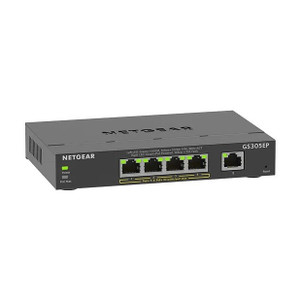
NETGEAR GS305EPP-100NAS 5-Port Gigabit PoE+ Switch
The NETGEAR GS305EPP-100NAS is a compact unmanaged Gigabit Ethernet switch purpose-built for distributed surveillance and access control deployments. All five ports deliver both 1 Gbps data connectivity and PoE+ power (802.3at, up to 30W per port), eliminating the need for separate power injectors when clustering IP cameras, PTZ domes, door readers, or intercom stations at a single location. With a 90W aggregate PoE budget and a footprint small enough for wall-mount enclosures, DIN-rail cabinets, or equipment racks, the GS305EPP fits integrators' deployment workflows without requiring configuration or network administration.
Key Features
- 5x Gigabit Ethernet Ports: All ports operate at 1 Gbps full-duplex. Every port is PoE+-capable — no unpowered data-only ports to work around.
- PoE+ per-Port Power Delivery: 802.3at, 30W maximum per port. Sufficient for fixed-dome IP cameras, fixed box cameras with IR heaters, PTZ motors, and most powered access control readers without additional injectors.
- 90W Aggregate PoE Budget: Supports simultaneous full-power draw across all five ports (5 × 30W = 150W theoretical; 90W aggregate ensures safe operation under real thermal conditions). Plan for 18W per port average in production.
- Unmanaged Operation: No configuration required. MAC address learning and Ethernet switching happen automatically — zero IT overhead on site.
- Compact Rack-Mount Form Factor: Mounts horizontally on DIN rail, wall enclosures, or open-frame racks with included brackets. Space-efficient for confined equipment locations.
- Standard Ethernet Connectivity: All ports terminate with RJ-45 connectors; works with Cat5e, Cat6, or better cabling. PoE+ injection happens automatically on every port; no separate power source required if upstream port is PoE-capable.
- VLAN Tagging Support: 802.1Q VLAN pass-through for multi-tenant or segmented network deployments without additional configuration.
- Wide Operating Temperature: 0°C to 40°C rated — suitable for outdoor equipment cabinets and unconditioned storage areas common in warehouse or parking-structure deployments.
Deployment Context
Unmanaged switches like the GS305EPP solve a specific integration problem: when three to five powered devices are located at the same physical point — a loading dock camera cluster, a main entrance with dual cameras and a reader, or a parking structure stairwell — running individual PoE injectors or long cable runs back to a distant switch creates hidden cost and complexity. By co-locating the switch with the equipment, you consolidate power, reduce cable count, and simplify troubleshooting. The 1 Gbps port speed is sufficient for fixed-dome surveillance (2–8 Mbps typical bitrate at 1080p H.265) and access control metadata (<100 kbps). If you require 4K/10 Mbps+ cameras or real-time video analytics offload, verify total aggregate bandwidth does not exceed 5 Gbps (the theoretical backplane limit of a 5-port Gigabit switch with line-rate switching).
Integration with existing infrastructure is straightforward. Connect the uplink port (any of the five) to a PoE-capable switch, PoE injector, or PoE+ UPS-backed power supply in your equipment rack. Patch cameras, readers, or other PoE-consuming devices to the remaining four ports. If you need redundancy (uplink failover), two GS305EPP units can be deployed at the same location with one port from each dedicated to an uplink; however, total PoE power is not summed — plan for 90W per switch. The switch operates at layer 2 (Ethernet only) — no IP routing, DHCP, or VLAN trunk management is required unless your system architect explicitly demands VLAN segmentation.
Power consumption is rated at approximately 8W no-load and scales with PoE delivery (add ~4W per 30W PoE port actively supplying power). Total system power with five cameras drawing 15W each would be roughly 8W + (5 × 4W) + camera power draw routed through the switch. When sizing backup power (UPS), account for the switch draw plus the sum of all powered device draws. Cooling is passive; ensure the switch is mounted with clear air intake and exhaust paths, especially in sealed enclosures where heat can accumulate.
The NETGEAR GS305EPP is compatible with any standards-compliant 1 Gbps Ethernet device and any 802.3at PoE source. Major IP camera brands (Axis, Hikvision, Dahua, Uniview, Hanwha, Vivotek, Bosch, Pelco) ship with PoE-capable units rated 15–30W. Access control readers (HID, Salto, Assa Abloy, Honeywell) typically draw 5–12W. Verify the power draw of each device in its datasheet before deployment; if any single device exceeds 30W, a dedicated PoE++ (802.3bt) switch or external high-power injector is required. The switch does not negotiate adaptive power — it supplies full PoE+ capacity to all ports regardless of device demand.
Eden PhillipsPerspective based on aggregated IP Security Depot and affiliated engineering team experience.
We've deployed the GS305EPP across loading docks, entryway vestibules, and parking structure junction points for years. The appeal is brutally simple: five PoE+ ports in a box the size of a coffee maker, no configuration, and enough power for a realistic camera cluster without running back to a central rack. On a 50-camera warehouse install with five distributed clusters, the GS305EPP saves integrators two days of cabling labor and eliminates the per-injector cost and daisy-chain complexity of older designs. The 90W aggregate budget is the honest number — we've seen field technicians attempt to load all five ports at 30W simultaneously, trip the power supply, and then spend an hour diagnosing a non-obvious PoE brownout. The device doesn't warn you; it just stops delivering power. Know your per-port draw before installation, and you won't encounter this.
Where this switch shines is simplicity. It's unmanaged — no web UI, no CLI, no firmware updates. MAC learning is automatic. If you need VLAN segmentation or static port mirroring, this is not your device; upgrade to a managed Gigabit switch. But in 90% of small-to-mid cluster deployments, the lack of configuration overhead translates directly to reduced site time and zero ongoing support burden. Pair it with a PoE+ uplink from your core switch or a dedicated PoE+ injector in the cabinet, and walk away.
Technical Highlights:
- 90W Aggregate PoE Budget (802.3at, 30W per port): Sufficient to power five 15W cameras simultaneously, or a mix of cameras and readers. Real deployments rarely max out all five ports at 30W — typical mixed clusters average 15–18W per port. Plan headroom: don't assign more than 18W per port in production to avoid edge-case brownouts under power-surge conditions.
- Gigabit Full-Duplex on All Ports: 1 Gbps throughput per port eliminates bandwidth bottlenecks for fixed-dome surveillance. Two or three concurrent 8 Mbps 4K camera streams will not saturate a single Gbps link. Monitor aggregate throughput only if you daisy-chain multiple camera clusters through one switch — in that case, ensure backhaul link (uplink port) is also Gigabit or higher.
- Unmanaged Layer 2 Switching: Wire-speed forwarding, no latency introduced. Suitable for real-time video or access control signaling with no scheduling overhead.
- Passive Cooling, Wide Temperature Rating (0°C to 40°C): No fans — operates silently in unconditioned outdoor cabinets. At 40°C ambient, verify passive airflow paths are not obstructed; sealed enclosures will cause thermal throttling or device shutdown.
- VLAN Pass-Through (802.1Q): Unmanaged mode preserves VLAN tags from uplink if you need segmentation at the network core. Configure VLAN membership at the upstream managed switch; the GS305EPP forwards tagged frames transparently.
Deployment Considerations:
- PoE power delivery is asymmetric — budget conservatively. If you spec five cameras at 25W each for a total of 125W, you will overrun the 90W aggregate and trigger thermal shutdown. Real-world approach: assume 15W per port average, reserve 30W for one high-power camera (heater + PTZ motor), and leave one port unloaded for future expansion or a powered reader.
- Uplink port selection is critical. If you designate one port as the uplink to your core switch, that port draws PoE power from upstream but does not inject it downstream — confirm your core switch or PoE injector is rated for at least 90W output and is positioned before the GS305EPP in the power chain. A common error is plugging the uplink into a non-PoE port on a managed switch, which will isolate the GS305EPP from power and leave all five ports unpowered.
- Cable runs from the GS305EPP to cameras should use Cat5e or better, with run lengths under 100 meters per Ethernet spec. If you're at 90+ meters, verify insertion loss does not degrade PoE voltage delivery to the camera (some low-power cameras are sensitive to voltage drop). Use proper termination (RJ-45 pinout, no improvisation) to maintain PoE+ compliance.
- No SNMP, no syslog, no network diagnostics built in. For troubleshooting, you rely on physical LED indicators (per-port activity lights, power indicator) and manual cable tracing. On a complex multi-cluster install, document which ports serve which cameras in your site diagram; without it, a failing port becomes a guessing game.
- Passive design means thermal management is passive — if you stack this switch with other gear in a sealed cabinet without ventilation, passive heat dissipation will fail. Ensure 2–3 inches of clear air above and below the switch; use a cabinet-mounted cooling fan if ambient temperature exceeds 30°C or cabinet density is high.
The GS305EPP is the right choice for cluster-based deployments where unmanaged simplicity outweighs VLAN segmentation or advanced diagnostics. If your integrators are building a 20-camera warehouse with five distributed clusters, this is the vehicle to reduce project time and total cost of ownership. For large enterprises that demand SNMP polling, per-port power metering, or port-based VLAN trunking, step up to a managed Gigabit PoE+ switch. Explore the full NETGEAR catalog for other PoE and networking solutions.